

Every Android framework promises the same thing. Faster development, lower costs, and better performance. Flutter claims one codebase is enough. Kotlin promises the best native experience. React Native sells code reuse, while newer options like Kotlin Multiplatform promise the best of both worlds.
The problem is that none of them is the right choice for every app. A framework that helps a startup launch in three months can become an expensive mistake for an enterprise managing millions of users. The wrong decision can increase development costs, slow future updates, and force a complete rebuild as your product grows.
This guide covers the seven best frameworks for Android app development in 2026. We break down where each platform performs best and highlight the key trade-offs to keep in mind. Use these insights to choose the framework that delivers the best return for your budget and goals.
What Are the Frameworks for Android App Development?
The best frameworks for Android app development give your team a single codebase to maintain. It handles the repetitive plumbing so you can focus entirely on building great features. An Android framework provides essential components, libraries, and testing tools right out of the box. That means developers stop wasting time on basic setup and start building real features.
Statista reports Android holds roughly 70% of the global mobile OS market, which means the framework choice touches billions of potential users. We use these frameworks because raw native code takes longer, costs more, and locks your app to a single platform. Each framework trades speed, native performance, and community muscle differently, and that trade-off is the entire game.
How We Selected These Android Frameworks
After fifteen years of shipping Android apps, we know marketing hype doesn’t hold up. The moment a client asks for real performance benchmarks, those surface-level rankings fall apart. We tested each contender against the same seven filters every time, across real client builds, not sandbox demos.
- Performance: how the app feels on mid-range devices, not just flagship phones
- Development speed: how fast a team moves from wireframe to working build
- Community support: how quickly a stuck developer finds an answer
- Scalability: how the app holds up once users cross the million mark
- Cost: what the framework actually adds to your total development budget
- Maintenance: how much upkeep the app demands after launch
- Learning curve: how fast a new hire becomes productive on the codebase
We run every project through a proven software development lifecycle. This strips the guesswork from a decision that usually relies on gut feeling. As a result, the best Android framework depends on your specific business needs. Keep scrolling to find your match.
7 Best Frameworks for Android App Development
Seven names dominate Android development in 2026, and each one earns its spot for a completely different type of business. A startup chasing speed needs a different answer than an enterprise chasing five-year stability, and we have built for both.
Not all tech stacks serve the same purpose. Below, we look at the best frameworks for Android app development to show how they perform, who trusts them in production, and where they yield the maximum return.
Flutter
- Popular apps: Google Pay, BMW, Alibaba
- Best for: Startups, MVPs, cross-platform business apps
- Primary strength: Fast cross-platform development with a native-like UI
| Criteria | Score |
|---|---|
| Development Speed | 10/10 |
| Performance | 9/10 |
| Scalability | 9/10 |
| Maintenance | 9/10 |
| Cost Efficiency | 9/10 |
| Community Support | 9/10 |
| Overall ROI Score | 9.2/10 |
Flutter compiles directly to native ARM code and draws every pixel on screen. Your UI looks identical on older Samsung devices and brand-new Pixels. Google backs this technology, and one codebase covers Android and iOS.
Startups pick Flutter when speed and budget take priority over ultimate native speed. It holds the best framework for Android app development title for tight deadlines. Our custom application development services use Flutter to build market-ready apps in months, not years.
Pros: single codebase for two platforms, fast hot-reload development, strong Google backing, consistent UI across devices
Cons: larger app size than pure native, occasional lag on complex animations, smaller talent pool than JavaScript-based stacks
Kotlin (Native Android)
- Popular apps: Pinterest, Trello, Airbnb
- Best for: Enterprise, fintech, healthcare, performance-critical apps
- Primary strength: Maximum native performance and security
| Criteria | Score |
|---|---|
| Development Speed | 7/10 |
| Performance | 10/10 |
| Scalability | 10/10 |
| Maintenance | 9/10 |
| Cost Efficiency | 8/10 |
| Community Support | 10/10 |
| Overall ROI Score | 9.5/10 |
Kotlin is Google’s official language for Android. It communicates directly with the device’s hardware, so there is no translation layer to slow your app down. Fewer crashes, tighter memory use, and full access to camera, sensors, and background processing come standard.
Enterprises building banking apps, health platforms, or anything security-heavy lean on Kotlin because native code gives auditors nothing to question. Performance-critical products treat this as the best framework for Android app development, full stop.
Pros: full native performance, direct access to Android APIs, backed officially by Google, minimal crash rates
Cons: Android-only (a separate iOS build is required), longer development timeline, higher upfront cost
React Native
- Popular apps: Instagram, Discord, Shopify
- Best for: Businesses with React teams, cross-platform products
- Primary strength: Code reuse across web and mobile
| Criteria | Score |
|---|---|
| Development Speed | 9/10 |
| Performance | 8/10 |
| Scalability | 9/10 |
| Maintenance | 8/10 |
| Cost Efficiency | 9/10 |
| Community Support | 10/10 |
| Overall ROI Score | 9.0/10 |
React Native lets JavaScript teams ship mobile apps without learning a new language from scratch. We include it in our list of the best frameworks for Android app development because it is backed by Meta, ensuring continuous funding and regular updates for over a decade..
Shared web and mobile components slash your overall build time. Plus, a deep plugin ecosystem has pre-built solutions for almost every feature on your roadmap. If you already run a React web app, your team can start building for Android overnight.
Pros: massive JavaScript talent pool, reuses existing web components, strong third-party library support, backed by Meta
Cons: occasional native module bridging issues, performance dips on animation-heavy screens, frequent version updates to manage
Xamarin (.NET MAUI)
- Popular apps: UPS, Alaska Airlines, Bosch
- Best for: Microsoft ecosystem enterprises
- Primary strength: Shared C# codebase across Microsoft platforms
| Criteria | Score |
|---|---|
| Development Speed | 8/10 |
| Performance | 8/10 |
| Scalability | 8/10 |
| Maintenance | 8/10 |
| Cost Efficiency | 9/10 |
| Community Support | 7/10 |
| Overall ROI Score | 8.3/10 |
If your team already runs on C#, .NET MAUI lets them build mobile apps without touching Java or Kotlin. It takes everything Microsoft built with Xamarin and connects it directly into your existing Azure and Visual Studio stack. You write your core logic once, and it deploys across Android, iOS, and Windows simultaneously.
That single-codebase approach slashes your overall mobile app development cost. It also makes MAUI the best framework for Android app development for Microsoft-centric teams. You move fast without hiring a brand-new dev team.
Pros: deep Microsoft and Azure integration, shared codebase across three platforms, strong enterprise tooling, backed by Microsoft
Cons: smaller community than Flutter or React Native, occasional platform-specific bugs, heavier app footprint
Ionic
- Popular apps: MarketWatch, Diesel, Sworkit
- Best for: Internal tools, MVPs, content-heavy applications
- Primary strength: Fastest transition from web to mobile
| Criteria | Score |
|---|---|
| Development Speed | 10/10 |
| Performance | 6/10 |
| Scalability | 7/10 |
| Maintenance | 8/10 |
| Cost Efficiency | 10/10 |
| Community Support | 8/10 |
| Overall ROI Score | 7.8/10 |
Ionic packages HTML, CSS, and JavaScript inside a native app shell. Because it uses standard web technologies, your existing web developers can ship a mobile app on day one. Capacitor handles the native bridge, and the component library ships pre-styled and ready.
Agencies building an internal tool, an MVP, or a content-heavy app reach for Ionic because the timeline shrinks to weeks, not months, without gutting the budget.
Pros: fastest path from web skills to mobile app, huge plugin library, low learning curve for web developers, cheap to prototype with
Cons: not built for graphics-heavy or high-performance apps, relies on a WebView layer, weaker for complex native interactions
NativeScript
- Popular apps: Strudel, Breethe, Rolls-Royce internal tools
- Best for: Angular and TypeScript development teams
- Primary strength: Native rendering without a WebView
| Criteria | Score |
|---|---|
| Development Speed | 7/10 |
| Performance | 9/10 |
| Scalability | 8/10 |
| Maintenance | 7/10 |
| Cost Efficiency | 8/10 |
| Community Support | 6/10 |
| Overall ROI Score | 7.5/10 |
NativeScript renders true native UI components directly, skipping the slow WebView layer used by hybrid frameworks like Ionic. Your JavaScript, TypeScript, or Angular developers can build native apps using the languages they already know.
No middleman bridge means fewer performance surprises during QA. Teams that already run Angular on the web pick NativeScript because their existing component knowledge transfers with almost no retraining required.
Pros: true native rendering without a WebView, direct access to native APIs, works with Angular, Vue, or plain TypeScript
Cons: smaller community than the big three, fewer ready-made plugins, steeper setup than Ionic
Kotlin Multiplatform
- Popular apps: Netflix, McDonald’s, Philips
- Best for: Long-term cross-platform enterprise products
- Primary strength: Shared business logic with native UI
| Criteria | Score |
|---|---|
| Development Speed | 8/10 |
| Performance | 10/10 |
| Scalability | 10/10 |
| Maintenance | 9/10 |
| Cost Efficiency | 8/10 |
| Community Support | 8/10 |
| Overall ROI Score | 8.8/10 |
Kotlin Multiplatform shares backend business logic across Android and iOS while preserving separate native UIs. It gives your team the ultimate balance of lower development costs and authentic native performance.
Netflix and McDonald’s both run production KMP code today, which answers the “is this ready for enterprise” question decisively. Companies pairing this approach with modern AI software development pipelines are seeing massive efficiency gains. They can cut QA cycles significantly by automating logic testing across both platforms at once.
This hybrid approach delivers the perfect balance of budget and performance. It is quickly becoming the best framework for Android app development for teams unwilling to compromise on cost or a native feel.
Pros: shared logic with fully native UI on each platform, backed by JetBrains and Google, lower long-term maintenance than duplicate codebases
Cons: newer ecosystem with fewer tutorials, requires native UI expertise on both platforms, tooling still maturing
How We Calculated the ROI Score
We tested these best frameworks for Android app development across six practical areas. We looked at development speed, performance, scalability, maintenance, cost efficiency, and community support. This rating is an editorial guide to help you compare business value. It is not a formal industry benchmark.
Framework Comparison Table
This table lets you compare all seven frameworks in one glance and make a confident call before your next planning meeting.
| Framework | Performance | Native UI | Development Speed | Best For |
|---|---|---|---|---|
| Flutter | High | Custom-rendered | Fast | Startups and MVPs |
| Kotlin (Native) | Highest | Fully native | Moderate | Performance-critical, enterprise apps |
| React Native | High | Near-native | Fast | Teams with existing React skills |
| .NET MAUI | Moderate-High | Near-native | Moderate | Microsoft-stack enterprises |
| Ionic | Moderate | Web-based | Fastest | Web teams, internal tools, MVPs |
| NativeScript | High | Fully native | Moderate | Angular or TypeScript teams |
| Kotlin Multiplatform | Highest | Fully native | Moderate | Long-term scalable products |
Every framework looks good on paper, but real-world trade-offs change the game. Talk with our engineers to pinpoint the right tech stack for your app before you write a single line of code.
Which Android Framework Delivers the Best ROI for You?
Return on investment depends entirely on where your business sits today, not on which framework trends the loudest on developer forums this year.
- Startup with a limited budget → Flutter gets your product into users’ hands fast without draining the runway
- Existing React team → React Native turns your current web engineers into mobile shippers immediately
- Enterprise running on the Microsoft ecosystem → .NET MAUI plugs straight into tools your team already owns
- Performance-critical apps (banking, health, real-time data) → Kotlin Native protects speed and security where it matters most
That mapping, not a generic ROI formula, is how the best frameworks for Android app development get chosen inside our own project scoping calls.
How to Choose the Right Android Development Framework
The budget sets the ceiling, and the timeline sets the floor. Set both before writing a single line of code. Your existing tech stack handles half the decision, since JavaScript teams rarely benefit from starting with native Kotlin. App complexity plays a major role as well. A simple social feed and a live trading platform require totally different setups.
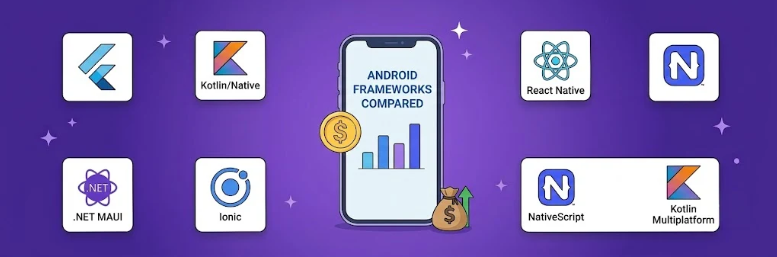
While the right tech stack stands out among the key components of a successful mobile app, framework choice alone will not guarantee success. Balance long-term maintenance, performance, and team skills, and the best framework for Android app development becomes obvious.
Need Help Choosing the Right Framework?
Most framework discussions begin with technology. Flutter or Kotlin? Native or cross-platform? We think that’s the wrong place to start.
Before choosing a framework, we need to look at the bigger picture. We evaluate what you’re building, who your target audience is, and where you expect the product to be two or three years down the road. Those answers usually eliminate half the options before we even talk about code.
That’s how we approached Parent Pass. The goal wasn’t to use Flutter because it was popular. The goal was to build a family platform that worked smoothly across Android and iOS without doubling development time. The framework supported the product, not the other way around.
We help teams pick the right tech stack. Flutter suits certain builds, while Kotlin fits others. Sticking with your existing tools might even make the most sense. We compare the best frameworks for Android app development to give you honest advice rather than a high price tag.
Final Verdict
Every business needs a different tech stack. An agency with a single answer offers templates, not true strategy. Flutter works for budget-focused founders with tight deadlines. Kotlin Native suits enterprise products that require total security and peak speed. Pick the best frameworks for Android app development based on your specific goals.
The right choice often depends on your team’s existing skill set. React Native fits teams living in JavaScript, while .NET MAUI suits Microsoft shops. Ionic helps web teams launch quickly, and NativeScript caters to Angular loyalists. Meanwhile, Kotlin Multiplatform fits businesses planning five years ahead rather than five months.
The best framework for Android app development is the one that matches your budget, your team, and your growth plan today, not the one topping a trends list this quarter. Get in touch with Unique Software Development to pick the right Android app development framework for your enterprise.