
LLMs have come a long way from simply generating text. They can now work with more context, understand different types of information, use tools, and reason through complex problems more effectively.
That opens up a different way to use AI inside a business. Instead of asking an LLM for an answer and stopping there, you can build an agent that understands a request, works with your business data, uses the right tools, and takes the next step.
That is where AI development becomes more than choosing an AI model. This guide shows you how to build an AI agent around your existing workflows and connect it to your business systems. You’ll also learn how to give the agent enough access to get the job done without giving it control over everything.
Find the Right Workflow for Your AI Agent
An AI agent is like a new employee in your firm. It brings broad knowledge, reasoning, and the ability to work through tasks, but it doesn’t know your business yet. It doesn’t know your internal processes, priorities, approval rules, or the exceptions your team handles every day.
An LLM brings general knowledge from its training, but your agent needs business context to do useful work. You provide that through system instructions, retrieved data, memory, and tool calls. The LLM acts as the reasoning layer, while the agent connects it to your systems and controls what it can access and do.
So don’t hand the agent every task at once. Start with one autonomous workflow to automate where it can take meaningful work off your team’s plate. Look for tasks where:
- The steps repeat, even though the details change from case to case.
- Several systems or tools are involved, requiring someone to move information between them.
- Inputs are unstructured, such as emails, documents, messages, or support requests.
- The work requires context, so a fixed rule cannot handle every situation.
- The task happens often enough that automating it can save significant employee time and justify the cost of custom AI development.
- The result can be measured, such as processing time, resolution time, cost per case, conversion rate, or error rate.
Once you identify what you want to automate, the next step is understanding how to build an AI agent that can handle it.
Decide What Your AI Agent Should Be Allowed to Do
AI agents can work through defined approval gates and human handoffs, much like assigning different levels of responsibility to a junior team member. You decide which tasks the agent can handle independently, which require approval, and which must always go to a human.
Set these boundaries across five levels: read, recommend, act, decide, and escalate. An agent may read CRM data and update internal records on its own, recommend a customer response for review, or hand off a large refund or unusual case to a human.
Start with limited autonomy and increase access as the agent proves reliable. This keeps permissions tied to actual performance instead of giving the agent broad control from day one.
Design the AI Agent Architecture
Now that you know what the agent needs to handle, the next step is to build an architecture that enables it to perform that work.
The LLM handles the reasoning, while the orchestration layer coordinates the work. Tools and APIs let the agent perform tasks, while your business systems provide the information it needs to get the job done. See the image below for a visual overview of the AI agent architecture.
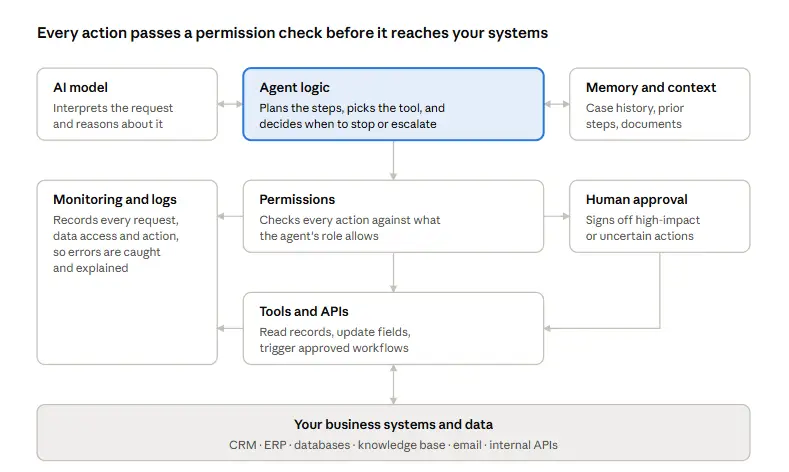
Here is what the AI agents do. The AI model interprets the request and reasons about what needs to happen. Agent logic controls the workflow, including which steps to take, which tools to call, and when to stop or escalate.
Memory and context provide the information the agent needs for the current task. Tools and APIs let it take action, while your business systems and data provide the information it works with.
Then you have the controls around the agent. Permissions determine what it is allowed to access or change, human approval catches actions that need review, and monitoring and logs record what happened so you can detect failures and trace decisions.
Good AI development starts with choosing the components your workflow actually needs rather than adding technology for its own sake.
Choose the AI Platform Behind Your Agent
Your AI agent needs an LLM behind it to understand requests, reason through tasks, and decide what to do next. OpenAI’s GPT, Anthropic’s Claude, and Google’s Gemini are some of the main options. The right choice depends on the work you want the agent to handle, the systems it needs to connect with, and how much control you need over the setup. If you’re not sure where to start, here’s how the main options differ.
OpenAI
AI agents often need to work inside the same systems your business already uses. OpenAI’s GPT -6 Astra, ChatGPT Work, and Codex can handle multi-step tasks, work with applications, write code, and go beyond simply generating text. Your development team still needs to understand how to build and integrate the agent. They need to handle agent architecture, tool use, API connections, permissions, debugging, and monitoring to make it reliable in a real business workflow. If you don’t have that expertise internally, a custom AI development team can handle the integration, tool use, API connections, permissions, debugging, and monitoring required to make the agent work reliably.
Anthropic Claude
Anthropic’s latest Claude Opus 5.5 is built for long-running agentic work and coding. Anthropic says it costs about 40% less than Opus 5 on typical workloads. Anthropic reports that one early tester completed a 680,000-line code migration in less than a day, showing where Claude can be useful for large engineering tasks. You can use Claude through Anthropic’s platform, AWS, Google Cloud, and Microsoft Foundry, so businesses can deploy it across different enterprise cloud environments. Opus 5.5 costs $4 per million input tokens and $20 per million output tokens, with cache reads at $0.20 per million tokens.
Google Gemini
Google Gemini is a strong option for AI agents that need to work with different types of information. Its models support text, images, audio, video, and code, making them useful for workflows that go beyond text-based tasks. Gemini 3.8 Flash, for example, is designed for complex agentic tasks at scale and supports different effort levels to balance quality, cost, and latency.
Gemini can also fit naturally into businesses already using Google Cloud. Google provides an enterprise platform for developing, deploying, orchestrating, and governing agents, so businesses can build agents around their existing cloud infrastructure instead of managing every component separately.
For teams choosing Gemini, the main consideration is how well its multimodal capabilities, Google Cloud environment, and agent infrastructure match the workflow. The right model still depends on the data the agent needs to process, the tools it needs to use, and the level of control required.
Open-Source, Self-Hosted Models
Self-hosted models give you more control over deployment, data handling, customization, and infrastructure. That flexibility can help when your custom AI development requirements include private infrastructure, custom model behavior, or tighter data control. Models from the Qwen, Llama, Mistral, and DeepSeek families can run in a private cloud or on-premises environment, depending on their licensing and infrastructure requirements.
The higher cost is often not the model itself. It’s the employee time spent handling repetitive tasks, reviewing outputs, and stepping in whenever an agent needs human approval. If your existing AI setup still depends on people for too much of the workflow, Custom AI Developers can help you build, integrate, or upgrade it around your existing systems. We can connect new LLMs, add tools and APIs, integrate your current stack, or build the agent from the ground up.
Connect the Agent to Your Existing Business Systems
Once you understand how to build an AI agent, the next step is connecting it to the systems your business already uses. This is where the agent starts doing real work instead of just giving answers. If your employee has to take output from one system, open another, copy the information, and complete the next step manually, the agent hasn’t removed much work. A proper integration can remove manual work between systems. For example, an agent can read a customer request. It can then check the CRM for account history and order details. Next, it can update the ERP and send a response. The employee only steps in when the agent needs approval.
Here are some of the systems your agent may need to connect with:
- CRM, for customer records, pipeline, and account history
- ERP, for orders, inventory, invoices, and financial data
- Internal databases and data warehouses, for operational and reporting data
- Knowledge bases, for policies, procedures, and product documentation
- Email and communication platforms, where requests arrive and updates go out
- Business APIs, for internal services and third-party tools
- Existing AI agents, which may handle related tasks and need to pass work between systems
This is where much of the real implementation effort sits. Enterprise application integration becomes especially important when the agent needs to work across CRM, ERP, databases, and internal tools. Legacy systems, inconsistent data, and undocumented internal tools can take much longer. They also affect how reliably the agent can retrieve information, use tools, and complete the workflow.
Once the agent is connected to your systems, you also need visibility into what it is doing. Monitoring can flag unusual calls or unexpected actions. Hard limits and circuit breakers can stop the agent before a small issue becomes a large bill. An automation may run reliably for weeks, then hit a loop or sudden volume spike that drives up usage.
Give the AI Agent Access Without Giving It Unlimited Control
Even the agent’s token usage can hit your costs. At the end of the month, you get the bill based on how many tokens and API calls the agent used. If you don’t set limits, those costs can eat into your margins quickly.
Recently, a market-research pipeline built with LangChain agents entered an infinite conversation loop and ran for 11 days, or 264 hours, resulting in a $47,000 API bill. Setting a usage or cost limit could have stopped the agents much earlier.
Security therefore needs to be part of AI development from the beginning, not something added after the agent is already in production. A 2026 Cloud Security Alliance study found that 53% of organizations had experienced AI agents exceeding their intended permissions. An agent should only access the customer, financial, operational, or internal data its workflow actually needs.
Set the Controls Before You Give the Agent Access
- Set a token and cost budget: Define how much the agent can spend on each task, run, or time period.
- Limit tool access: Give the agent access only to the APIs and tools required for its workflow.
- Set maximum steps and retries: Stop runaway loops before they keep generating calls.
- Use role-based permissions: Give the agent its own identity and permissions instead of using a broad employee account.
- Protect sensitive data: Restrict access to financial, customer, employee, and other sensitive records unless the workflow requires them.
- Add approval gates: Require human approval before high-impact actions such as refunds, payments, account changes, or external messages.
- Log every action: Keep a record of what the agent accessed, which tools it used, and what actions it took.
- Add circuit breakers: Automatically pause the agent when it reaches a cost, error, duration, or unusual-activity threshold.
- Monitor the agent in production: Don’t rely only on alerts after something goes wrong. You need visibility into the agent while it is running.
Give the agent enough access to finish the job, but never more authority than the job requires.
Test the Agent With Real Business Scenarios
A successful demo proves that an agent can work. Production testing proves that it can work reliably inside your business.
Demos use clean examples. Real operations don’t. Before going live, the agent should be tested against the situations your employees actually face:
- Normal cases, to establish a baseline of accuracy
- Incomplete information, such as a request missing an order number
- Conflicting information, where the CRM and ERP disagree
- Unusual requests that fall outside the expected pattern
- Incorrect tool responses and failed API calls, to confirm the agent stops or retries rather than guessing
- Sensitive situations, such as complaints, legal threats, or requests involving personal data
- Escalation paths, to confirm cases reach the right person with useful context
The best test sets come from historical data: real tickets, real invoices, real requests, with known correct outcomes. That lets you measure the agent against your own standard, not a generic benchmark.
Measure Whether the AI Agent Is Actually Worth the Investment
Don’t measure an agent by how impressive its demo looks. Measure what changes in the business after it goes live. That starts with a baseline taken before deployment. Then track the metrics that matter to the workflow:
| Category | What to measure |
|---|---|
| Efficiency | Time saved per task, labor hours redirected, processing volume |
| Speed | Response time, cycle time from request to resolution |
| Quality | Error rate, rework, escalation rate |
| Revenue | Conversion rate, pipeline velocity, retention |
| Cost | Cost per task, including AI model and infrastructure costs |
| Adoption | How often employees use or accept the agent’s output |
| Customer impact | Satisfaction scores, complaint volume |
Adoption deserves particular attention. An agent that employees route around produces no return, no matter how capable it is. And AI operating costs belong in the calculation from day one, because usage-based model pricing grows with volume.
Build, Integrate, or Upgrade? Where Enterprise AI Projects Usually Start
Very few enterprises are truly starting from zero. Most fall into one of three situations, and each calls for a different first step.
- You don’t have an agent yet. The work begins with mapping the workflow: where time is lost, which systems are involved, and what a good outcome looks like. Only then does it make sense to choose between a custom build, a framework, or a platform.
- You already have an AI agent. Perhaps it answers questions well but can’t act, or it works in one system but not the others your teams depend on. The priority here is integration and capability: connecting it to your CRM, ERP, and internal tools, tightening its permissions, and improving how it executes multi-step work.
- You built a prototype. Your team proved the concept, but it isn’t ready for real customers or real data. Moving it to production means adding proper integrations, error handling, security controls, monitoring, and the reliability testing described above.
The common thread is that existing work has value. The right implementation partner doesn’t ask you to discard what you’ve built. Bring the agent you have, build one from the right starting point, or upgrade what you’ve already started.
How Much Does It Cost to Build an AI Agent?
AI agent development can cost anywhere from $40,000 to $400,000, depending on the agent type, integrations, security requirements, and level of autonomy. A simple FAQ agent can cost less than $50,000, while a production-grade multi-agent system can exceed $400,000.
Any single number quoted without knowing your workflow is a guess. The cost depends on workflow complexity, the number and age of integrations, model usage, data preparation, and security and compliance requirements. It also depends on the level of autonomy, the amount of custom development, the deployment environment, and ongoing maintenance.
It helps to think about cost in three distinct stages:
- Prototype. A working version on a limited dataset, proving the agent can handle the task. This is the smallest investment, but it may not reflect the full cost of moving the agent into production.
- Production implementation. Real integrations, permissions, approval workflows, testing, monitoring, and security review. This is typically where most of the project budget goes.
- Ongoing operation. Model usage fees, infrastructure, monitoring, and continued improvement. These scale with volume and should be modeled against the expected savings.
Ask any vendor or partner to break their estimate into these three stages. If they can’t, the true cost of production is probably missing.
Let AI Agents Handle the Busywork
AI reasoning helps you hand off the tasks that keep your team busy. The real work is building an agent that can handle those tasks inside your existing workflow, without creating new security or integration headaches.
That’s what the steps above show you about how to build an AI agent. Find the right workflow, connect the right systems, set clear boundaries, and give the agent only the access it needs.
And if building all of that feels like a lot, you don’t have to start from scratch. Unique Software Development builds custom AI workflows around the work your business actually needs to automate. If you already have an AI agent, we can integrate it with your existing systems, upgrade its capabilities, and reduce the manual work around it without forcing you to rebuild everything.