

In day-to-day work, teams don’t just need tools that speed things up, they need systems that can handle entire processes on their own. That’s exactly what autonomous AI systems do. They read information, make decisions, and take action, almost like having a digital worker running tasks alongside them.
But handing over control isn’t easy. What if it makes the wrong call, misses the flow, and in the end, who’s responsible for its actions? For many businesses, it’s not just fear, it’s confusion. They’ve heard what AI can do, but they don’t really know how to build autonomous AI systems that fit into complex workflows without creating more problems than solutions
So instead of throwing theories at you, this guide walks you through the full journey. From the first idea… to how it’s designed… to how it actually runs in the real world.
What is an Autonomous AI Systems Workflow?
An autonomous AI workflow is a system where an AI does not just answer a question and stop. It takes action, checks the result, adjusts, and keeps going until the job is done.
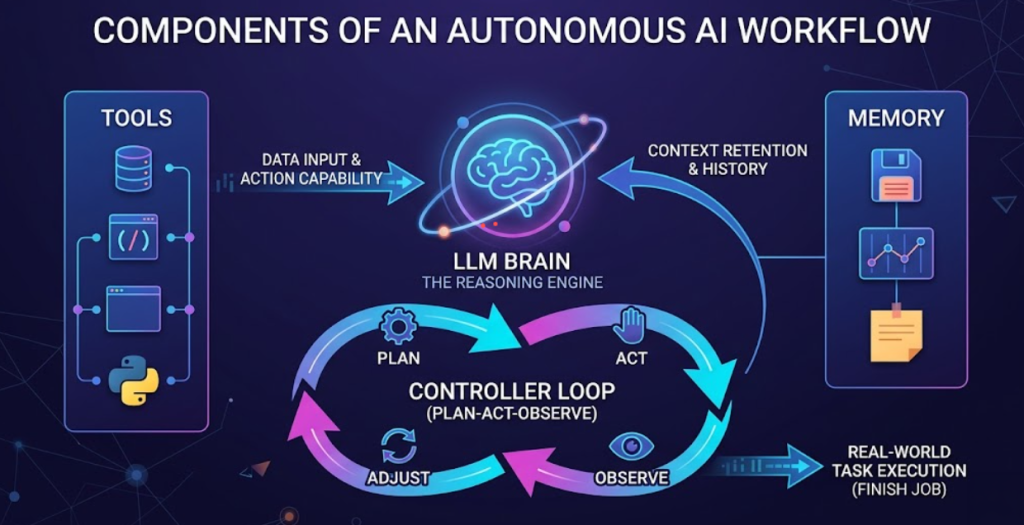
Every agentic AI workflow has four core parts:
LLM brain: The AI model that reasons and communicates. It reads the situation, decides what to do next, and produces the output. Think of it as the decision-maker sitting at the center of the system.
Tools: APIs, databases, SaaS apps, browser access, and code execution give the AI a solid ground to work on. They feed it the data it needs to make informed decisions. Without this context, the AI is just guessing, and sometimes it can even hallucinate.
Memory: A one-shot AI forgets everything after each response. Agentic systems keep context across steps. They remember what they did earlier, what worked, and what information they already collected. This is what makes multi-step work possible.
A controller loop: This is the engine that runs everything. It follows a simple but powerful cycle: plan what to do, act on that plan, observe what happened, then adjust and repeat. This loop is what separates an intelligent automation system from a basic chatbot.
Together, these four parts turn a language model into something that can actually handle real work from start to finish.
How to Build an Autonomous AI Agent
Everyone wants their business operations to be faster, smarter, and more efficient. That’s why many businesses try to create AI decision-making systems. But according to recent research, 95% of attempts fail to create autonouns Ai agent.
Why? Most people don’t know how to build a system that flows correctly, fits real-world needs, and actually works in practice.
To help you avoid that trap, we’ve listed simple, practical steps to create an autonomous AI workflow for your business. One that doesn’t just look good on paper, but actually delivers results.
Step 1: Pick One Workflow to Automate First
Do not try to automate everything at once. Pick the one process that is most repetitive, most time-consuming, and has clear inputs and outputs. Support ticket routing is a classic starting point. So is invoice processing or lead qualification.
Step 2: Define the Objective Clearly
The AI agent needs to know exactly what success looks like. Write it out in plain, simple language.
For example:
“Triage every incoming support ticket, assign a priority level, update the CRM, and draft a first response for the support agent to review.”
Vague goals produce vague results and that’s when AI starts to hallucinate. Often, it’s not the AI’s fault; it’s because the instructions or settings were unclear from the start.
Step 3: Build the Controller Loop
This is where the agent gets its logic. Set up the plan-act-observe-adjust cycle and define how the agent handles unexpected situations. What does it do when it cannot find a customer record? What does it do when a ticket is ambiguous?
Step 4: Add Memory
Decide what the agent needs to remember across steps. Short-term memory helps within a single workflow run. Long-term memory helps the agent get smarter over repeated runs.
Step 5: Test Before You Trust It
Run the agent on past tickets or documents where you already know the right answer. Measure accuracy. Fix the gaps before it touches live data.
Step 6: Add Approvals
Sending an email, updating a record, or deleting a file should go through a human checkpoint until you are confident the agent gets it right consistently.
Autonomous AI systems can make complex workflows feel easy. But the tricky part is actually getting the system started. That’s why it’s smart to get help from AI development services. Specialist can build your AI workflow, plug it into your system, and turn those long, messy tasks into something you can actually handle quickly and easily.
Why Choose Autonomous AI Agents Over Traditional Workflows?
Traditional workflows feel safe, but they move slowly and have limits that a smart AI system can fix. We made a simple table to show you why business process automation with AI beats old-school workflows and where each one works best.
| Feature / Aspect | Traditional Automation | Autonomous AI Agents |
| How it works | Follows scripted rules. If X happens, it does Y | Focuses on the goal and figures out the steps automatically |
| Flexibility | Low. Breaks if input changes | High. Recalculates when it hits a roadblock |
| Error Handling | Needs manual fixes | Handles unexpected situations intelligently |
| Adaptability | Works only on predefined cases | Handles complex and changing real-world inputs |
| Best for | Simple and predictable tasks | Complex workflows with variable inputs |
| Analogy | Like a train on tracks. Fast but fixed path | Like a car with navigation. Adjusts route to reach the destination |
| Maintenance | High. Scripts break often | Lower. Self-adjusting reduces manual work |
What Tools and Frameworks Can You Use to Build Autonomous AI Agents?
You do not have to build everything from scratch. A strong ecosystem of tools exists specifically for this.
- Code: LangChain is the most widely used. It handles agent pipelines, tool calls, memory, and loops. LlamaIndex shines when agents need to pull information from large document sets. LangGraph is useful if you want agents to run tasks in parallel or handle complex branching. These frameworks give you full control but require coding skills.
- Language models: The brain of your agent can be GPT-4o from OpenAI, Gemini from Google, Claude from Anthropic, Grok, or Deepseek. Each has different strengths in reasoning, cost, and speed. Microsoft AutoGen is worth considering for multi-agent systems where multiple AI models need to collaborate on a single task.
- No-code and low-code builders: If your team does not have engineers to spare, tools like n8n, Zapier, Make.com, and Google Opal let anyone build and manage agent workflows visually. They are perfect for prototyping fast and getting business teams involved in the design.
- Connectors: Your agent needs to pull data from somewhere. Most enterprise tools have APIs. For more technical setups, MCP (Model Context Protocol) is an emerging standard that makes it easier to connect agents to external data sources and services in a structured way.
The right combination depends on your use case, your team’s technical skill, and the systems you already use. The goal is not to adopt the most advanced stack. The goal is to ship something reliable.
Use Cases of Agentic Workflows
Many businesses hesitate to go for AI software development because they wonder if the change really matters or if it’s just hype. To clear the doubt, here are the real workflows we have built and what actually happened when they went live.
Customer Support: From 400 Tickets a Day to Zero Backlog
One of our clients ran a SaaS product with a small support team of six people. Every morning they opened to 300 to 400 new tickets. Half were password resets and billing questions. The other half were real bugs and angry enterprise clients who needed fast responses. The team could not tell the difference fast enough, so everything piled up and enterprise clients waited alongside basic queries.

We built an agent that reads every incoming ticket the moment it arrives. It classifies by urgency, pulls the customer’s subscription tier and history from the CRM, drafts a response using past resolved tickets as reference, and routes it to the right person with full context already attached. The support agent opens a ticket and the draft is already there. They review, adjust if needed, and send.
Within three weeks of going live, first response time dropped from 11 hours to under 90 minutes. The team did not grow. The backlog did not grow. The work just moved faster.
HR and Hiring: One Recruiter Handling What Used to Take Four
A hiring team was managing 60 to 80 open roles at once across different departments. Each role got anywhere from 100 to 400 applications. Recruiters spent most of their day reading resumes, copying candidate details into the ATS, sending scheduling emails, and chasing interview confirmations. By the time they got to actual conversations with candidates, they were exhausted.

We built an autonomous AI agent that does filtering. It reads every resume and scores them against a rubric defined by the hiring manager. The system flags the top 15 percent and automatically sends a scheduling link to shortlisted candidates. It also confirms the interview time and updates the ATS with every status change.
Recruiters now open their day with a ranked shortlist and a full calendar. They spend their hours talking to people, not managing spreadsheets. One recruiter told us she went from feeling like a data entry operator to actually doing the job she was hired for.
Real Estate: Leads Came In Around the Clock But Agents Only Worked Nine to Five
A real estate agency receives inquiries about properties 24/7, but its agents only worked during business hours. A lead that came in at 9 PM on a Friday often sat untouched until Monday morning.

As a real estate service provider, we built an agent that handles every inbound inquiry the moment it arrives. Leads coming in outside business hours no longer went cold. Over the following quarter, the agency increased its conversion rate from roughly 11% to 27%, without adding any new agents.
Why Most Task Automation with AI agents Fail (And How to Avoid It)
Most agentic deployments fail not because the technology does not work, but because the team skips steps that matter.
- Start with one workflow and expand after it is proven reliable. The temptation to automate everything at once is strong. Resist it. Pick one workflow, get it working well, measure it, then move to the next.
- Use structured outputs for tool calls. When your agent communicates with external tools, use use structured schemas (i.e. CSV, JSON, TOON, etc) to define exactly what the output should look like. This reduces errors and makes your system far easier to debug.
- Ground your agent in retrieval, not retraining. For most internal knowledge, retrieval-augmented generation (RAG) is the right approach. You connect the agent to a searchable knowledge base.
- Put write actions behind approvals until you trust the agent. Reading data is low risk. Writing, updating, deleting, and sending are high risk. Until the agent has proven it handles edge cases correctly, put a human in the loop.
Common Mistakes Teams Make:
- Letting the agent access and write to every system too early is the fastest way to create expensive errors. Give it read-only access first.
- Shipping without an evaluation set is shipping blind. If the only evidence that the agent works is that it performed correctly in a few test chats, you do not actually know it works. Build a proper test set before going live.
- Skipping guardrail layers is a shortcut that always costs more later. Guardrails catch the agent before it does something outside the intended scope. They are not optional.
- Ignoring change management is a people problem, not a technology problem. Research consistently shows that technology accounts for about 10-20% of a successful transformation. The remaining 70-80% is people and process. Get your team involved early.
- Not budgeting for ongoing maintenance is a planning failure. Prompts drift. Tools change their APIs. Documentation goes stale. Agentic systems need continuous care to stay accurate and reliable.
- Skipping a proper way to measure software quality is another mistake. If you don’t track how the system performs, you’re just guessing. And guessing breaks things faster than you think.
Automate the Work With Unique Software Development
If you want to build autonomous AI systems that connect to your existing tools, including your CRM, ticketing platform, internal dashboards, and databases, we can help. Our team designs the agent architecture, implements tool integrations, and sets up evaluation and monitoring so the system gets more reliable over time, not less.
Unique Software Development specializes in agentic system design, from architecture to integration to ongoing monitoring. We build systems that get more reliable over time, not less. Reach out and tell us about the workflow you want to automate first. We will help you build it right.