
Shopify, WooCommerce, Magento, BigCommerce… and many of them call themselves the best ecommerce platform. Each one comes with a polished website, recognizable brand logos, and pricing that looks reasonable at first glance.
But as your store grows, things start to change. You begin adding plugins, integrations, and extra features just to make the platform work the way your business actually needs. What looked affordable at first slowly becomes a layered cost structure, one that quietly starts eating into your ROI.
That’s where most businesses get it wrong. In this guide, we break down industry-grade e-commerce platforms based on what truly impacts returns in 2026, like scalability, checkout flexibility, integrations, SEO control, and the real cost of running your store. So you can choose a platform that supports growth rather than limits it.
Quick Overview of Best eCommerce Platforms
Here is the short version for anyone who wants the answer fast. We break down the full numbers for the best ecommerce platform in the sections below.
BigCommerce: A solid B2C eCommerce platform for SMBs and enterprises. Starts around $39/month, with no transaction fees. Often delivers strong ROI (around 200%+ over time).
Shopify: A widely used eCommerce platform for startups and DTC brands. Starts at $39/month. Easy to use, but extra apps and transaction fees (0.5–2%) can reduce margins.
WooCommerce: Often seen as the cheapest eCommerce platform to start with. Free core, but hosting, plugins, and maintenance add up.
Adobe Commerce (Magento): A powerful eCommerce platform for large enterprises. Starts around $2,000+/month. High upfront cost, but strong ROI potential.
Pro Insights! Around 15% of ROI is often lost due to friction-heavy checkouts. Fixing this with proper ecommerce management or expert software developers’ support can recover a significant chunk without changing the platform.
What ‘ROI’ Means in E-Commerce (And How to Calculate It)
ROI stands for Return on Investment. The formula is straightforward:
ROI = (Net Return on Investment ÷ Cost of Investment) × 100%
In plain terms, you spend money on a platform, apps, developers, hosting, and marketing. Your store generates revenue. Whatever comes back to you above what you spent is your ROI.
But here is what most platform comparison articles skip. They compare sticker prices. Real ecommerce ROI depends on five things your monthly plan cost tells you nothing about:
- How fast your site loads (slow sites lose sales)
- How much do you pay for apps that should be built-in
- How much developer time do you burn every time something breaks
- How well the platform converts browsers into buyers
- How costs change as your business grows
A solid software development strategy treats your ecommerce platform as a long-term investment, not just a monthly subscription. The platforms that win on ROI are the ones built to grow with you, not the ones that seem cheapest on day one.
How We Picked These Platforms (Methodology)
Our team at Unique Software Development has built and migrated e-commerce stores across all the top ecommerce software. We have first-hand experience with the specific challenges businesses face on each platform. To ensure a comprehensive evaluation, we tested the best online store platforms against the following criteria:
- Total Cost of Ownership (TCO): We mention the names of ecommerce solutions that provide the complete cost of apps, hosting, dev costs, and transaction fees over 3 years
- Conversion Rate Optimization (CRO): Each of the software has built-in checkout tools, upsell features, and page speed impact on sales
- Scalability Without Cost Spikes: How costs change as traffic, products, and orders grow
- SEO & Organic Growth: Control over URLs, site structure, speed, and indexing
- Ecosystem Dependency: How much you rely on paid plugins just to function
- Time-to-Launch & Simplicity: How fast you go live and manage daily operations
- Performance & Site Speed: Core Web Vitals, hosting quality, load time, and its direct revenue impact
In our research on e-commerce solutions for businesses, we found one consistent pattern. Most top ecommerce platforms charge for features that not every business actually needs. This often leads to unnecessary cost buildup over time.
That’s why some businesses choose a smarter approach and build custom solutions with the help of an e-commerce development company. This way, they only get the features that match their actual requirements, rather than bundled, unused functionality.
What Actually Impacts ROI on an E-Commerce Platform
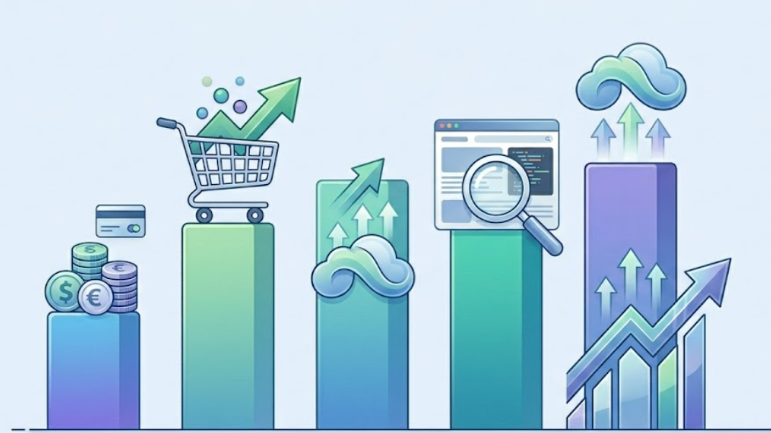
Four things drive your ecommerce ROI more than any marketing budget ever will. Get these right, and you win. Miss them, and your best ecommerce platform becomes a cost center, not a growth engine.
Platform Costs
Your monthly plan is just the cover charge. The real bill comes from payment gateway fees, third-party apps, premium themes, and developer time. Some ecommerce solutions hide these costs well. Others make them unavoidable. A good rule of thumb: budget at least 2x your base subscription for total monthly platform costs in year one.
One of the best ways to skip this cost is by choosing custom software over off-the-shelf. Its custom builds give you full cost control, while SaaS platforms keep adding line items as your needs grow.
Conversion Optimization Features
Every 1% improvement in your conversion rate can add thousands of dollars in monthly revenue. The best ecommerce software for small businesses and large stores alike reduces drop-off rates at checkout with built-in abandoned cart recovery, one-click upsells, and a frictionless checkout flow that keeps customers moving forward.
SEO Capabilities
The best ecommerce platform for SEO gives you full control over your URL structure, page titles, schema markup, and site speed. Organic traffic is free traffic. A platform that boxes you into rigid URL patterns or loads slowly on mobile will quietly cost you thousands in revenue you never knew you lost.
Scalability and Hidden Costs
The cheapest ecommerce platform to start on is not always the cheapest to grow on. Some platforms charge higher transaction fees as you scale. Others require expensive enterprise upgrades when your catalog or traffic exceeds thresholds. Plan for where you will be in three years, not just where you are today.
Types of E-Commerce Platforms (And How They Impact ROI)
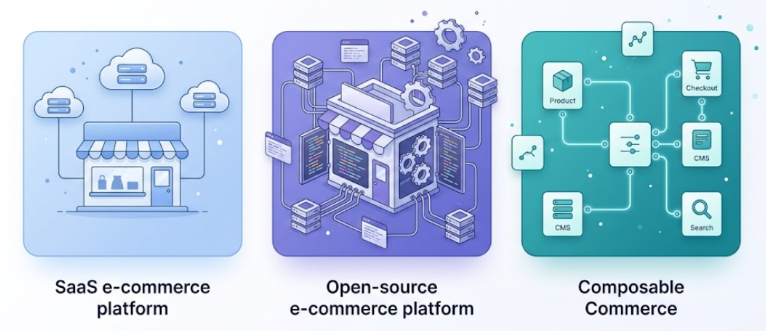
The ecommerce platform market breaks into three main categories. Each one trades different things for different outcomes. Your job is to match your business model to the right category before you spend a dollar on setup.
SaaS (Software-as-a-Service) Platforms
Examples: Shopify, BigCommerce
SaaS ecommerce platforms host everything for you. You pay a monthly fee, and the platform handles servers, security patches, and uptime. You get a store up and running fast. This set up time is about a single day, without hiring a developer.
Fast launch means faster first sale. But as your store grows, you start hitting limits. You add apps for features that the platform does not include. Those apps stack up. Monthly costs climb. Your dependence on the platform’s ecosystem grows.
- Low upfront cost
- Faster time to first dollar
- Long-term dependency on monthly fees and app stacks
SaaS platforms are also where a good mobile payment gateway integration matters most. Shopify and BigCommerce both support major gateways natively, which saves you the dev cost of building those connections yourself.
Open-Source Platforms
Examples: WooCommerce, Magento (self-hosted)
Open-source platforms give you the code. You own it, host it, and customize it however you want. That freedom is real. The catch is that this flexibility needs technical support to manage properly. For this, you either need an in-house development team or support from solution engineering service providers.
WooCommerce starts at essentially zero in software costs. But you pay for hosting, SSL, plugins, and a developer the moment something breaks. Magento (Adobe Commerce) goes further: it is full enterprise ecommerce software, built for large operations, but it demands a skilled dev team and serious infrastructure budget.
- Full control over your store
- Higher ongoing development and maintenance costs
- Cheap to start, expensive to scale without a plan
The importance of eCommerce software development becomes very clear here. With open-source platforms, your software development team is not optional; it is the product.
Composable Commerce
Examples: Headless architecture with custom tech stack
Composable commerce separates your storefront (what the customer sees) from your backend (the engine running it). You pick the best tool for each function, best CMS, best checkout, best search, and connect them via APIs.
This approach delivers the highest potential ROI of all three categories. You eliminate the compromises that come with all-in-one platforms. But you need a skilled software developer and a clear architecture plan before you write a single line of code.
- Maximum flexibility
- Requires strong dev investment upfront
- High ROI potential, only for businesses ready for it
Composable builds are also where teams begin creating autonomous AI agents. These systems handle personalization, inventory alerts, and customer support without manual intervention.
Best eCommerce Solutions For Different Needs
The definition of “top ecommerce software” is different for every business. For inventory-heavy businesses, an ecommerce platform with strong ERP capabilities matters more, while fashion-focused brands look for platforms with better UI/UX flexibility.
For your business, the ideal platform depends on your specific needs, and below we have listed the best ecommerce platforms that you can choose from based on your requirements.
BigCommerce: Built for Stores That Want to Grow Without Paying Growth Penalties
BigCommerce is built on the philosophy that “your success should not cost you more.” In our experience migrating mid-size stores to BigCommerce, the zero-transaction-fee structure alone recovered between $800 and $2,400 per month for stores with $50K–$120K in monthly revenue.
That single difference saves mid-size and growing stores thousands of dollars. It ships with more native features than almost any other SaaS platform for your business. It means you buy fewer apps and spend less time patching your store together with third-party tools.
Pros
- Zero transaction fees on every plan
- Strong native multi-channel selling tools
- Multi-channel selling
- No limits on staff accounts or API calls
- Headless commerce ready for brands
Cons
- Annual sales thresholds force plan upgrades
- The theme selection is smaller
- Backend dashboard feels dense
- The app marketplace is smaller
Shopify: The Store That Runs Itself (Almost)
Shopify holds roughly 28% of the entire US eCommerce platform market. That number did not happen by accident. Shopify made the hard things easy.
We’ve seen this efficiency in action: In our recent deployment for a fashion client, we moved their store from zero to live in 14 days using Shopify’s native Liquid engine, a feat that would take months on a legacy system. This allowed the client to start setting up products, running ads, and managing inventory and returns through one clean, unified dashboard almost immediately.
Pros
- Seamless Point of Sale (POS) integration
- App ecosystem with 8,000+ integrations
- Shopify Payments eliminates the transaction
- Built-in abandoned cart recovery
- 24/7 support through chat, email, and phone
Cons
- Transaction fees apply if you use a third-party payment processor
- Advanced features require higher-tier plans
- Monthly costs add up fast once you start adding paid apps
- URL structure for blog content limit
Adobe Commerce: Enterprise Power for Stores With Complex Operations
Adobe Commerce, also known as Magento, is ideal for retailers when they need full control over every process. From visitor login and data storage to checkout, order collection, and vendor management, everything can be customized on Adobe Commerce.
Since it uses an open-source infrastructure, it can handle complex product catalogs, multiple storefronts in different languages and currencies, and custom pricing rules for B2B accounts.
Pros
- Unlimited customization
- Native multi-store management
- Advanced B2B features
- Deep integration with Adobe Experience Cloud for analytics
Cons
- The total cost of ownership is high
- Requires experienced Magento developers
- Upgrades and security patches
- Not suitable for small stores
Salesforce: The Enterprise Platform That Connects Your Entire Business
Salesforce Commerce Cloud connects your store directly to your CRM. It puts your marketing automation, customer service tools, and analytics all inside one ecosystem. The advantage of this feature is that when a customer buys a product, the purchase data automatically flows into Salesforce CRM. Your sales team sees it.
Your email marketing team uses it. Your customer service team has it ready when the customer calls. That connected intelligence is what separates Salesforce from every other enterprise option on this list.
Pros
- Native integration with Salesforce CRM
- Einstein AI powers product recommendations
- Built for omnichannel
- Strong compliance and security infrastructure
Cons
- Pricing is enterprise-tier and requires a custom quote
- Implementation takes months
- Customization is complex and costly
Commercetools: The Platform Built for Developers Who Want Total Freedom
All the best ecommerce platforms for enterprises now pitch a feature called headless commerce. This “headless commerce” concept was originally introduced by commercetools.
The entire platform is API-first, which means there is no pre-built storefront. Developers use the APIs to build exactly the experience they want, on any frontend, for any device.
Pros
- True headless architecture
- Composable commerce approach
- Cloud-native infrastructure
- Multi-region, multi-currency, and multi-language support
- No rigid templates or themes limiting
Cons
- Requires an in-house development team
- The total project cost and timeline are significantly higher
- Not suitable for any business without serious technical resources
WooCommerce: The Free Platform That Costs More Than You Think
They say “free” is the most expensive word in software, and WooCommerce proves that point. The plugin itself costs nothing. But you pay for hosting, security, SSL certificates, premium themes, and the extensions that add the features you need.
Done wrong, it becomes a patched-together mess of plugins that slows your site down and breaks during traffic spikes. We have seen WooCommerce stores running 34 active plugins with a Time to First Byte over 4 seconds, directly costing the business an estimated 18% in monthly lost conversions.
Pros
- No monthly platform fee
- Runs inside WordPress
- Massive plugin library
- Full control over your data, your code, and your hosting
- Large community with extensive documentation
Cons
- Requires self-managed hosting, security updates, and backups
- Performance degrades without proper optimization
- Plugin conflicts are common
- Total cost, including hosting, extensions, and developer time, can exceed SaaS alternatives
Wix: The Fastest Way to Open a Store
Wix built its reputation on simplicity. You can create and drag anything wherever you want. That simplicity works beautifully for small stores selling a limited number of products to a local or niche audience. Wix eCommerce includes a functional store builder, basic inventory management, payment processing, and marketing tools in a single subscription.
For someone selling handmade jewelry, art prints, or local services, Wix does the job without requiring any technical knowledge.
Pros
- Easiest editor on this list
- All-in-one subscription covers website, store, and basic marketing tools
- Hundreds of professionally designed templates
- Built-in SEO tools, email marketing, and social media integration
- No transaction fees on eCommerce plans
Cons
- Product catalog limits
- Cannot migrate your site to another platform
- Lacks advanced eCommerce features
- The app market is smaller and less powerful than Shopify or BigCommerce
- Slower page load performance
ROI Comparison of the Best Ecommerce Platforms
We looked at each platform across the total three-year cost, conversion capability, SEO strength, and scalability. This is your ecommerce platform comparison chart for 2026.
| Criteria | BigCommerce | Shopify | WooCommerce | AdobeCommerce | Salesforce CC | CommerceTools | Wix |
|---|---|---|---|---|---|---|---|
| 3-Year ROI | 211% (Forrester) | ~165% | Variable | High | High | Very High | Low–Medium |
| Base Cost/month | $39–$399 | $39–$399 | $0 + hosting | $2,000+ | Custom quote | Custom quote | $17–$35 |
| Transaction Fees | None | 0–2% (3rd party) | None | None | None | None | None |
| 3-Year TCO (est.) | $5K–$20K | $8K–$35K | $10K–$50K | $80K–$300K | $150K+ | $200K+ | $1K–$5K |
| Setup Speed | Fast | Fastest | Moderate | Slow | Very Slow | Very Slow | Instant |
| SEO Control | Strong | Moderate | Full | Full | Moderate | Full | Basic |
| Native B2B Tools | Strong | Basic | Plugin-based | Advanced | Advanced | Advanced | None |
| Scalability | High | High | Medium | Highest | Highest | Highest | Low |
| Dev Requirement | Low | Low | Medium | High | Very High | Very High | None |
| CRO Features | Strong native | Best-in-class | Plugin-based | Custom | AI-powered | Custom | Basic |
| Headless Ready | Yes | Yes | Limited | Yes | Yes | Native | No |
| Best For | SMB → Enterprise | Startups / DTC | Budget + devs | Enterprise | Enterprise CRM | Dev-led builds | Micro / local |
Total Cost Breakdown by Platform
The number on the pricing page is the starting line. Here is what the full race actually costs.
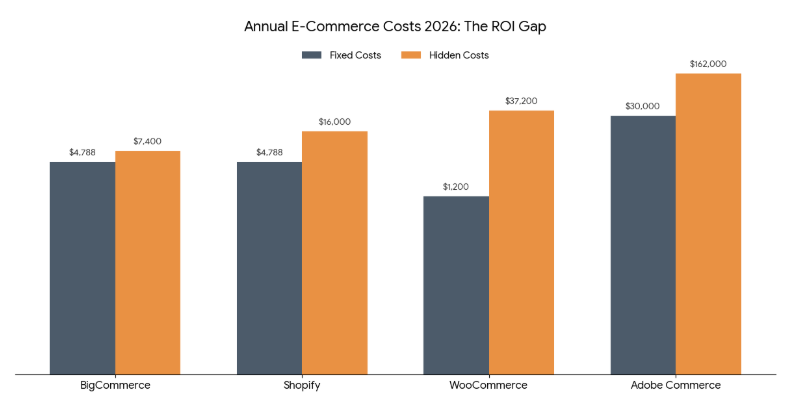
These numbers show why good eCommerce software development matters more than which platform you pick. A poorly built Shopify store can cost more than a well-architected BigCommerce one. The platform sets the ceiling. How you build sets the floor.
Best Ecommerce Platform Based on Business Type
The best ecommerce platform for a fashion startup is not the same as the best one for a wholesale distributor. Here is the honest breakdown.
Startups
Shopify wins here. You get the fastest path from idea to first sale. The best ecommerce platform for startups needs to get out of your way while you figure out product-market fit, and Shopify does that better than anyone. BigCommerce is a close second if you want more native features without app costs.
- Top pick: Shopify (Basic or Grow)
- Runner up: BigCommerce Standard
- Avoid: Adobe Commerce (too complex, too expensive for early stage)
Small and Mid-Size Businesses
This is where BigCommerce earns its crown of proven ROI. The best ecommerce platform for small businesses that plan to grow is one that does not penalize growth with transaction fees or expensive tier jumps.
BigCommerce gives you enterprise-grade features at SMB pricing. Shopify also works well here, especially for B2C ecommerce brands with strong branding.
- Top pick: BigCommerce (Plus or Pro)
- Strong alternative: Shopify (Shopify or Advanced)
- Consider WooCommerce only if you have a developer and want full customization
Enterprises
At enterprise scale, the question shifts from “which platform” to “how do we architect it.” Adobe Commerce handles complex operations at scale, multiple storefronts, deep ERP integration, custom pricing engines, and international compliance. BigCommerce Enterprise also competes here with lower TCO and faster deployment.
- Top pick: Adobe Commerce (for truly complex operations)
- Strong alternative: BigCommerce Enterprise
- Require: A clear right web development stack decision before you commit
Dropshipping
The best ecommerce platform for dropshipping is Shopify. DSers, AutoDS, and Zendrop all integrate natively with Shopify. You can launch a dropshipping store in hours. BigCommerce also supports dropshipping, with lower transaction costs at higher volumes. WooCommerce works if you enjoy managing plugins.
- Top pick: Shopify
- Volume play: BigCommerce
- Budget pick (with dev help): WooCommerce
Common Mistakes That Reduce ROI
They say the most expensive mistakes in ecommerce are the ones you do not notice until year two. Here are the four most common ones, and what they actually cost you.
| Mistake | What Happens | Real Cost |
|---|---|---|
| Plugin-First Trap | You stack 20+ apps. Each adds latency. Your site slows down. Sales drop. | 15–20% revenue loss from speed alone |
| Hard-Coding Transient Logic | Dev bakes in a promo rule. Now every sale requires a dev to change it. | $5K–$15K/year in unnecessary dev hours |
| Ignoring CLS (Layout Shift) | Buttons jump around on mobile. Shoppers bounce before checkout. | 3–5% drop in conversion rate |
| Messy API Integrations | Your ERP, CRM, and storefront talk to each other in broken whispers. | Lost orders, wrong inventory, angry customers |
In one project, a client came to us mid-peak season with broken ERP integrations on their Shopify store. Fixing it under live traffic pressure cost them three times as much as a proper pre-launch audit would have. So, getting the integration right before launch is always cheaper than fixing it under pressure.
It’s better to go with specialized software developers who can handle custom middleware and webhook orchestration for high-volume brands, ensuring your ERP, CRM, and storefront work as a single, unbreakable unit.
Which Ecommerce Platform Should You Choose?
The best ecommerce platform is the one that fits your current business and your next three years of growth, not just this month’s budget.
| If You Are… | Choose This | Because… |
|---|---|---|
| Launching your first store | Shopify | Fastest path to first sale, lowest learning curve |
| Growing a B2C brand fast | Shopify (Advanced) | Best conversion tools and brand ecosystem |
| Running an SMB, plan to scale | BigCommerce Plus/Pro | Highest proven ROI, zero transaction fees |
| Selling wholesale or B2B | BigCommerce or Magento | Native B2B features, tiered pricing, bulk orders |
| Need total customization | Adobe Commerce | Full control, enterprise-grade flexibility |
| Budget-first with a dev | WooCommerce | Full ownership, lowest software cost |
| Dropshipping | Shopify | Best supplier integrations, fastest launch |
One thing cuts across all of these choices: the platform you pick is only as good as the team and the architecture behind it. A well-built WooCommerce store outperforms a poorly built Shopify store every time. The platform sets the playing field. How you build decides the game.
Conclusion
Most businesses often assume that the best ecommerce platforms are the ones offering the most features at the lowest cost, but they miss checking whether those features actually align with their requirements. If they don’t, then these so-called e-commerce solutions are not worth it.
So before choosing any ecommerce software, it’s better to match your requirements with what the platform actually provides, and understand the hidden costs you may end up paying over time.
If you are managing complex operations or scaling toward high-volume transactions, don’t leave your ROI to chance. A proper technical architecture audit helps you identify where your current stack is leaking revenue and what needs to be optimized.
At Unique Software Development, we work with businesses to audit, optimize, and build ecommerce systems that are designed around actual requirements. So your platform stays lean, scalable, and ROI-focused from day one.