

Every day, the business gets the leads, and the warehouse team picks and packs each order right on time. But because the WMS and ERP do not communicate, inventory data stalls.
Shipments face delays, and employees waste hours on manual data entry just to correct the records. For businesses bound to a legacy ERP system, these small friction points quickly compound into costly operational nightmares.
That is why WMS ERP integration is now a top priority for manufacturers, distributors, and logistics firms. The real challenge is not the choice to modernize; it is how to execute the transition while daily operations stay live. In this guide, we show you how to connect custom WMS software with a legacy ERP system with zero downtime, zero data loss, and zero risk to your business.
What Is WMS ERP Integration?
WMS ERP integration is the process of connecting a Warehouse Management System (WMS) with an Enterprise Resource Planning (ERP) system so that inventory, orders, shipments, and financial data flow seamlessly between both platforms in real time.
- It controls and optimizes day-to-day warehouse operations. It includes receiving, putaway, picking, packing, shipping, and returns.
- An ERP is the central nervous system of a business. It manages accounting, procurement, sales orders, HR, and supply chain data.
- By integrating your WMS and ERP, daily warehouse operations like picking, packing, and shipping automatically sync with your central system.
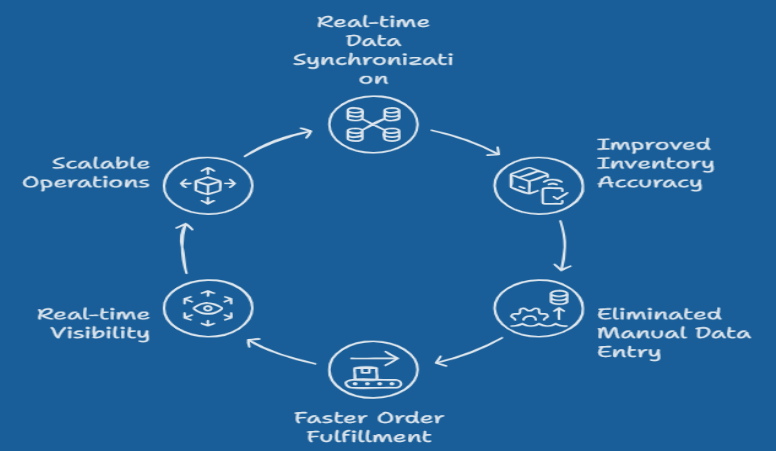
Visual Workflow
At Unique Software Development, we build custom WMS and ERP integration solutions for warehouses, distributors, and logistics operations across Dallas and beyond, engineered for zero downtime and built to scale with your business.
Why Companies Integrate WMS With Legacy ERP Systems
If your warehouse runs on gut instinct and morning standup counts, you are already losing money you cannot see. Here is how slow software is impacting your business.
Inventory Inaccuracies
Legacy ERPs rely on batch updates, sometimes refreshing inventory counts hours after a pick has happened. A study found that 63% of warehouses experience inventory accuracy below 95%. When a WMS integrates with ERP in real time, every transaction writes instantly to both systems, eliminating phantom inventory and costly over-ordering.
Manual Data Entry
When WMS and ERP systems do not communicate, warehouse staff bridge the gap manually. Re-keying shipment confirmations, printing pick lists, and entering receipt data twice. This wastes hours every day and introduces human error at every touchpoint. Automated ERP WMS data synchronization eliminates this entirely.
Delayed Order Fulfillment
Disconnected systems mean a sales order confirmed in the ERP may not reach the warehouse floor for 20 to 45 minutes, or longer during peak hours. In same-day and next-day fulfillment environments, that lag is the difference between retaining a customer and losing them to a competitor.
Lack of Real-Time Visibility
Operations managers cannot make decisions on yesterday’s data. Without real-time WMS ERP integration, leadership lacks live dashboards showing what is in stock, what is committed, and what is in transit. This visibility gap is what separates reactive warehouses from optimized ones.
Inability to Scale Operations
Legacy ERP platforms were not designed for multi-location fulfillment, automated picking systems, or third-party logistics (3PL) operations. As businesses add SKUs, warehouses, or carrier integrations, the strain on an unintegrated ERP becomes a hard ceiling on growth.
A custom logistics mobile app that works offline and syncs data when connectivity resumes bridges this gap for field teams and remote warehouse locations without breaking the integration architecture.
Common Legacy ERP Systems That Require WMS Integration
Most businesses do not choose a new ERP. They build around the one they have. That is the correct business decision. It is exactly where custom WMS ERP integration proves its value.
Legacy ERP platforms are deeply embedded in financial processes, compliance workflows, and institutional knowledge. Ripping them out creates more risk than the problem they solve. The smarter move is connecting them to a modern WMS using the right software development models, whether middleware, API-first, or event-driven architecture.
| ERP System | Primary Industry Use | Integration Complexity |
|---|---|---|
| SAP ECC | Manufacturing, enterprise distribution | High, complex BAPI/RFC layers |
| Oracle E-Business Suite | Large enterprise, finance-heavy ops | High, requires certified connectors |
| JD Edwards | Agriculture, construction, distribution | Medium-High, best with open-source middleware |
| Microsoft Dynamics GP | Mid-market distribution | Medium, REST API available with GP Web Services |
| Sage 100 | SMB manufacturing and distribution | Medium, ODBC, and SDK integration paths |
| Infor ERP | Food & beverage, industrial | Medium-High, ION integration platform |
| Epicor | Manufacturing, automotive, retail | Medium, REST APIs available in recent versions |
| Custom ERP Platforms | Any industry | Variable; requires a custom middleware build |
A note on open-source integration tools: When budgets are constrained, open-source platforms like Apache Camel, WSO2, or MuleSoft Community Edition serve as robust integration middleware for connecting legacy ERP systems to modern WMS platforms. Particularly for JD Edwards and Sage environments, where commercial connectors incur high licensing costs.
Challenges of Integrating WMS with Legacy ERP Platforms
This is where most integration projects hit a wall. Understanding the technical barriers upfront is what separates a successful rollout from a six-month delay.
Outdated APIs
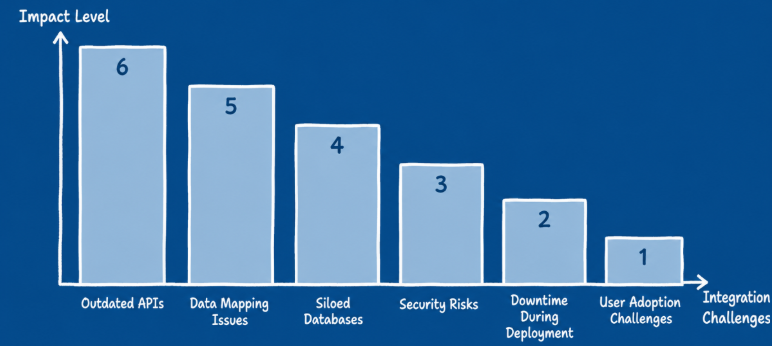
Many legacy ERP systems were built before REST APIs were standard. SAP ECC uses BAPIs and RFCs. Oracle EBS uses database-level calls. These architectures require translation layers. Custom adapters or middleware platforms that speak the legacy language and convert it into modern API calls that the WMS can process.
Data Mapping Issues
ERP and WMS platforms rarely share the same data structure. An item in the ERP might be identified by a 12-digit SKU with prefix codes. The WMS might use a UPC barcode or bin location reference. WMS ERP data mapping requires a field-by-field translation schema.
Siloed Databases
Oracle or Microsoft SQL Server instances from the early 2000s are tightly coupled to the application layer. Direct database integration bypasses the ERP’s business logic and validation rules, creating sync errors and audit trail gaps. The right architecture accesses data through the ERP’s approved integration layer, not around it.
Security Risks
Every integration point is a potential attack surface. Legacy ERPs often lack modern token-based authentication. A poorly designed WMS-ERP integration can expose warehouse data, customer records, and financial information via unsecured middleware endpoints. Defining a clear software development strategy up front, including security requirements, prevents costly post-launch patches.
Downtime During Deployment
This is the risk every operations leader fears. A traditional “big bang” cutover requires shutting down the ERP for hours or days during system migration. For a warehouse processing hundreds of orders daily, that is unacceptable. The alternative, parallel system deployment with a phased rollout, requires careful planning but eliminates deployment downtime entirely.
User Adoption Challenges
A technically perfect integration fails if the warehouse team does not trust or understand it. Supervisors who built workflows around manual processes resist change. Training must be embedded in the deployment plan. Role-specific onboarding, on-floor demos, and a feedback loop in the first 30 days drive adoption faster than any documentation can.
How to Integrate a Custom WMS With a Legacy ERP Without Downtime
Zero-downtime integration is not a slogan; it is an engineering strategy. Here is how it works in practice, with the technical rigor each step demands. This applies whether you are integrating transportation software, a manufacturing WMS, or a multi-site distribution system.
Audit Existing ERP Workflows
Document every transaction type the ERP handles — purchase orders, sales orders, inventory adjustments, transfers, returns, and financial postings.
Identify Critical Warehouse Processes
Determine which processes require real-time sync versus near-real-time. Picking and shipment confirmations are real-time. Purchase order receipts may tolerate a 2–5 minute lag.
Build an Integration Architecture
Select the architecture pattern based on ERP capabilities: point-to-point for simple environments, middleware for complex multi-system landscapes, or API-first for modern ERP versions.
Create Data Mapping Rules
Build a master data translation layer, mapping every field, every unit of measure, and every status code between WMS and ERP. Include transformation rules for edge cases.
Implement the Middleware Layer
Deploy the integration engine, MuleSoft, Boomi, Azure Integration Services, or a custom-built broker in a staging environment.
Run Parallel Systems
Before go-live, operate both systems simultaneously for a defined period. Validate that every ERP transaction produces the correct WMS response and vice versa. This is the safety net that prevents downtime risk at cutover.
Execute Controlled Rollout
Cut over one process at a time, starting with inbound receiving, then moving to outbound fulfillment. Each phase is validated before the next begins. This incremental approach keeps operations running throughout the transition.
Monitor Performance in Real Time
Post-launch, instrument every integration endpoint with logging and alerting. Track transaction volumes, error rates, sync latency, and system load. Define SLA thresholds and escalation paths for integration failures.
At Unique Software Development, we have executed this exact methodology for distribution and logistics businesses across Dallas, delivering full WMS ERP integration without a single hour of unplanned downtime.
Real-Time Data Synchronization Between WMS and ERP
Two lines is all the setup this needs: the value of WMS ERP integration lives or dies in the quality of its data sync. Here is what that synchronization covers across every operational category.
| Data Type | Sync Direction | Frequency | Business Impact |
|---|---|---|---|
| Inventory Levels | WMS → ERP | Real-time | Eliminates overselling and phantom stock |
| Purchase Orders | ERP → WMS | Near real-time | Drives receiving workflows and putaway |
| Sales Orders | ERP → WMS | Real-time | Triggers pick list generation |
| Shipment Status | WMS → ERP | Real-time | Updates customer records and financials |
| Returns Processing | Bidirectional | Near real-time | Restocks inventory and triggers credit memos |
| Financial Data Updates | WMS → ERP | Batch / real-time | Closes cost of goods sold and updates GL |
WMS ERP Integration for Manufacturing Companies
The production floor finishes a run, the inventory count in the ERP is wrong by the time the shift ends, and procurement places a redundant order because the system did not reflect what was just produced. This is not a process failure. It is an ERP WMS integration failure.
- Production planning: WMS confirms raw material availability before production orders are released.
- Raw material tracking: Bin-level inventory feeds the ERP’s material requirements planning (MRP) engine.
- Work-in-progress inventory: WMS tracks partially assembled goods across multiple warehouse zones.
- Quality control: Inspection holds in the WMS trigger quarantine statuses in the ERP, preventing premature shipment.
- Lot traceability: Full lot-level tracking from receiving through shipment, critical for food, pharma, and automotive compliance.
- Logistics: Outbound shipping events in the WMS update the ERP’s open order register and trigger customer invoicing.
If your manufacturing operation is still bridging these stages with spreadsheets and manual entries, the cost of inaccuracy compounds daily.
Build vs Buy: Should You Use Off-the-Shelf Integration or Custom Development?
Two options exist. Neither is universally right. The decision depends on your ERP version, your warehouse complexity, and where you want to be in five years.
| Factor | Off-The-Shelf | Custom Integration |
|---|---|---|
| Cost | Lower initial investment | Higher initial investment |
| Flexibility | Limited to the vendor’s connector library | Built to your exact workflows |
| Scalability | Constrained by the vendor roadmap | Scales with your operations |
| Legacy ERP Compatibility | Usually covers only major ERP versions | Custom adapters for any ERP version |
| Competitive Advantage | Same tools your competitors use | Proprietary integration as a business asset |
If you run SAP S/4HANA or Dynamics 365 with a standard product catalog, off-the-shelf connectors may cover 80% of your needs. If you run a legacy ERP with custom workflows, multi-location fulfillment, or specialized product handling, custom development is not a premium. It is a requirement.
Cost of WMS ERP Integration
Integration costs vary significantly based on ERP complexity, number of data entities, architecture pattern, and whether development is custom or connector-based.
1. Mid-Market / Rapid-Growth Systems
- Target Environment: 1–3 distribution hubs utilizing standard cloud ERPs (e.g., NetSuite Starter, Microsoft Dynamics 365 Business Central, or Sage Intacct) with minimal legacy customizations.
- Investment Range: $45,000 – $95,000
- What This Includes: Standard real-time inventory and order sync, deployment of secure pre-built or hybrid middleware connectors, comprehensive end-to-end data mapping, dedicated User Acceptance Testing (UAT) sandboxes, and foundational staff onboarding.
2. Complex Enterprise Networks
- Target Environment: 4–10 regional fulfillment centers with heavily customized ERP workflows, unique SKU structures (kitting, assembly, serial tracking), or hybrid cloud/on-premise environments.
- Investment Range: $100,000 – $250,000
- What This Includes: Custom middleware engineering or advanced iPaaS architecture, high-frequency multi-entity data synchronization, custom API wrapper development for legacy endpoints, automated error-handling protocols, parallel deployment to prevent operational downtime, and 30 days of post-launch technical hypercare.
3. Tier-1 Global Enterprise & Automation
- Target Environment: 10+ global logistics hubs operating across multi-ERP environments (e.g., SAP S/4HANA, Oracle Cloud ERP) integrated with automated material handling systems (AMRs, conveyor systems, or AS/RS).
- Investment Range: $250,000 – $600,000+
- What This Includes: Event-driven, microservices-based architecture for instantaneous transaction processing, high-availability dedicated server infrastructure, strict military-grade security and compliance auditing, end-to-end automated testing pipelines, and tier-1 SLA-backed engineering support.
These ranges reflect the full project cost, architecture, development, testing, deployment, and post-launch support. Ongoing integration maintenance typically runs 15–20% of the build cost annually.
Case Study: How a Dallas Distribution Company Reduced Fulfillment Errors by 42%
A mid-sized building materials distributor based in Dallas operated on a 12-year-old custom ERP platform. Their warehouse team processed 600–900 orders per day across two locations. Inventory counts were reconciled each morning manually, and shipment confirmations required a supervisor to re-enter data into the ERP after the WMS logged the pick.
Fulfillment error rates were running at 7.3%, costing the company roughly $180,000 annually in reshipment costs, customer credits, and expedited freight.
Solution: Unique Software Development conducted a full workflow audit and designed a custom ERP WMS integration using a middleware architecture built on Azure Integration Services. Data mapping covered 14 distinct transaction types. A custom adapter was developed for the legacy ERP since no off-the-shelf connector existed. The integration was deployed using a parallel systems approach, running both the old manual process and the new integration simultaneously for three weeks before the final cutover.
A custom logistics mobile app was also deployed to the warehouse floor, with offline capability for scanning and picking in low-connectivity zones. Data synced to both the WMS and ERP the moment connectivity is restored.
The full integration went live without a single day of unplanned downtime.
Results
- Fulfillment error rate dropped from 7.3% to 4.2% within 60 days, a 42% reduction
- Manual data entry labor has been reduced by 14 hours per week across both locations
- Inventory accuracy improved from 91% to 98.6%
- Order-to-ship cycle time decreased from 4.2 hours to 2.7 hours on average
For more on how Unique Software Development builds for logistics and distribution businesses, visit the CargoBarn case study.
Solve the Downtime Risk With the Right WMS ERP Integration Partner
Not every development partner has the depth to handle legacy ERP complexity without disrupting your operations. Before you sign a statement of work, validate your partner against this checklist:
- Proven legacy ERP integration experience, including custom adapters and connectors for older ERP versions as well as modern platforms.
- Advanced API development expertise to build REST APIs, middleware layers, and event-driven integrations tailored to complex business workflows.
- Cloud migration capabilities that enable businesses to modernize infrastructure and move workloads to the cloud without disrupting ERP operations.
- Deep warehouse operations knowledge, including pick-pack-ship processes, lot and batch tracking, inventory management, and 3PL environments.
- Dedicated post-launch support with performance monitoring, issue resolution, system optimization, and ongoing technical assistance after deployment.
Unique Software Development checks every item on this list. We have built WMS ERP integration solutions for distributors, manufacturers, and logistics companies across Dallas and nationally, with zero-downtime deployments as the standard, not the exception.