

Most WMS checklists online give you the same recycled bullet points: “look for real-time inventory tracking” and “make sure it integrates with your ERP.” That advice is not wrong. It is just incomplete to the point of being useless when you are actually evaluating $200,000+ software investments for a live operation.
This checklist is built differently. It is structured around how warehouse operations directors, IT architects, and operations managers actually make WMS decisions, not how software vendors want you to think about it.
According to a Panorama Consulting report, over 75% of ERP and WMS software implementations run over budget or behind schedule, and unclear requirements are the real reason. The problem is not the technology. It’s the planning that comes before it.
Successful WMS software projects usually start with clear operational priorities and documented requirements before development even starts.
Why Defining WMS Software Requirements Before Development Matters
There’s a meaningful difference between a feature and a requirement. Teams blur this line constantly, and it costs them.
A feature is something a system does. A requirement is why the business needs it and what problem it solves. A WMS implementation built around features often ends up technically complete but operationally useless; it handles barcodes but not your specific SKU structure, it generates reports but not the ones your operations team actually reads.
When teams align business goals with architecture decisions early, WMS software becomes easier to scale, maintain, and adopt across warehouse operations.
Defining warehouse management system requirements before development forces the right conversations early. It surfaces conflicts between departments, aligns IT and operations, and gives your development team a clear target to build toward instead of a shifting list of requests.
From a scalability perspective, requirements also determine architecture. A warehouse management system checklist that includes multi-site expansion from day one will need a fundamentally different data model than one designed only for today’s single location. Retrofitting that later is expensive. Building for it from the start is not.
Here’s how requirements differ from features in practice:
| Feature | Actual Requirement Behind It |
|---|---|
| Inventory dashboard | Real-time inventory visibility across all bin locations |
| Reporting module | Faster operational decisions with shift-level performance data |
| Barcode scanning support | Reduce receiving errors and manual data entry time |
| Automated alerts | Faster warehouse response to stock-out or overstock conditions |
| Returns processing screen | Full reverse logistics workflow with condition grading and restocking rules |
Once your team has documented requirements at this level, the development process moves faster, stays on budget, and produces a system that people actually use. With that context in place, here’s the warehouse management system checklist to work through before you start.
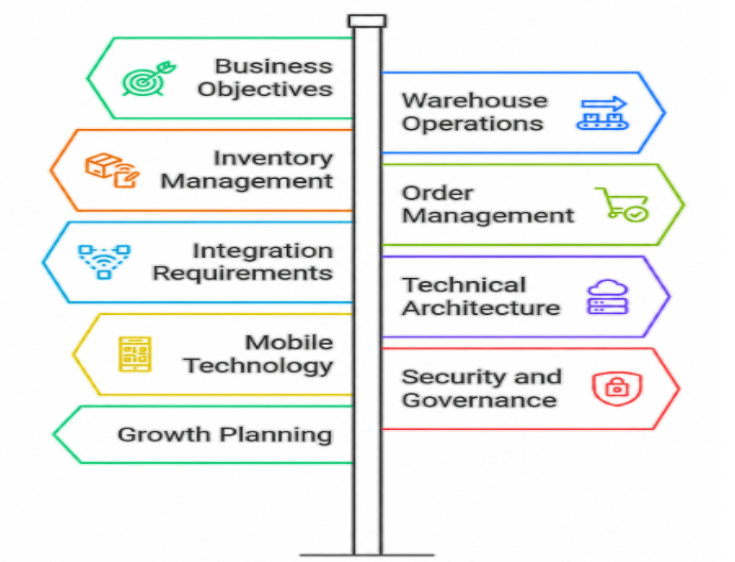
9 Requirements to Include in Your WMS Software Requirements Checklist Before Development
Use these requirements to get your operations team, IT team, and business leadership aligned before architecture decisions lock you in.
Step 1: Define Business Objectives and Success Metrics
Start here, not with features. Write down what’s actually broken in your warehouse today and what fixed looks like a year from now.
Attach real numbers to everything. Picking accuracy at 94% when you need 99.5% is a specific problem. “We need better picking” is not a requirement; it’s a complaint. ROI expectations belong here, too, because a system that needs to pay back in 18 months gets built differently than a five-year infrastructure investment.
Step 2: Document Warehouse Operations and Workflows
This is the step teams rush most, and it creates the most expensive problems six months into a build. Walk every workflow on your floor before a single screen gets designed:
- Receiving: How products arrive, who inspects them, where discrepancies go
- Putaway: Fixed slots, dynamic placement, or zone-based rules
- Storage: Temperature-sensitive items, hazardous materials, high-turn SKUs
- Picking: Single order, batch, zone, or wave, and whether different products follow different rules
- Packing: Carton selection, packing slips, label triggers
- Returns: Condition grading, restocking rules, exception handling
Detailed workflow documentation also creates stronger alignment during WMS implementation because operations teams and developers work from the same process expectations instead of interpreting requirements differently.
Step 3: Establish Inventory Management Requirements
Decide upfront how granular your tracking needs to be. Lot-level, serial-level, and SKU-level tracking each require different data structures. Get specific about location granularity, too; zone tracking and bin-level tracking are not the same system.
If you’re in food, pharma, or any regulated space, full lot traceability needs to be designed into the data model from day one. A recall situation will tell you very quickly whether this was planned properly or not.
Step 4: Define Order Management and Fulfillment Requirements
Think through the full order cycle, not just the picking workflow. How do orders get into the system: ERP feed, ecommerce sync, EDI, or manual entry? What rules govern picking priority for rush orders alongside standard ones? How does the system handle backorders or partial shipments? What triggers carrier selection and label printing?
Every answer has a technical implication. Get them documented before development starts, not during testing.
Step 5: Identify Integration Requirements Early
No WMS runs in isolation, and integration is where more mid-project surprises originate than almost anywhere else. List every system your WMS needs to talk to: ERP, ecommerce platform, shipping carriers, and any reporting tools downstream. For each connection, document what data moves, which direction, how often, and in what format. Real-time sync and nightly batch are architecturally different problems that cannot be decided in month four of a six-month build.
Modern WMS software projects succeed when integration planning happens before development begins, since disconnected systems create delays, duplicate work, and unreliable warehouse data.
Step 6: Define Technical and Architecture Requirements
Document your current infrastructure, deployment preference, cloud, on-premise, or hybrid, and API requirements for external connections. Think about peak concurrent users and transaction volumes. A warehouse moving 1,000 orders a day and one moving 50,000 need fundamentally different infrastructure, and those decisions happen in architecture planning, not mid-development.
Step 7: Plan Mobile and Warehouse Technology Requirements
List every device type in use: RF scanners, barcode guns, RFID readers, voice headsets. Note operating systems and hardware models. Define which workflows need handheld support versus desktop. If you’re buying new hardware alongside the software, document the target specs now so the UI gets built to match. Software that doesn’t work on a four-inch rugged scanner screen gets abandoned fast, and that’s very hard to fix after launch.
Step 8: Include Security and Governance Requirements
Define role-based access clearly, which job roles have access to which parts of the system, and what each can do versus view. Document audit logging, encryption standards, and any compliance obligations relevant to your industry. Disaster recovery belongs here, too. What’s your acceptable downtime during a peak shipping period? These are business decisions with direct technical answers, and they need to be made before the system is designed.
Step 9: Plan for Growth Before Development Starts
Write down where the business is going: a second warehouse, new product lines, higher volumes, and automation equipment. Each scenario has implications for how the data model and API layer need to be structured. Adding a second facility or integrating an automated sorter should be a configuration project, not a rebuild. Whether it is or isn’t comes down entirely to decisions made right here, during requirements.
WMS Requirements Complexity vs. WMS Implementation Risk
The matrix below illustrates how incomplete requirements across key operational categories create compounding implementation risks.
Organizations that complete a full WMS checklist before development begins consistently report lower change-order rates, faster go-lives, and higher user adoption on the floor.
| Requirement Category | Technical Complexity | Risk of Deferring to Later Stages | Real-World Operational Impact |
|---|---|---|---|
| 1. Business Objectives & KPIs | Low: Driven by executive alignment rather than complex code. | Scope Creep: Without fixed target metrics, project boundaries continuously shift. | The system is technically sound, but fails to improve the bottom-line metrics that justified the investment. |
| 2. Workflow Mapping (Picking/Packing) | Medium: Requires converting physical footsteps into logical loops. | Operational Bottlenecks: Forcing the floor to adapt to rigid software limitations. | Mid-project change orders are required to redesign picking logic because the software doesn’t support zone-picking. |
| 3. Inventory Traceability | High: Requires complex, relational database tables. | Compliance & Recall Failure: Hard to inject compliance workflows into completed architecture. | A product recall forces a complete system shutdown or manual paperwork because the data structure cannot trace lot parents/children. |
| 5. Integration Mapping (ERP/EDI) | High: Relies on third-party API dependencies and data syncing. | Critical Architecture Re-writes: Mismatched data cadences break core business systems. | Orders fail to drop into the WMS in real-time, causing fulfillment delays and inventory desynchronization with your ERP. |
| 7. Mobile Hardware & OS | Medium: Involves UI/UX responsiveness and hardware APIs. | UAT Failure / Low Adoption: Software that works on desktops fails on the warehouse floor. | Warehouse staff rejects the software because the button layouts are unusable on standard 4-inch rugged scanner screens. |
| 9. Future Growth & Automation | Very High: Requires highly modular, scalable data modeling. | Total System Obsolescence: The system must be scraped and rebuilt from scratch within 3 years. | Acquiring a second warehouse facility or adding an automated sorter requires a multi-hundred-thousand-dollar root-code overhaul. |
Why Choose Unique Software Development for Custom Warehouse Management Software
At Unique Software Development, we’ve spent over 12 years building custom logistics and warehouse software for companies that outgrew off-the-shelf platforms or needed systems built around how their operations actually work, not how a vendor demo assumes they work.
- We start with requirements, not features. Before our team writes a single architecture proposal or project timeline, we sit down with your operations leaders, IT team, and floor managers to map workflows, document integrations, and build out the warehouse management system checklist that drives the entire build. That discovery phase is what separates software that performs under real warehouse conditions from software that impresses in a sales presentation.
- Unique Software Development builds custom architecture, not adapted templates. Every system we develop is designed around your specific inventory rules, fulfillment workflows, hardware environment, and integration dependencies. That means less time working around limitations and more time improving the metrics your business cares about.
- We’ve connected WMS platforms to legacy ERPs, ecommerce systems, shipping carriers, and third-party reporting tools across dozens of complex client projects. We know the data flows, the edge cases, and the failure modes, and we account for them in the requirements phase, before they have a chance to become expensive problems.
- And we build for growth. Whether you’re running one facility today or planning to scale to five in the next three years, we design the data model and API layers to support that expansion without requiring a rebuild. Our team stays involved after go-live with ongoing support, monitoring, and enhancements as your operations change.
We build custom WMS software that supports how your warehouse actually operates instead of forcing teams to adjust their workflows around system limitations.
If your operation depends on connected logistics workflows and long-term scalability, we can work together. Our custom warehouse management software development unifies warehouse, fulfillment, and movement systems into one operational ecosystem.
Final Thoughts
WMS software performs best when requirements are defined before development begins. That’s not a project management formality; it’s the difference between a system that runs your warehouse and one that constantly fights it.
The WMS checklist in this guide covers the operational, technical, integration, security, and growth requirements that determine whether your project succeeds. Work through each category carefully. Involve the people who run your warehouse every day, not just the executives who approved the budget.
Strong planning reduces WMS implementation risk, keeps projects on budget, and produces warehouse management systems built for real growth. If you’re ready to start that process with a development partner who has built these systems before, Unique Software Development is ready to help.