

Custom CRM software development means building a customer relationship management platform around a company’s specific sales processes, customer data, workflows, integrations, reporting requirements, and access controls rather than adapting a standard CRM to fit those needs. The goal is to build a system that supports how the business actually acquires, serves, and retains customers.
A custom CRM can range from a focused sales platform for a small team to an enterprise system connecting sales, marketing, customer service, finance, analytics, ERP systems, and legacy applications. That difference has a major impact on the budget. A CRM for 20 users with one sales pipeline has a very different development and operating cost from a platform supporting 1,000 users, complex approvals, automated workflows, advanced reporting, and multiple integrations.
The broader CRM market also reflects growing investment in these platforms. Gartner forecasts the CRM sales software market to reach $28.7 billion in 2025, with a 12.8% compound annual growth rate through 2029. But market growth alone does not tell a decision-maker whether custom development makes financial or operational sense.
This guide explains what custom CRM development involves, which features and integrations affect scope, how much development can cost, how long a project may take, and what to evaluate before approving a custom CRM project.
When Does Custom CRM Software Make Financial Sense?
Custom CRM software can make financial sense when an existing CRM becomes costly to adapt. At that point, the business should compare the cost of continued workarounds with the investment required to build a system around its actual operations.
A standard CRM can handle common sales processes efficiently. Problems appear when employees need spreadsheets, manual exports, duplicate data entry, separate reporting tools, or third-party automation platforms to complete routine work.
Your Processes Do Not Fit Standard CRM Workflows
A company with a straightforward sales funnel may not need a custom platform. A business with multiple sales divisions, account hierarchies, approval levels, regional pricing, complex renewals, or industry-specific customer records has a stronger case.
For example, suppose 80 sales representatives each spend 30 minutes per day transferring customer information between systems.
80 employees × 0.5 hours × 250 working days = 10,000 hours per year
At an illustrative loaded labor cost of $35 per hour, that represents $350,000 in annual labor capacity.
That does not automatically justify a custom CRM. It does, however, give finance and technology teams a measurable figure for evaluating the problem.
Integration Requirements Are Driving CRM Complexity
The custom CRM software development rarely operates alone. A mature business may need connections to:
- ERP: Connect customer and sales data with inventory, orders, procurement, finance, and other core business operations.
- Accounting software: Sync invoices, payments, balances, billing records, and customer financial information.
- Marketing automation: Connect leads, campaigns, email activity, forms, and customer engagement data.
- Customer support platforms: Bring tickets, complaints, service requests, and customer interaction history into the CRM.
- Email and communication systems: Capture emails, calls, messages, and other customer communications within account records.
- Payment systems: Connect transactions, payment status, subscriptions, refunds, and billing information.
- Data warehouses: Send CRM data into centralized repositories for large-scale analysis and historical reporting.
- Business intelligence platforms: Combine CRM data with other business information to create dashboards, forecasts, and executive reports.
- Customer portals: Allow customers to access accounts, submit requests, view orders, track interactions, or manage their information.
- Identity and access management systems: Connect user authentication, single sign-on, permissions, and access controls with enterprise identity systems.
The integration requirement can turn a simple CRM project into an enterprise application project. Data must move between systems with defined ownership, validation rules, authentication, error handling, and monitoring.
The Cost of Workarounds Is Exceeding Development Cost
A spreadsheet is inexpensive. A workforce that spends thousands of hours maintaining spreadsheets is not. The same principle applies to disconnected dashboards, duplicate software subscriptions, manual approvals, and repeated data entry. The right comparison is:
Total cost of current process vs. total cost of ownership of the proposed CRM
What Does Custom CRM Software Development Cost in 2026?
Current 2026 industry estimates place custom CRM software development projects across a very wide range.
For executive planning, it is more useful to work with budget bands than a single headline figure. Published 2026 estimates vary significantly because CRM scope, integrations, migration, security, and workflow complexity can change the development effort substantially. Current estimates from GMWARE and Dev Cost Calculator provide useful reference points for basic, mid-level, and enterprise CRM projects. For planning purposes, the following ranges provide a practical starting point.
| CRM Scope | Typical Project Profile | Planning Range |
|---|---|---|
| Basic CRM | Contacts, leads, pipeline, roles, basic reporting | $25,000–$60,000 |
| Mid-level CRM | Automation, dashboards, multiple workflows, integrations | $60,000–$150,000 |
| Enterprise CRM | Complex workflows, multiple integrations, migration, advanced security | $150,000–$500,000+ |
These figures are planning ranges, not fixed market prices. Development location, team composition, integration depth, data volume, security requirements, and project governance can move the final quote substantially.
What Actually Drives the Development Cost?
Feature count is only one variable. The largest cost drivers usually include:
- Number of user roles: Different access levels for sales teams, managers, administrators, customers, and executives increase permission and workflow requirements.
- Number and complexity of workflows: Custom approvals, escalations, lead routing, renewals, and automated actions require more development and testing.
- Third-party integrations: Connecting ERP, accounting, payment, communication, and other systems adds API development, data mapping, testing, and maintenance costs.
- Data migration requirements: Moving legacy customer records requires data cleansing, deduplication, transformation, validation, and migration testing.
- Reporting and analytics: Advanced dashboards, forecasting, custom reports, and real-time analytics require additional data processing and architecture.
- Mobile requirements: Native or cross-platform mobile applications add interface design, development, device testing, notifications, and maintenance.
- Security architecture: Encryption, access controls, authentication, audit logs, and security monitoring increase both development and testing requirements.
- Compliance requirements: Industry or regulatory requirements can add controls for data handling, retention, auditing, access, and reporting.
- AI and automation: Predictive scoring, AI-assisted insights, recommendations, and intelligent workflows require additional models, infrastructure, and integration work.
- Infrastructure requirements: Cloud environments, databases, storage, backups, monitoring, scaling, and disaster recovery affect both setup and operating costs.
- Testing scope: Complex CRM systems require functional, integration, performance, security, usability, and user-acceptance testing.
- Post-launch support: Maintenance, bug fixes, monitoring, security updates, performance optimization, and future enhancements contribute to the long-term cost of ownership.
A CRM with 15 modules can cost less than a CRM with six modules if those six modules require complex integrations and transaction logic.
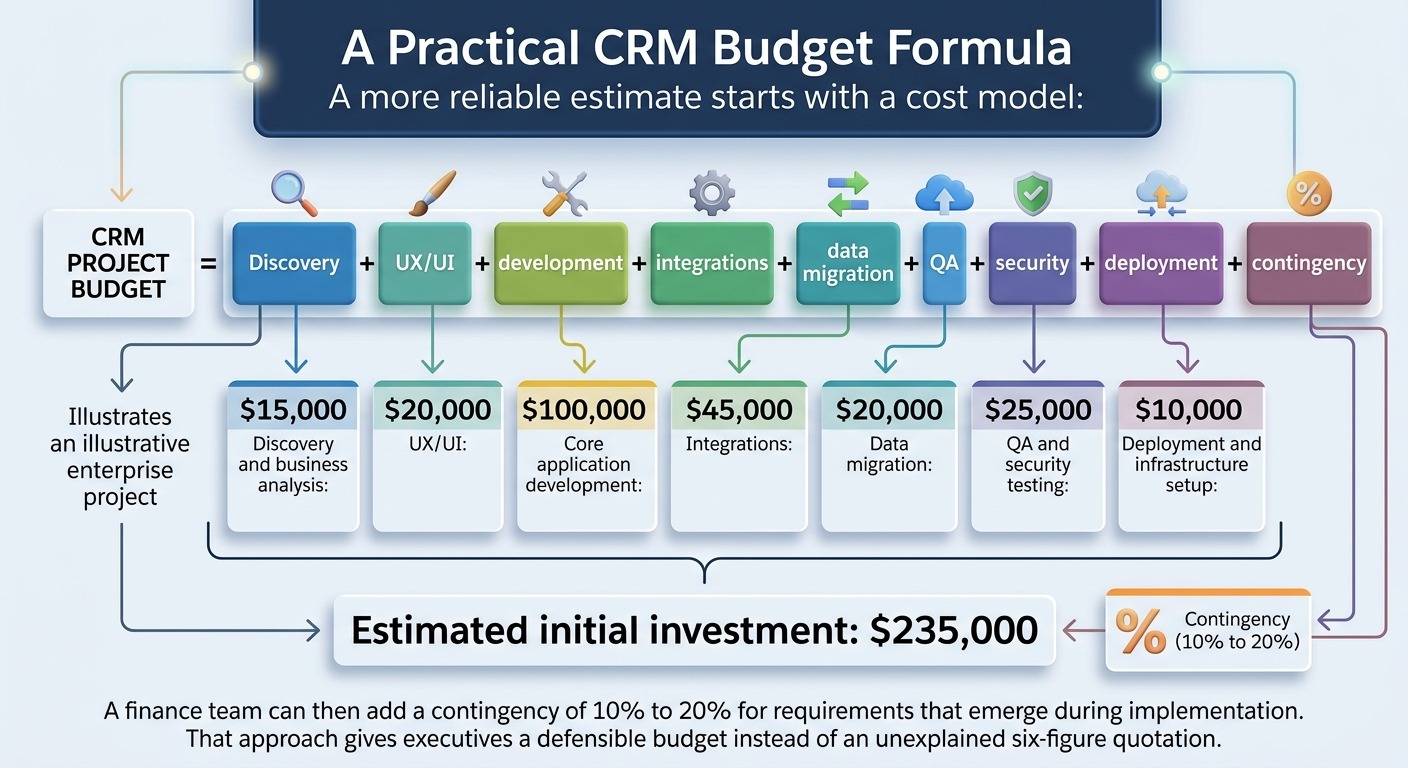
A Practical CRM Budget Formula
A more reliable estimate starts with a cost model:
CRM project budget =
Discovery + UX/UI + development + integrations + data migration + QA + security + deployment + contingency
For example, an illustrative enterprise project could allocate:
- Discovery and business analysis: $15,000
- UX/UI: $20,000
- Core application development: $100,000
- Integrations: $45,000
- Data migration: $20,000
- QA and security testing: $25,000
- Deployment and infrastructure setup: $10,000
Estimated initial investment: $235,000
Featured Article: Custom Business Software Development for Business Process Optimization
Data Migration Is a Major CRM Cost Factor
Legacy customer data can become one of the most underestimated parts of a CRM project. A company may have customer records across:
- Previous CRM
- Spreadsheets
- ERP
- Email platforms
- Sales databases
- Customer service tools
Suppose the company has 500,000 customer records and even 5% require manual review.
500,000 × 5% = 25,000 records
At only six minutes of review per record:
25,000 × 6 minutes = 150,000 minutes
That equals 2,500 hours of review work.
The exact effort will vary, but the calculation shows why migration deserves its own project budget.
Migration Work Usually Includes
For CRM data migration, the process should cover data assessment, deduplication, field mapping, data cleansing, transformation, migration testing, validation, and final cutover. Each stage helps ensure legacy customer data is accurate, compatible with the new CRM structure, and ready for reliable use after launch.
A migration plan should also define which historical records need to move and which can remain archived.
How to Control Custom CRM Development Costs
A custom CRM does not need every possible feature at launch.
Define the Highest-Value Workflows First
Prioritize processes that create measurable financial or operational value. For example:
Lead capture → qualification → opportunity → proposal → approval → contract
A secondary customer-feedback module can come later.
Separate Must-Have Features From Nice-to-Haves
A useful prioritization model is:
| Priority | Example |
|---|---|
| Critical | Customer records, pipeline, permissions |
| High | ERP integration, automation, forecasting |
| Medium | Mobile app, advanced dashboards |
| Later | Experimental AI features, secondary modules |
Plan Integrations Before Development
Late integration requirements can force changes to the data model and application architecture. A $20,000 integration identified during planning can become significantly more expensive after core development if the application was not designed to support it.
Use Phased Development
A company might allocate:
Phase 1: $100,000
Core CRM, accounts, opportunities, permissions, reporting
Phase 2: $60,000
ERP integration, automation, advanced dashboards
Phase 3: $40,000
Mobile application, AI features, advanced analytics
This approach limits the initial capital commitment while preserving a path toward the full platform.
Core Features Your Custom CRM Should Include
A custom CRM software development should support specific business decisions rather than simply reproduce the feature list of another platform.
Contact and Account Management
The foundation should provide a unified record for customers, prospects, companies, contacts, interactions, contracts, activities, and relevant documents. Enterprise requirements may also include:
- Parent-child account relationships: Link subsidiaries, branches, departments, and related companies under a single corporate account structure.
- Multiple contacts per account: Store and manage several decision-makers, employees, stakeholders, and other contacts associated with one customer.
- Account ownership: Assign accounts to specific sales representatives or teams to establish responsibility for customer relationships.
- Territory assignment: Organize accounts by region, market, industry, or sales territory for better resource allocation and management.
- Custom fields: Add business-specific information that standard CRM fields may not capture, such as customer classifications, contract details, or internal identifiers.
- Customer segmentation: Group customers by industry, revenue, location, buying behavior, lifecycle stage, or other business criteria.
- Interaction history: Maintain a centralized record of emails, calls, meetings, purchases, support requests, and other customer interactions.
Lead and Opportunity Management
Sales teams need more than a list of prospects. The system should capture lead sources, qualification stages, opportunity values, expected close dates, assigned representatives, probability scores, activities, and conversion history.
Management should also have visibility into pipeline movement without requesting manual reports from sales teams.
Sales Pipeline and Forecasting
A useful pipeline module connects opportunity data to revenue forecasting.
For example:
- Open opportunities = $4.2M
- Weighted pipeline = $2.1M
- Forecast for quarter = $1.4M
The CRM should calculate these figures from defined rules rather than rely on manually updated spreadsheets.
Workflow Automation
Automation can handle repetitive actions such as lead assignment, approval requests, follow-up reminders, customer notifications, escalations, renewal alerts, task creation, and status updates. These automated workflows reduce manual effort, speed up responses, and lower the risk of human error.
Reporting and Executive Dashboards
Executives need dashboards that turn CRM data into decisions across sales, revenue, customer acquisition, retention, and team performance. Useful metrics include pipeline value, regional revenue, conversion rates, sales cycle length, acquisition cost, renewal rates, representative performance, lost-deal reasons, and forecast accuracy. The data must remain consistent across connected systems, or conflicting figures can undermine management decisions.
Advanced CRM Features for Enterprise Operations
Enterprise CRM systems increasingly extend beyond conventional sales management. Gartner expects CRM end-user spending to continue growing at a 14.4% CAGR through 2029, with generative and agentic AI among the factors driving investment.
AI-Assisted Sales and Customer Insights
AI can summarize customer interactions, identify changes in buying behavior, recommend next actions, classify conversations, and surface accounts that require attention.
The business case should focus on measurable outcomes rather than adding AI simply because it is available.
Predictive Lead Scoring
A predictive model can rank prospects based on historical conversion patterns. For example, a CRM could assign:
- Lead A → 82% conversion likelihood
- Lead B → 54%
- Lead C → 19%
Sales management can then allocate attention according to expected commercial value.
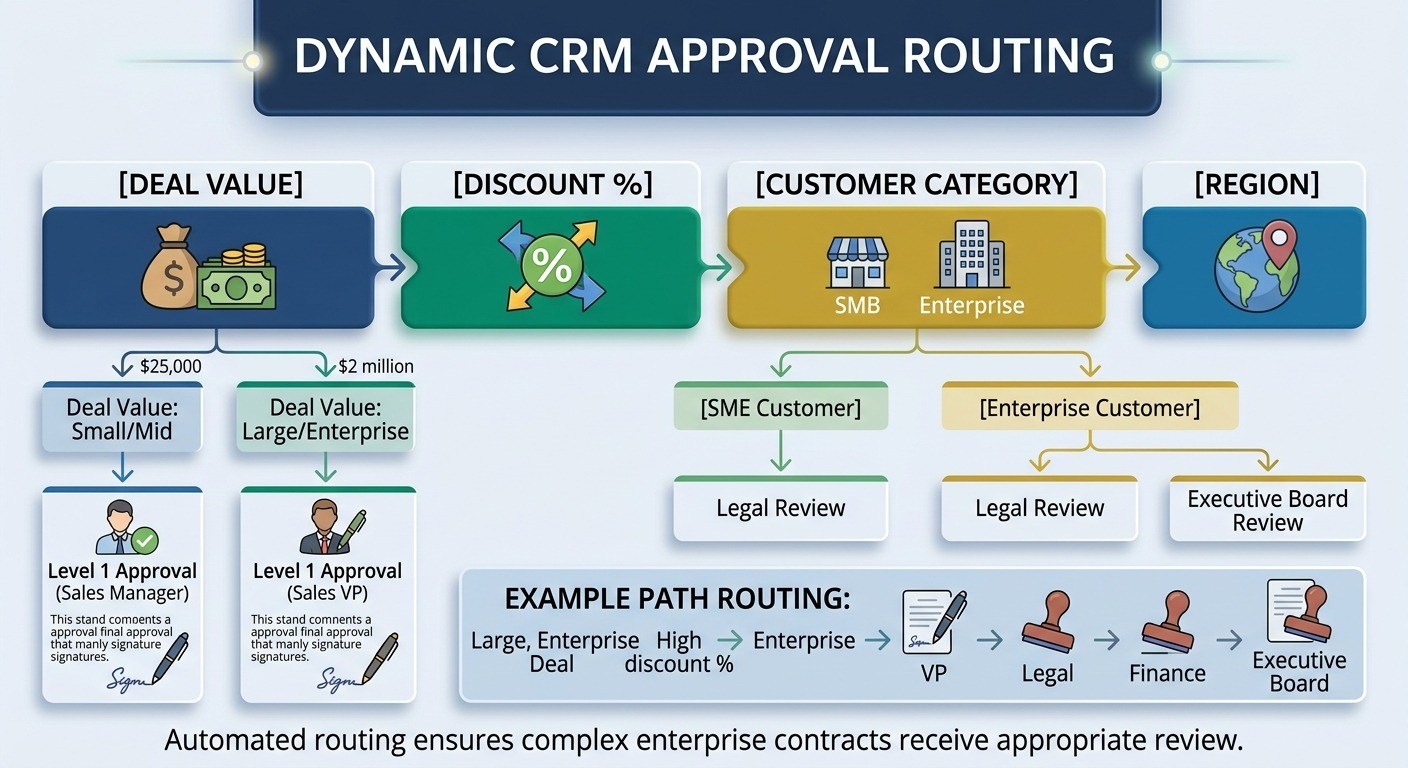
Automated Approvals and Escalations
Enterprise deals often require approval from finance, legal, regional management, or senior executives. A custom workflow can route an opportunity automatically based on:
Deal value + discount percentage + customer category + region
A $25,000 deal might follow one approval path, while a $2 million enterprise contract follows another.
Advanced Analytics
Enterprise CRM analytics can combine customer, sales, financial, and operational information to answer questions such as:
- Which customer segments generate the highest margin?
- Which sales channels produce the shortest sales cycle?
- Which accounts show declining engagement?
- Which opportunities have the highest probability of closing?
- Which customers generate high revenue but require excessive service resources?
CRM Integrations Can Change the Project Budget
Integration often creates more complexity than the CRM interface itself. A project with five simple API connections is not equivalent to one with five systems that exchange sensitive data, require bidirectional synchronization, and contain conflicting customer records. This is where enterprise application integration becomes a core architecture concern.
ERP Integration
ERP integration can create a shared flow of financial, sales, and product data between the CRM and back-office systems. It can synchronize customer accounts, orders, invoices, product information, pricing, payment status, and credit limits, giving sales teams a more complete view of each customer without switching between separate systems.
For example, a sales representative should not need to leave the CRM to determine if an account has an outstanding balance of $75,000.
Marketing and Communication Systems
Marketing integration can connect campaign responses, email activity, lead sources, forms, and customer engagement data. Email and communication integrations can also attach customer interactions to the correct account or opportunity.
Data Warehouses and BI Platforms
Large organizations may not want the CRM to handle every analytical workload. The CRM can provide operational data while a data warehouse supports large-scale analysis and business intelligence. A mature architecture might look like:
CRM → Integration Layer → Data Warehouse → BI Platform
What an Integration Actually Requires
An integration budget should account for the full technical process, from API development, authentication, data mapping, and field transformation to synchronization rules and error handling. It should also cover retry mechanisms, monitoring, logging, security, testing, and long-term maintenance, since reliable integrations require ongoing oversight after launch.
A $5,000 integration that connects two systems through a simple API is fundamentally different from a $25,000 integration that synchronizes complex financial and customer data across multiple environments.
Custom CRM Development Team and Timeline
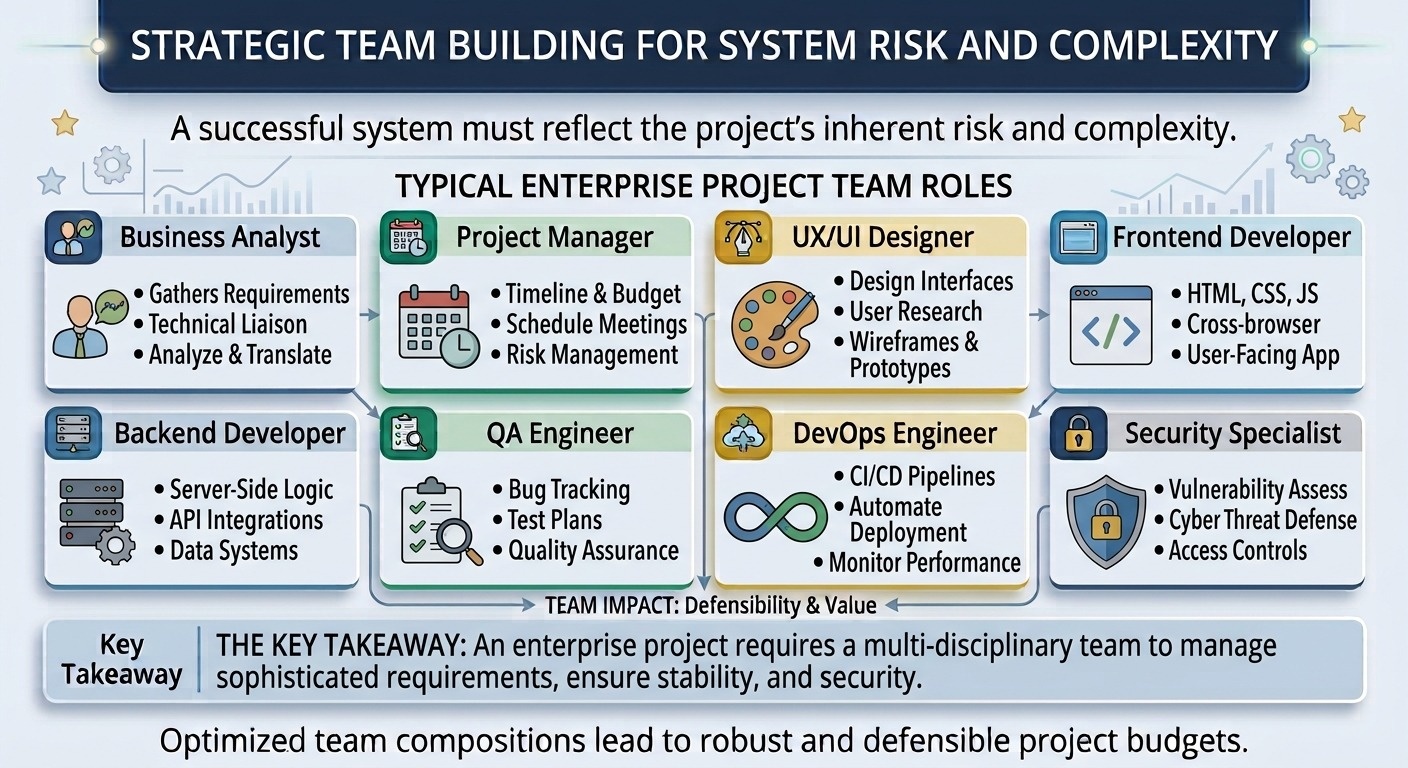
The development team should reflect the system’s risk and complexity. A typical enterprise project may require:
- Business analyst
- Project manager
- UX/UI designer
- Frontend developer
- Backend developer
- QA engineer
- DevOps engineer
- Security specialist
How Long Does Custom CRM Development Take?
A basic CRM may require 8 to 12 weeks. A mid-level system with multiple workflows and integrations can take approximately 4 to 6 months.
A complex enterprise CRM can require 6 to 12 months or more, especially when legacy migration, multiple integrations, compliance, and extensive testing are involved. Current 2026 development benchmarks show similar timelines across basic, mid-tier, and enterprise CRM projects.
A shorter schedule is not automatically a better proposal. A vendor that promises an enterprise CRM in six weeks may simply have excluded discovery, migration, testing, security, or post-launch stabilization from the quoted scope.
Security and Compliance Requirements for Custom CRM
A CRM contains commercially valuable information. Customer contacts, contracts, pricing, communication history, financial information, and employee activity can all require protection. The architecture should account for:
Role-Based Access
A sales representative may access assigned accounts, while regional managers can access regional pipelines and executives can access organization-wide reporting.
Authentication and SSO
Enterprise CRM deployments may require stronger access controls such as single sign-on, multi-factor authentication, identity provider integration, and session controls. These measures help centralize user authentication, prevent unauthorized access, and give administrators greater control over how employees access sensitive CRM data.
Encryption
Sensitive information should receive appropriate encryption at rest and in transit.
Audit Logs
The system should record important events such as:
User → Action → Record → Timestamp → Previous value → New value
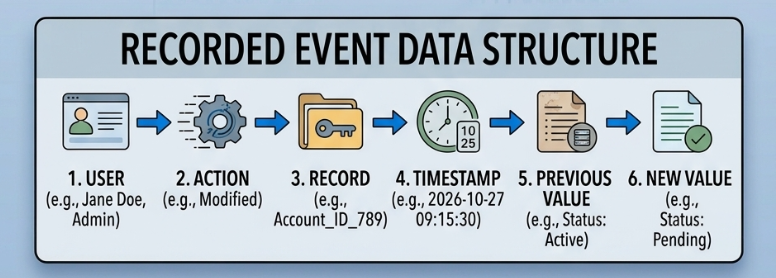
That trail becomes valuable during security investigations, compliance reviews, and dispute resolution.
Backup and Disaster Recovery
A CRM should have defined recovery objectives, backup schedules, retention policies, and restoration procedures.
How to Choose a Custom Enterprise Software Development Company for Your CRM
The vendor should demonstrate more than technical capability. Look for a custom enterprise software development company that can explain how it would translate your sales and customer processes into a data model, workflow architecture, integration strategy, and measurable delivery plan.
Evaluate Relevant CRM Experience
Ask the vendor to show relevant projects that demonstrate experience with CRM workflows, enterprise integrations, data migration, role-based access, reporting, automation, security, and mobile applications. Look beyond screenshots and feature lists: review how the vendor handled complex business processes, connected existing systems, protected sensitive data, migrated legacy records, and supported users across different platforms. This gives decision-makers a clearer view of whether the team can manage the technical and operational demands of an enterprise CRM.
Ask How They Handle Integrations
Do not accept a vendor’s claim that it “can integrate with your ERP” without understanding how the integration will actually work. Ask which data will move, which system owns each field, how frequently data will synchronize, what happens when a sync fails, and how conflicting records will be resolved. Clear answers to these questions reveal the vendor’s integration architecture and technical maturity far better than a long feature list.
Ask for a Detailed Cost Breakdown
A strong proposal should clearly separate the costs for discovery, design, development, enterprise application integration, data migration, testing, deployment, and ongoing support. This breakdown shows exactly where the budget is going and makes it easier to compare vendors against the same scope. For example, a $180,000 CRM proposal becomes much easier to evaluate when every major cost, including integration work, has a defined deliverable and business purpose.
Custom CRM vs. Off-the-Shelf CRM: Which Should You Choose?
| Factor | Off-the-Shelf CRM | Custom CRM |
|---|---|---|
| Initial investment | Lower | Higher |
| Deployment | Faster | Slower |
| Workflow flexibility | Product-defined | Business-defined |
| Integrations | Supported connectors | Tailored architecture |
| Data model | Limited to platform | Fully customizable |
| Ownership | Vendor-controlled | Greater organizational control |
| Long-term changes | Subject to vendor roadmap | Controlled internally |
| Unique processes | Often require workarounds | Can be built directly |
The financial decision should depend on the gap between the company’s requirements and the capabilities of available products.
If 90% of the business process fits an existing CRM, customization may provide poor capital efficiency. If employees require multiple systems, manual workarounds, custom approval chains, and extensive integrations, a tailored platform can justify its higher initial investment.
Budget for the Business System, Not Just the CRM!
Custom CRM software development is ultimately a business investment, not simply a technology project. The right budget must account for development, integrations, data migration, security, infrastructure, maintenance, and future changes. Before approval, decision-makers should compare the cost of current inefficiencies with the total cost of building and operating the new CRM, then measure the expected gains in productivity, revenue visibility, customer retention, and operational control.
Unique Software Development helps businesses turn those requirements into practical CRM solutions built around their workflows, data, and growth plans. The goal is not to build the most feature-heavy platform. It is to create a CRM that eliminates costly workarounds, connects critical systems, gives teams reliable customer data, and delivers measurable business value over its lifecycle.