


What takes your team a full day might take your competitor an hour. The warning sign isn’t that your employees work slowly. It’s that your best people spend their best hours moving data between systems, checking spreadsheets, chasing approvals, and cleaning up a mistake someone made yesterday.
Day to day, highly skilled employees get tied up in activities that don’t require critical thinking or line-by-line human checking. These are exactly the tasks your custom business software can perform. That way, the data stays secure, repetitive work gets handled with expertly built software for your specific processes, and most importantly, you stop paying highly skilled people to perform work that doesn’t need their expertise.
Let’s look at what you can hand over to custom business software development and what you still need your team for. Then, we’ll look at what investment it takes to make your processes more productive, efficient, and fast.
What Exactly Is Causing the Friction?
Manual work takes more employee time than it deserves. Bottlenecks, scattered spreadsheets, multiple tools, and repetitive checks keep skilled people busy with work that does not need much thinking.
Here is a graph showing employee productivity and task completion when work is handled through different tools and platforms.
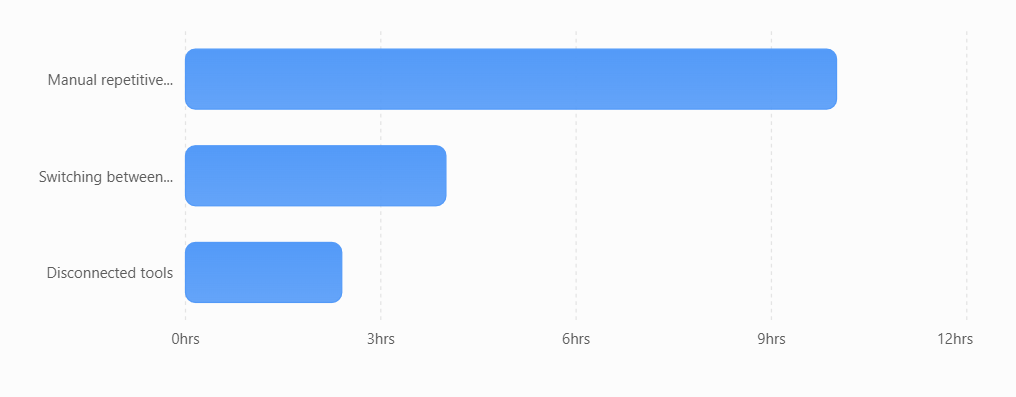
A team can lose 4 to 10 hours a week simply moving data, checking entries, fixing gaps, or putting reports together. Many businesses try to fix this by adding another ready-made software. But a new tool does not always mean less work. It can add more steps, give reports that do not show what the business actually needs, or leave the team using the new software and old spreadsheets together.
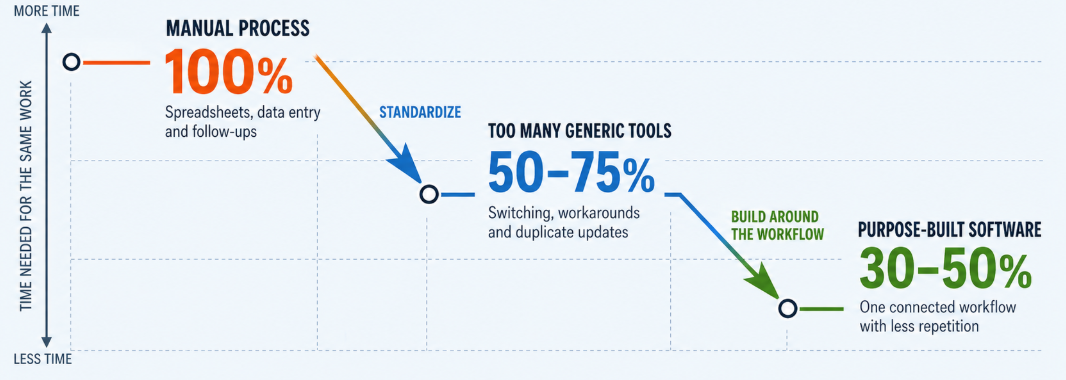
The graph below shows how productivity and task completion can differ across manual systems, multiple tools, and custom business software development.
Another concern for opting for a custom software development agency is data. According to industry reports, 30% of data breaches involve third-party vendors or tools. Using external software can increase security risks, and a data breach can cost more than money. It can also damage customer trust. In the long run, that cost can be far greater than investing in custom business software built around your needs.
Which Business Process Should You Optimize First?
Start with the process that consumes the most employee time without requiring much human judgment. Look for repetitive work, frequent errors, duplicate data entry, approval delays, and tasks that move between multiple systems.
Common starting points include:
- Sales administration: Automate lead capture, CRM updates, follow-up reminders, quote preparation, and sales reporting via a custom software development agency. This gives salespeople more time to speak with prospects and customers.
- Finance and accounting: If someone downloads an invoice, types the same information into the accounting system, checks it against a spreadsheet, then emails a manager for approval, that whole chain can run itself. Well-built invoice automation software keeps people involved only when a transaction looks unusual.
- Operations: Team coordinates jobs through WhatsApp messages and a shared sheet; you have no timestamps, no record, and no way to prove what you promised at 7 a.m. For multi-site operators managing assets, vendors, and inspections, work orders can become a significant source of delay, which is why facility management software is needed.
- Customer support: Automate ticket classification, response suggestions, request routing, and conversation summaries. Employees can then focus on complaints, complex questions, and valuable customer relationships.
- Document and data handling: Use AI to extract information from invoices, contracts, forms, emails, and reports. Employees should review sensitive or low-confidence results before the information enters the main system.
- Procurement and approvals: Digitize purchase requests, vendor records, approval chains, and renewal reminders. This makes it easier to see where a request is delayed and who needs to act.
- Field work: Custom business app development software closes that gap with offline capture, signatures, and evidence attached to the job. In regulated delivery work, complete and verifiable records are critical, and purpose-built medical courier apps can turn chain of custody into a stronger operational advantage.
The opportunity is substantial. Asana reports that knowledge workers spend 60% of their day on “work about work,” including coordination, duplicated tasks, and unnecessary communication.
Reclaiming just five hours per employee each week would return approximately 260 hours per employee annually. A good custom software development agency can help turn that recovered time into better customer service, stronger quality control, faster problem-solving, and more capacity for business growth.
Steps to Audit Friction and Find What to Automate First
Spend five days tracking where time, handoffs, errors, and rework happen. Then rank each problem by its yearly cost and the effort needed to fix it. Start with the one that costs the most and is easiest to fix.
You only need a notebook, a shared sheet, and honest numbers.
Day 1: Track Time and Handoffs
Ask everyone involved to record each task, how long it takes, which systems they use, and who receives the work next. Do not ask for estimates. Record the time as the work happens.
Day 2: Track Repeated Data Entry
Look for every task where someone moves information from one system into another. Record how often it happens each week. High-volume tasks are usually the quickest wins.
Day 3: Track Rework
Record how often your team has to fix work that came in wrong. Then trace where the error started. A small mistake at the start can become much more expensive later.
Day 4: Measure Waiting Time
For your five biggest workflows, separate actual working time from waiting time. A task may take 20 minutes to complete but sit in someone’s queue for two days. That waiting time is often the real bottleneck.
Day 5: Score and Rank
Now rank the problems using the numbers you collected. This gives you a better basis for deciding which problems to address with custom business software development first, rather than simply fixing the problem people complain about most.
The Friction Score
Annual Cost of Friction = (hours lost per month × 12 × loaded hourly cost) + (rework incidents per month × 12 × cost per incident) + Revenue at risk per year
* Revenue at risk should only be included when the business can reasonably estimate revenue affected by delays, missed orders, cancellations, or payment issues.
Friction Score = Annual Cost of Friction ÷ Build Complexity
Build Complexity: 1 = low, 5 = high.
Example: 60-Person Services Firm
Invoicing handoff:
96 hours lost per month at $38 per hour = $43,776 per year.
30 disputed invoices per month at $95 each = $34,200.
Revenue at risk = $22,000.
Total annual cost: $99,976 | Complexity: 2 | Score: 49,988
Quote approvals:
40 hours lost per month = $18,240 per year.
Revenue at risk = $60,000.
Total annual cost: $78,240 | Complexity: 4 | Score: 19,560
Onboarding paperwork:
24 hours lost per month = $10,944 per year.
Total annual cost: $10,944 | Complexity: 3 | Score: 3,648
Do not automate the noisiest task just because people complain about it the most. A custom software development agency should help you tackle the problem that costs your business the most for the least effort. If the calculation feels difficult, put the highlighted section above into any AI tool with your task, and it will give you the results.
How to Optimize Business Processes With Custom Software Development
You should not have to commit your entire budget before seeing whether the software works. Divide the project into short stages, with a clear deliverable and decision point after each one.
Week 0: Understand the Problem
A senior member of the development team observes how your employees currently complete the work. We examine the spreadsheets, software, approvals, manual handoffs, and exceptions involved.
You receive:
- A map of the current process
- A list of the biggest friction points
- A recommendation for the first workflow to improve
- A measurable target for the first release
Weeks 1–2: Design One Complete Workflow
We select one high-value process and define how it should work from beginning to end. The goal is written in measurable business terms before development starts.
For example:
Reduce the administrative time required for each work order from 22 minutes to under 10 minutes.
During this stage, we also decide which existing systems need to be connected and what information the new software must use.
Weeks 3–6: Build With Real Business Data
We build the first working version and connect it safely to the systems you already use. The initial connection can be read-only, allowing the software to display real records without changing the original information.
Your employees see the system working with familiar customers, orders, invoices, or jobs. This helps them identify missing rules and unusual cases early.
Week 7: Test With a Small Team
Three to five employees use the new workflow alongside the current process. This controlled pilot reveals problems that may not appear during interviews or planning.
We record:
- Where employees become confused
- Which exceptions the software cannot yet handle
- Which steps still happen outside the system
- Whether the agreed performance metric improves
The software moves forward only after the pilot demonstrates that it can support the real workflow.
Weeks 8–12: Expand and Retire the Old Process
After the pilot succeeds, we complete the required integrations, enable approved write access, and introduce the software to the remaining users.
Training is based on each employee’s actual role. A firm date is then set to retire the old spreadsheet or manual process. This prevents employees from maintaining two systems and duplicating the same work.
Case Study: How a Custom Business Software Agency Can Remove Process Bottlenecks
ShedCard’s Rent-to-Own process relied on agents, paperwork, and manual approvals, creating delays for customers and businesses. Unique Software Development built a custom mobile platform that brought customers, vendors, and approvers into one workflow.
Customers could select an outdoor structure, choose a preferred vendor, submit their request, track its status, sign contracts, and manage payments through the app. Digital approvals reduced processing time from days to a few hours, while the centralized workflow reduced manual handoffs and made the entire RTO process easier to manage.
The value of this type of workflow becomes clearer when you measure the cost it removes. In a comparable process optimization example, reducing administrative time from 22 to 7 minutes per order recovered approximately 1,900 administrative hours annually, worth an estimated $72,000 in labor value. Faster collections also released around $180,000 in working capital.
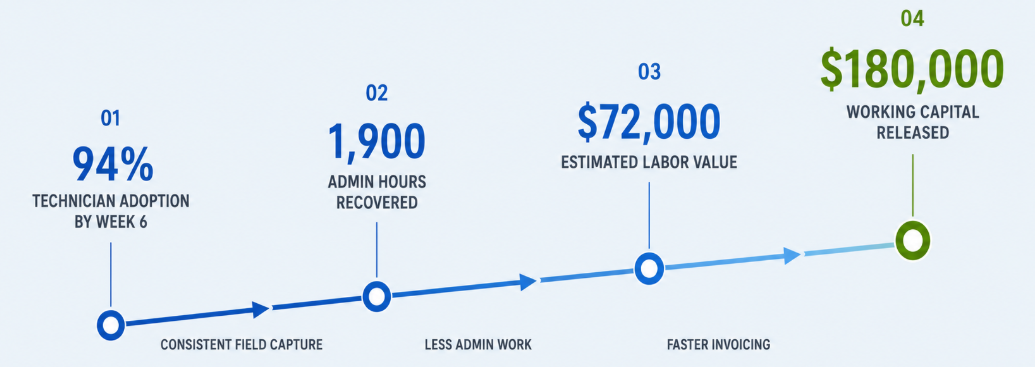
Together, these improvements recovered approximately 1,900 administrative hours annually, representing an estimated $72,000 in labor value. Faster collections also released around $180,000 in working capital. Technician adoption reached 94% by week six.
How to Know If Custom Software Development Is Worth the Investment
A focused first release may cost around $1,340,000, plus 15–20% a year for maintenance. The price depends on the features, integrations, users, and security involved.
That can feel expensive until you count what the current process already costs. Staff may spend hours copying data, chasing approvals, fixing errors, and working across disconnected tools.
In this example, a $1,340,000 workflow reduced admin time from 22 to 7 minutes per order and helped invoices get paid 23 days faster. Its estimated payback was 3.2 months.
When the savings can outweigh the ongoing cost of an inefficient process, custom software can become the safest investment with the highest return. You are not investing simply to add another system to your business. You are investing to remove the recurring costs of a process that is already taking time, creating errors, and slowing your team down.
Your Next Move Can Take Fifteen Minutes
You do not need more software. You need to know where your business is losing time, money, and productivity. Start by identifying the workflow that creates the most friction, then measure what it is costing your team before deciding what to automate.
You can do that with your own five-day audit, or bring the problem to a conversation with our solution architects. In a quick call, we can discuss where your current process is slowing the business down, what could be automated, and whether custom business software development makes financial sense for your situation.
If the process needs more than a quick fix, Unique Software Development is a custom software development agency offering custom business software development built around the way your business actually works. We offer workflow automation and system integration to reporting and process management. We build software that removes unnecessary work and gives your team more time for the work that matters.