


A custom web application can represent a six-figure technology investment long before the first production release. The final exposure depends on more than developer hours. Integrations, data migration, security requirements, responsive interfaces, testing, infrastructure, and post-launch support can all change the budget.
The development process therefore needs to establish financial and technical boundaries before implementation begins. A project with 2,000 estimated development hours has a very different exposure from one that requires 5,000 hours, and an application with two integrations has a different risk profile from one that depends on 15 external systems.
Responsive behavior adds another planning dimension. Desktop, tablet, and mobile users may interact with the same application through different navigation patterns, screen constraints, connection speeds, and input methods. This guide examines the custom web software development process from requirements and architecture through development, responsive implementation, testing, deployment, and ongoing maintenance.
Define the Business Requirements
The first stage should establish what the custom web software must accomplish and how those requirements translate into development scope.
A request such as “build a customer portal” is not a useful development specification. The project may require customer authentication, account management, document access, payments, notifications, support tickets, reporting, CRM software integration, and administrative controls.
Identify Users and Workflows
Start with the people who will use the application and the actions each role must complete. Different users interact with the same system in different ways, so defining these roles early helps determine the required features, permissions, screens, and workflows. For example, an internal operations application might serve:
- Administrators: Manage user accounts, permissions, system settings, configurations, and access controls. They may also review audit logs and resolve administrative issues.
- Managers: Review team activity, approve requests, monitor performance, assign tasks, and access reports or dashboards that support operational decisions.
- Employees: Complete day-to-day tasks such as submitting requests, updating records, processing assigned work, uploading documents, and communicating status changes.
- Customers: Access accounts, submit requests, view transactions or documents, make payments, track progress, and receive notifications.
- External partners: Share required information, submit updates, access approved records, or complete specific workflows without receiving access to the company’s entire system.
The next step is to map the actions each role must perform. A manager, for instance, may need to review → approve → assign → monitor, while a customer may need to log in → submit → track → receive confirmation. These workflows become the foundation for defining screens, database requirements, permissions, notifications, integrations, and development effort.
For budget planning, the number and complexity of workflows matter more than the number of user roles alone. A system with five roles and 20 straightforward workflows can require significantly less development effort than one with the same five roles but 60 workflows involving approvals, integrations, calculations, and exception handling.
20 × 30 = 600 hours
At an illustrative blended rate of $100 per hour:
600 × $100 = $60,000
The $60,000 figure is not an industry benchmark. It demonstrates why the workflow complexity of custom web application development can produce a much larger budget impact than the simple label attached to the application.
Define Functional Requirements
Document the functions the custom application must perform before development begins. This creates a clear reference for developers, designers, testers, and budget owners and reduces the risk of important requirements appearing midway through the project.
- User roles and permissions: Define what each user can view, create, edit, approve, or delete.
- Business workflows: Map the steps required to complete key processes, including approvals and exceptions.
- Forms and validation: Specify required fields, input rules, error messages, and validation requirements.
- Notifications: Identify when users should receive email, SMS, in-app, or system notifications.
- Reports and dashboards: Define the metrics, filters, charts, and data different users need to monitor performance.
- Search and filtering: Establish which records users need to search, sort, and filter and how results should be displayed.
- Data storage: Identify the information the application must store, update, retrieve, and retain.
- Authentication: Define login methods, password requirements, multi-factor authentication, and session controls.
- Payment functions: Document payment methods, transactions, refunds, invoices, and payment-status handling where required.
- APIs and integrations: List the external systems the application must connect with and the data that must move between them.
- Administrative controls: Define functions for managing users, permissions, settings, configurations, and system activity.
Each requirement should also have a defined owner, expected behavior, and acceptance condition. This makes it easier to determine when a feature is complete and gives the development and QA teams a measurable standard for testing it.
Establish Scope Before Development
Scope uncertainty creates direct financial exposure.
Suppose a project starts with 2,000 estimated development hours at an illustrative $100 blended rate:
2,000 × $100 = $200,000
If requirements uncertainty adds 20% to the workload:
2,000 × 20% = 400 hours
400 × $100 = $40,000
The estimate has moved from $200,000 to $240,000 before additional infrastructure, testing, migration, and maintenance costs.
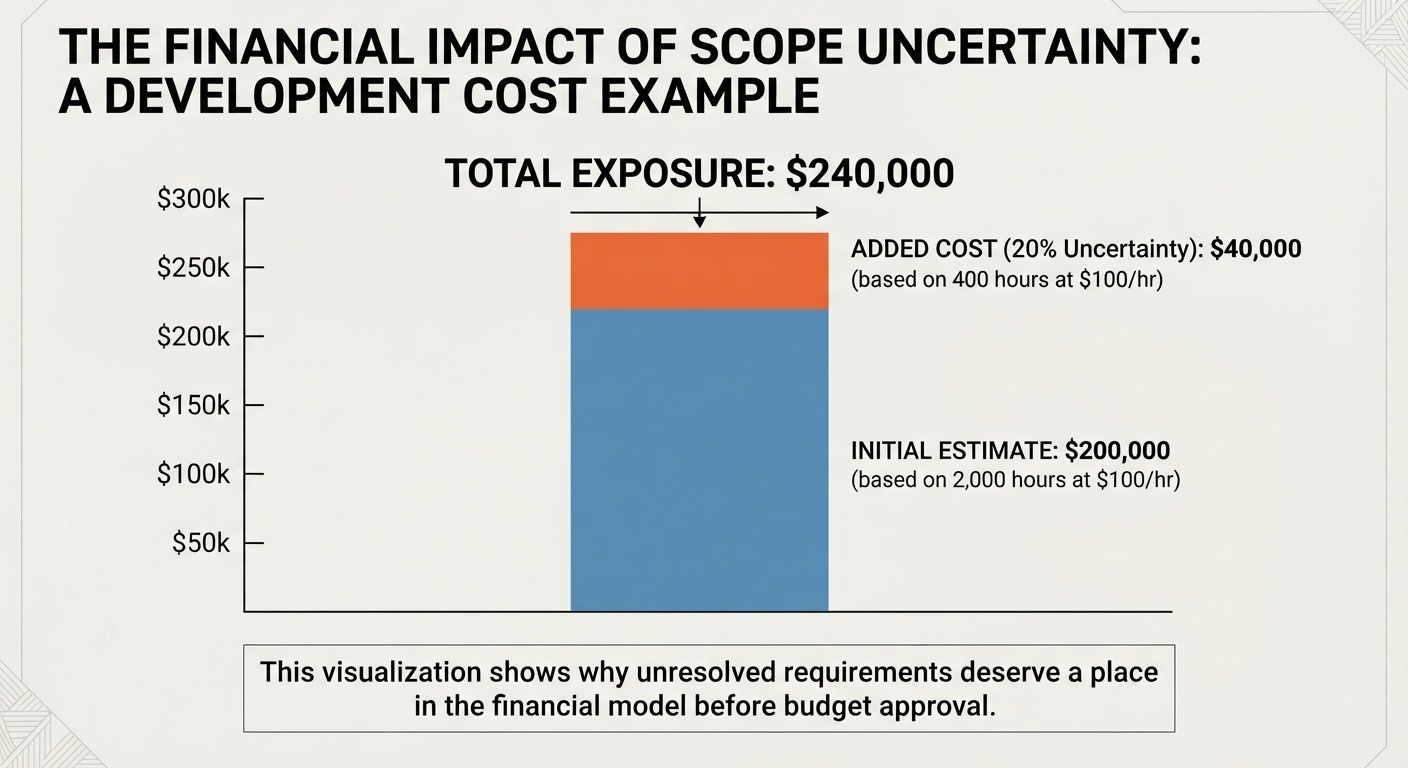
That does not make 20% a universal contingency figure. It shows why unresolved requirements deserve a place in the financial model before a budget receives approval.
Assess the Existing Technology Environment
Custom web software rarely operates in isolation. Existing ERP, CRM, accounting, payment, inventory, identity, analytics, and communication systems can determine a significant part of the project scope.
Identify Existing Systems
Create an inventory of every system the new application must use, connect with, or eventually replace. For each system, document the data it owns, available APIs, authentication method, data format, update frequency, existing technical limitations, contractual dependencies, and security requirements. This assessment helps identify integration constraints, data dependencies, licensing issues, and potential migration risks before development begins.
Define Integration Requirements
Integration scope depends on more than the number of systems. Suppose an application requires eight external integrations and each integration needs an illustrative 80 hours for API development, authentication, mapping, error handling, testing, and documentation:
8 × 80 = 640 hours
At $100 per hour:
640 × $100 = $64,000
A project that initially appeared to require $200,000 of application development could therefore carry another $64,000 in integration development.
The 80-hour assumption is illustrative. Actual effort depends on API quality, authentication complexity, data mapping, documentation, and the behavior of the external system.
Assess Data Migration Requirements
Migration deserves its own scope because legacy data rarely matches the structure of a new application perfectly. Suppose a business has 1.5 million customer and transaction records. The migration process may require extraction, cleansing, transformation, validation, duplicate handling, testing, and reconciliation.
A project should therefore estimate migration effort independently instead of treating it as a final database import.
Plan the Web Application Architecture
Architecture should reflect the application’s expected business load rather than technical fashion. Before selecting the architecture, assess the number of users, expected concurrent activity, transaction volume, data growth, availability requirements, security controls, integration volume, hosting needs, disaster recovery requirements, and potential future expansion.
For example, an application serving 5,000 registered users but only 300 concurrent users has different infrastructure requirements from one expected to support 5,000 concurrent users.
Planning around these factors helps avoid both underbuilding, which can create performance and reliability problems, and overbuilding, which can increase infrastructure and development costs without a clear business benefit.
Choose the Technology Stack
The technology stack should support the application’s requirements, existing technical environment, security obligations, and expected lifespan.
The lowest initial development estimate does not automatically produce the lowest total cost.
For example, suppose Technology A requires $180,000 to develop, and Technology B requires $210,000. If Technology A creates an additional $30,000 per year in specialized maintenance and Technology B requires $15,000, the five-year maintenance exposure becomes:
Technology A: $30,000 × 5 = $150,000
Technology B: $15,000 × 5 = $75,000
The initial $30,000 difference does not tell the complete financial story. A technology decision should therefore consider development cost alongside maintenance, staffing, infrastructure, security, and future change requirements.
Design the User Experience for Web and Mobile
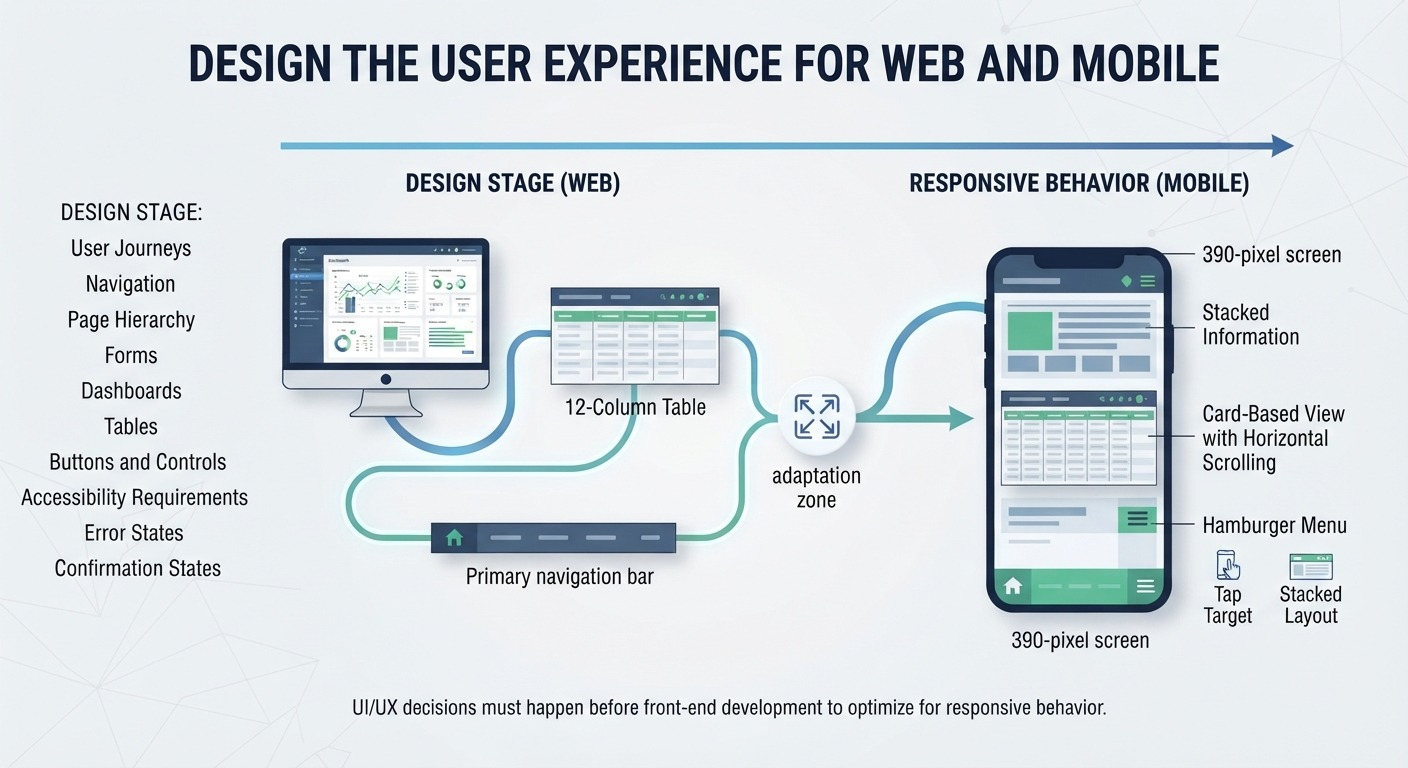
UX and UI decisions should happen before front-end development because interface structure affects both development effort and responsive behavior. The design stage should establish:
- User journeys
- Navigation
- Page hierarchy
- Forms
- Dashboards
- Tables
- Buttons and controls
- Accessibility requirements
- Responsive layouts
- Error states
- Confirmation states
Develop the Custom Web Application
The custom development stage converts approved requirements and designs into working software.
Front-End Development
Front-end development covers the browser-facing interface, including:
- Navigation
- Forms
- Dashboards
- Tables
- Interactive components
- Validation
- Responsive layouts
- Accessibility behavior
The front end must communicate correctly with the application’s back end and adapt to the supported device range.
Back-End Development
Back-end development handles business logic, authentication, permissions, APIs, processing rules, and server-side operations.
For example, an approval workflow may require:
Employee submits request → Manager reviews → Finance validates → System records approval → Notification sent
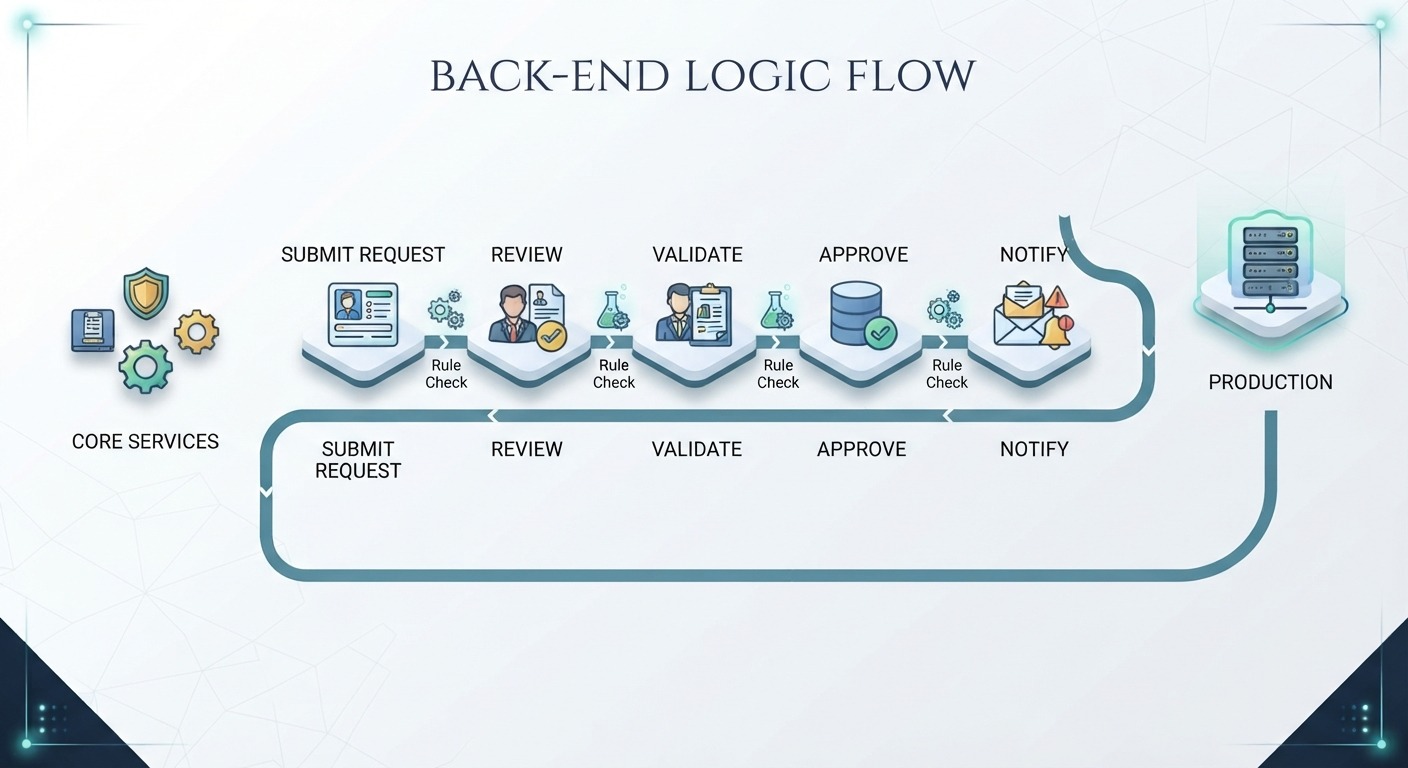
Each transition introduces rules that need implementation and testing.
Database Development
Database architecture determines how information is stored, related, retrieved, protected, and updated. The team should establish:
- Data entities
- Relationships
- Indexes
- Access rules
- Backup requirements
- Retention policies
- Audit records
Poor database planning can create performance problems later, especially as transaction volumes increase.
API and Integration Development
APIs connect the application with external services and internal systems. A payment platform, CRM, ERP, shipping service, identity provider, or analytics platform can each introduce authentication requirements, data mappings, failure conditions, and monitoring needs.
For a project with 10 integrations, even small failures across individual interfaces can create operational problems. The architecture should therefore define how the application handles failed requests, duplicate transactions, unavailable services, and inconsistent data.
Build the Web App for Responsive Use
Responsive web apps should account for different screen sizes, browsers, interaction methods, and performance conditions during development.
Define Device and Browser Requirements
Create a support matrix before testing begins.
For example:
| Environment | Example |
|---|---|
| Desktop | Chrome, Edge, Safari |
| Tablet | iPad-class devices |
| Mobile | iOS and Android |
| Screen sizes | Small, medium, large |
| Input | Mouse, keyboard, touch |
A six-browser/device combination is not the same testing scope as a 15-combination matrix.
If each combination requires 4 hours of regression testing:
15 × 4 = 60 QA hours
At an illustrative $75 QA rate:
60 × $75 = $4,500
The calculation shows how a broader support matrix creates measurable QA exposure.
Design for Different Screen Sizes
Responsive behavior can change navigation and tables, requiring menus to become more compact and complex data to shift into scrollable or stacked layouts. It can also affect forms and button placement, as fields and actions may need larger touch areas and a different arrangement on smaller screens.
The objective is not to make every desktop element smaller. The objective is to preserve the workflow across supported environments.
Prioritize Mobile-Critical Workflows
Not every workflow needs identical mobile treatment. A sales representative may need mobile access to customer records and approvals, while a finance analyst may perform complex reporting primarily on a desktop.
That distinction helps allocate development and testing resources toward workflows that produce actual business value.
Plan Responsive Performance
Mobile users can face weaker hardware, slower connections, and tighter bandwidth limits.
Suppose a business application serves 100,000 monthly sessions and 30% occur on mobile devices:
100,000 × 30% = 30,000 mobile sessions
If a slow page causes even a small portion of those users to abandon a transaction or support workflow, the commercial effect can exceed the cost of front-end optimization.
Performance should therefore be treated as part of responsive application planning, not as a cosmetic enhancement.
Integrate External Systems
Integration work can influence both project cost and operational reliability because each external system introduces technical dependencies that must be handled correctly. A production-ready integration should cover API authentication and data mapping, along with request validation and error handling to prevent bad or incomplete data from moving between systems.
It should also include retry logic and rate-limit handling for temporary failures, while logging, monitoring, failure alerts, and data reconciliation help teams detect issues and confirm that information remains accurate across connected systems.
Suppose an application exchanges data with five external systems and each system requires 100 hours of integration and testing:
5 × 100 = 500 hours
At $100 per hour:
500 × $100 = $50,000
The $50,000 figure is illustrative. The actual cost depends on the systems involved and the complexity of the data exchange.
The larger financial concern is operational dependency. If a core external service fails and the application has no retry, queue, or fallback mechanism, the problem can move from a technical error to a revenue or operational issue.
Test the Web Application
Software testing should validate the application against the requirements established at the start of the project. It should cover not only whether individual features work, but also how the complete application behaves under real business conditions, different devices, connected systems, and expected user loads.
Functional Testing
Verify that individual functions perform their intended tasks. This includes forms, calculations, workflows, permissions, notifications, search functions, reports, and other features defined in the requirements.
Integration Testing
Confirm that data moves correctly between the application and connected systems. Testing should verify that information is sent, received, transformed, and stored correctly and that failures are handled without creating inconsistent records.
Responsive Testing
Test layouts, workflows, forms, navigation, and interactions across supported devices and browsers. The goal is to ensure that users can complete important tasks without usability or display problems on different screen sizes.
Security Testing
Test authentication, authorization, input validation, session handling, data access, and other security controls appropriate to the application. Testing should also verify that users cannot access information or functions outside their assigned permissions.
Performance Testing
Performance tests should reflect expected production conditions. Suppose peak demand is expected at 200 concurrent users. Testing only with 20 users provides limited evidence about how the application will behave during actual peak activity. Reliability testing assesses response times, resource usage, and system stability under realistic loads.
User Acceptance Testing
Business users should validate critical workflows before production release. A UAT checklist can cover the processes that matter most to revenue, operations, compliance, and customer service, helping confirm that the application works as expected from the business user’s perspective.
Deploy the Custom Web Application
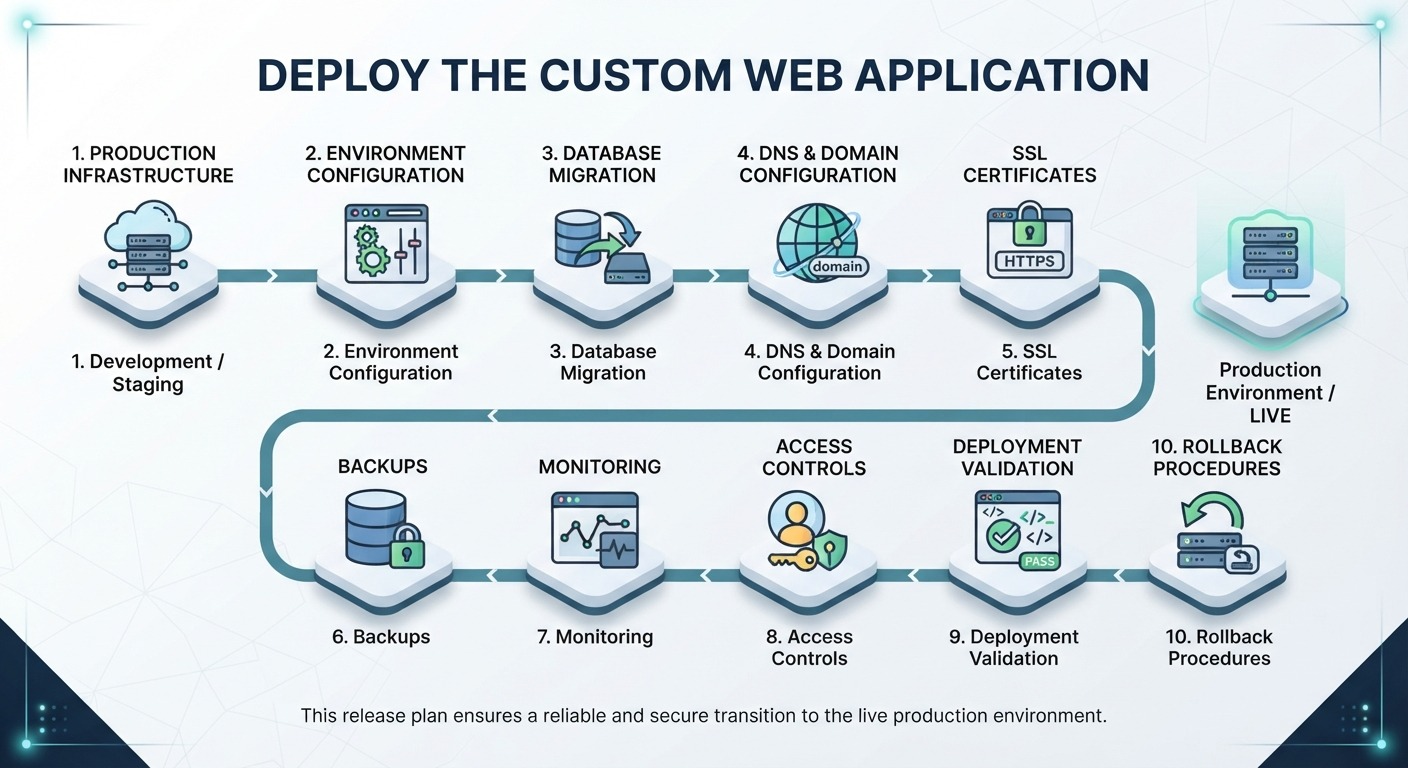
Custom web application deployment moves the tested application from the development environment into production. The image below outlines the key steps involved, from configuring the production environment and migrating data to setting up security, monitoring, backups, validation, and rollback procedures for a controlled release.
Maintain and Improve the Web Application
Launch does not end the software investment. Maintenance typically includes:
- Bug fixes
- Security patches
- Dependency updates
- Browser compatibility
- Performance monitoring
- Infrastructure updates
- Backups
- Technical support
- Minor enhancements
Maintenance should remain separate from major new development.
Suppose a $250,000 application requires an illustrative annual maintenance allocation of 15%:
$250,000 × 15% = $37,500 per year
Over five years:
$37,500 × 5 = $187,500
That produces a five-year maintenance exposure of $187,500, before major feature additions or infrastructure expansion.
The 15% figure is an illustrative planning assumption, not a universal industry rate. The correct budget depends on application complexity, service-level requirements, infrastructure, security obligations, and the pace of change.
How Much Does Custom Web Software Development Cost?
There is no single price for custom web software because scope determines the underlying effort. A practical budget model is:
Total software exposure = development + integrations + infrastructure + testing + security + migration + maintenance + change cost
Suppose a project has:
- Development: $200,000
- Integrations: $50,000
- Testing and security: $30,000
- Migration: $20,000
- Initial infrastructure: $10,000
The initial exposure becomes:
$200,000 + $50,000 + $30,000 + $20,000 + $10,000 = $310,000
If annual maintenance and infrastructure total another $45,000:
$45,000 × 5 = $225,000
The illustrative five-year exposure becomes:
$310,000 + $225,000 = $535,000
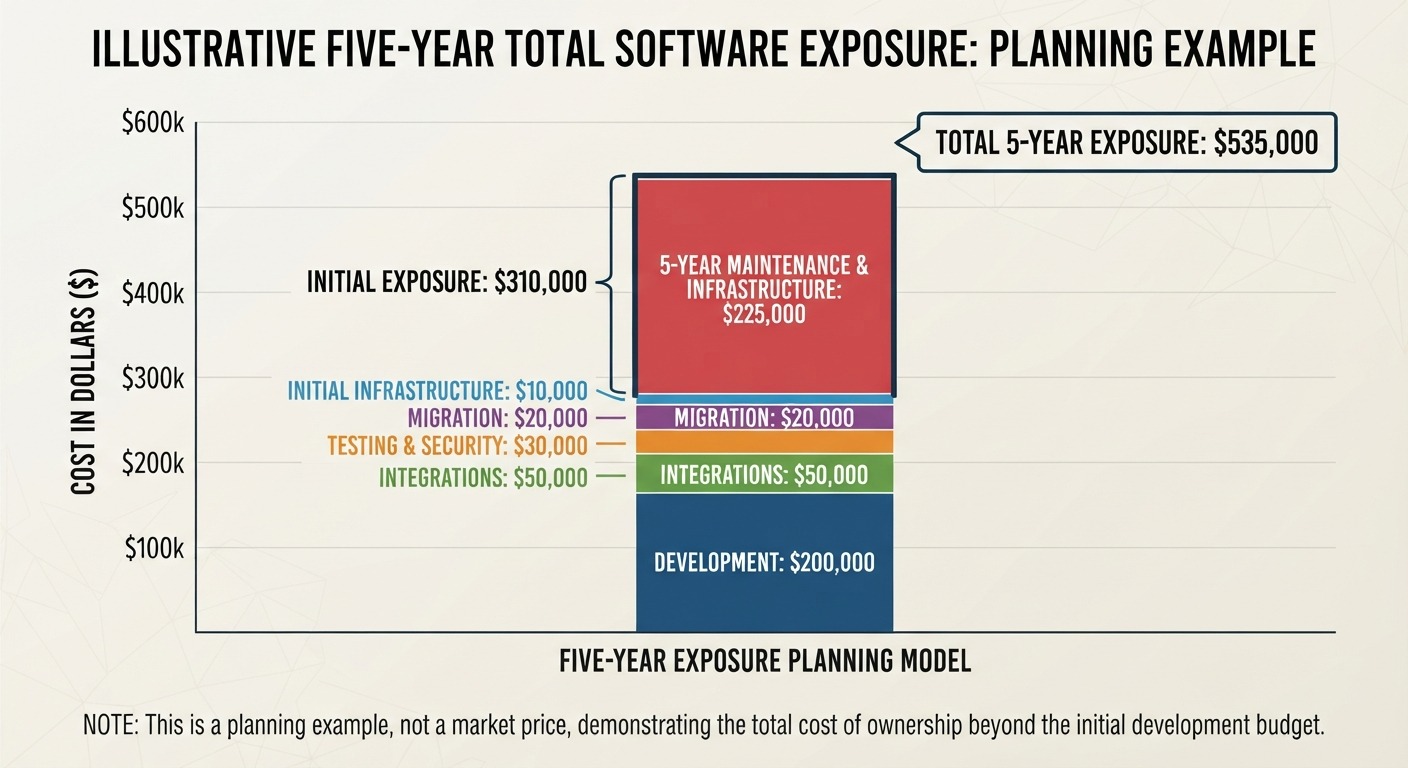
This is not a market price. It is a planning example that demonstrates why an approved development budget should not automatically be treated as the total cost of ownership.
How Do Responsive Web Apps Affect Development Cost?
Responsive requirements can increase work across UX and UI design, front-end development, browser testing, accessibility, performance optimization, and QA.
Suppose a $200,000 application requires an additional 15% effort for expanded responsive design, implementation, and testing:
$200,000 × 15% = $30,000
The adjusted estimate becomes:
$200,000 + $30,000 = $230,000
The 15% figure is illustrative rather than a universal responsive-development premium.
The important budgeting question is not simply “Does the application need to be responsive?” Most modern applications do. The useful question is which devices, workflows, browsers, and performance conditions must the project support, and what effort does that support require?
Should You Build a Progressive Web App?
Progressive Web Apps can add capabilities beyond standard responsive behavior, including installation, offline functionality, caching, and push notifications.
The business case depends on the workflow.
For example, an application used by field employees in locations with unreliable connectivity may gain measurable value from offline access. A simple internal dashboard with stable connectivity may have little reason to carry that additional scope.
A PWA should therefore enter the project plan as a specific business requirement rather than as an automatic upgrade to every responsive application.
For businesses evaluating Progressive Web Apps, the decision should consider offline requirements, device usage, notification needs, development scope, maintenance, and expected operational value.
How Long Does Custom Web Software Development Take?
Project duration depends on the actual scope rather than simply being labeled a “custom web application.” The image below summarizes the key factors that can influence the timeline, including workflows, user roles, integrations, data migration, security, responsive requirements, reporting, testing, user acceptance, and deployment complexity.
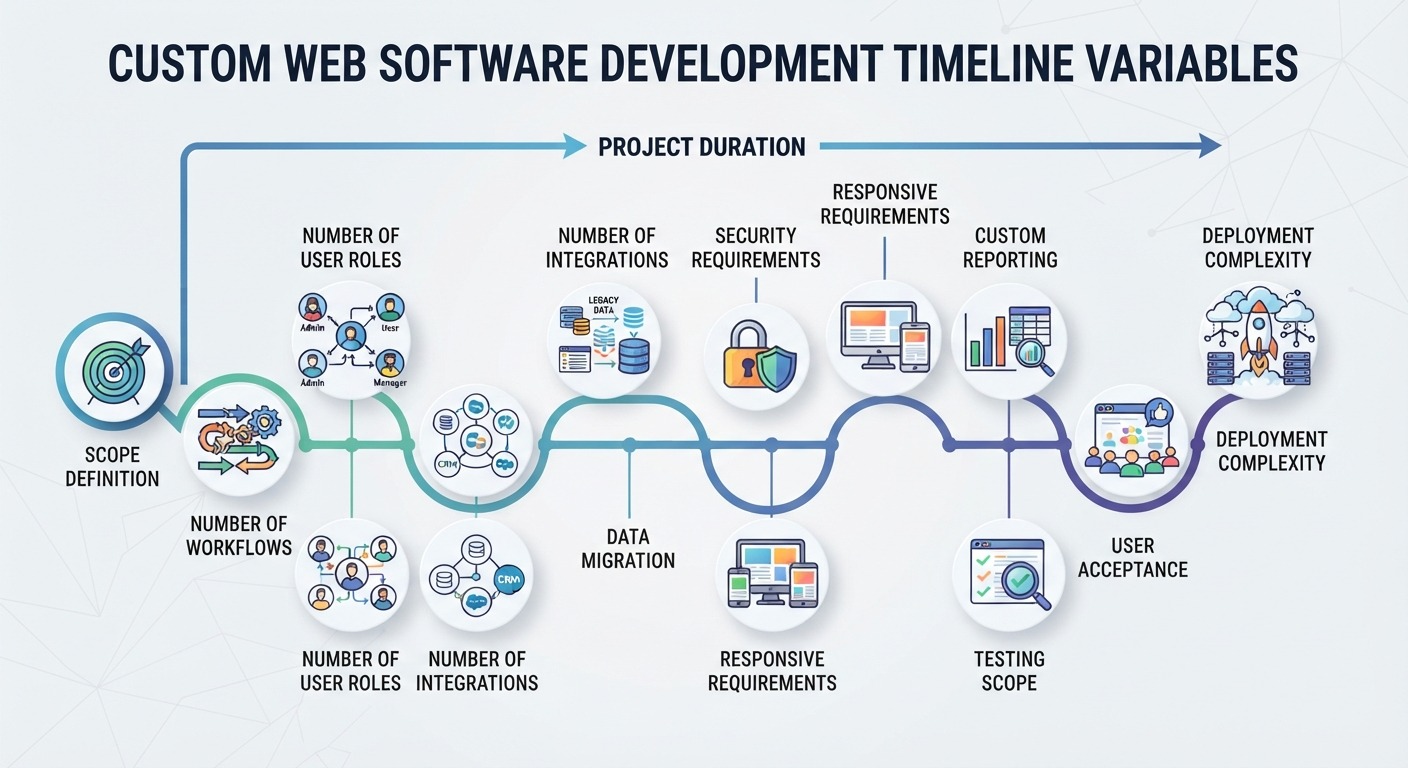
Suppose a project requires 4,000 development hours and the team can deliver 800 productive development hours per month:
4,000 ÷ 800 = 5 months
That calculation does not mean the project will launch in exactly five months. Requirements, design, QA, UAT, deployment, dependencies, and approval cycles can extend the calendar timeline.
A more useful planning approach is to estimate work by phase and identify dependencies instead of applying a generic “three to six months” statement to every project.
Build It Right Before You Build It Bigger
Custom web software becomes expensive when important decisions are made after development has already started. Clear requirements, defined integrations, suitable architecture, responsive UX, structured development, thorough testing, and a controlled deployment process help reduce that exposure before it becomes a budget problem. The financial model should also extend beyond the initial quote to include migration, infrastructure, security, maintenance, and future enhancements.
For a business approving a major technology investment, the goal is to build software that supports real workflows, performs across the required devices, integrates with the existing technology environment, and remains practical to operate as the business grows.
Unique Software Development helps businesses translate those requirements into custom web solutions designed around their operations, users, integrations, and long-term objectives.