

A transportation management system can remove much of that manual work, but the result depends on how well it fits your operation and how carefully you roll it out. The upside can be large. In an ARC Advisory Group survey, more than a third of TMS users reported freight cost reductions above 12 percent. Those results show what is possible, and the rollout decides whether you get there. A TMS implementation touches orders, carriers, invoices, and every person who juggles them.
Get the sequence right, and the system earns its keep in hours and dollars. Rush it, and the old problems return wearing new screens. Teams that succeed treat data, integrations, and cutover as the main event and give them the most attention.
This guide walks you through the full TMS implementation process. You’ll learn how to choose your approach, protect your data, test like a skeptic, pick a safe cutover, and prove results your leadership will trust.
What TMS Implementation Involves
At its core, setting up a Transportation Management System is about getting your logistics tools to actually talk to each other. Instead of asking your team to manually copy details from one spreadsheet to another, a solid TMS implementation connects your existing tools into one smooth flow. It takes care of everyday tasks like booking carriers, tracking shipments, and checking freight bills, connecting everything so your team can work without the extra hassle.
How TMS Implementation Varies by Business Type
Transportation runs through different stages, from onboarding raw products to exporting finished goods and moving units between nodes. Each stage requires a different type of transportation system, which we explain below.
| Business type | What the TMS mainly runs | Where the hard work sits |
|---|---|---|
| Shippers (manufacturers, distributors, retailers) | Rate shopping, carrier tendering, freight audit | ERP order flow and carrier connections |
| Carriers | Dispatch, drivers, equipment, driver pay | Driver apps, electronic logging devices, fuel data |
| Brokers and 3PLs | Carrier sourcing, customer quotes, margins | Carrier onboarding and customer portals |
TMS implementation for shippers starts and ends with the ERP, because every load begins life as a customer order. Carriers live inside dispatch software that has other features. TMS implementation for small business teams follows the same steps with fewer hands, so a tight scope matters more than a long feature list.
Replace, Extend, or Build: Choose Your Approach for TMS Implementation
If your current software still gets the job done, you do not need to toss it out or build a brand-new platform from scratch. Most companies choose one of three main paths for their setup.
Some replace their old software with a modern system to start clean. Others modernize their legacy systems with quick add-ons to fill small gaps without a total overhaul. A few even build a custom system from the ground up to match unique daily tasks.
Here is how each approach works and when it makes sense.
When an off-the-shelf TMS fits
Packaged software fits when your workflows match the rest of your industry, and the vendor already supports your ERP, accounting tool, and main carriers. You trade some flexibility for speed, and the vendor handles upgrades. Ask for references that match your freight modes and company size. A vendor with no customers like you puts you at risk as the first adopter.
When extending your current systems works better
Many teams already own most of what they need. The ERP holds orders, the accounting tool holds invoices, and the real gap sits in the handoffs between them. Adding integrations, automated tendering, or a tracking layer around your current tools can pay off faster than a full replacement. Our guide to enterprise application integration explains how those connections work.
When a custom TMS earns its cost
Sometimes, your existing TMS handles most of the work, but a few gaps slow your team down. You may need new integrations, automated workflows, or features that connect your current software more effectively. If the platform supports these additions without expensive customization, extending what you already have may be the more practical option.
But what if the gaps run deeper? When off-the-shelf software cannot support critical workflows or requires costly workarounds, custom TMS development may be worth considering. A custom solution can be built around your existing processes, business rules, and integrations instead of forcing your team to work around the software.
The Cargobarn case study offers a real example of custom logistics software built around specific business needs. Reviewing projects like this can help you understand what a tailored solution involves before comparing its costs with extending or replacing your current system.
The TMS Implementation Process, Step by Step
A reliable implementation follows the dependencies between each stage. Each step below feeds the next, and the riskiest steps end with a clear signal that you can move on.
1. Name a sponsor, an owner, and process owners
Start with people. An executive sponsor clears roadblocks and guards the budget. A project owner makes daily decisions. Process owners from planning, dispatch, billing, and customer service speak for the work they do every day. Give each of them real authority to make decisions.
2. Document today’s workflows and capture your baseline
Write down how freight moves today, including the workarounds nobody likes to admit. The spreadsheet a planner keeps on her desktop counts as a requirement, too. Then record the numbers you plan to improve. Capture it before anything changes, because this baseline later shows what metrics indicate TMS implementation success.
| Measure | What to record |
|---|---|
| Manual work | Weekly hours spent booking, tendering, tracking, and reconciling |
| Freight cost | Cost per comparable load or shipment |
| Billing | Invoice exceptions and hours spent resolving them |
| Service | On-time pickup and delivery rates |
| Visibility | Share of shipments without timely status updates |
| Data quality | Missing, duplicate, or wrong shipment records |
3. Define requirements and scope
Sort every requirement into two bins: what you need on day one and what can wait. Day one covers the work that keeps freight moving and invoices flowing. Route optimization, advanced analytics, and extra dashboards can follow once the core runs clean. A smaller first release lowers risk and puts value in your team’s hands sooner.
4. Choose your cutover strategy early
Your cutover plan shapes staffing, budget, and timeline months before launch. A parallel run, for example, needs extra hands for weeks. Make this call during planning. The cutover section below compares your options side by side.
5. Select the platform and implementation partner
Ask vendors to demo your real workflows with your real shipment types. Ask for references that match your size and freight modes. Read the contract for data ownership, export formats, and termination terms. Strong TMS implementation services pair logistics know-how with integration skill, because most of the hard work happens between systems.
6. Secure your current data and plan your exit
Your old system holds years of lanes, rates, carrier profiles, and shipment history. Confirm your contractual export rights, available formats, access limits, and notice periods before you end the current service. Run a test export while you still have authorized access, and check that the files open and reconcile.
7. Map data ownership and every integration
Decide which system owns each piece of data. Orders usually live in the ERP, carrier rates in the TMS, and paid invoices in accounting. Then map every connection and agree on what each field means.
8. Clean, back up, and migrate your data
Clean before you move. Remove duplicates, fix addresses, and retire carriers you no longer use. Back up the source, migrate in batches, and reconcile record counts and dollar totals after each batch. Add validation rules so the system rejects bad entries at the door.
9. Configure core workflows and build integrations
Configure the system around your day-one scope. Resist a custom tweak for every edge case. Each customization adds testing, upgrade risk, and cost for years. When a gap truly matters, close it with a clean integration or extension and leave the core intact.
10. Test the full journey of a real shipment
Test with real orders, real lanes, and real carriers. Follow one shipment from order to invoice, and break it on purpose along the way.
| Stage | What should happen | What to break on purpose |
|---|---|---|
| Order import | The ERP order lands in the TMS with correct weights and addresses | Send an order with a missing ZIP code |
| Tender (204 or API) | The carrier receives the load offer | Tender to a carrier with an expired setup |
| Response (990 or API) | The acceptance updates the load status | Let the response window expire |
| Status (214 or API) | Pickup and delivery events update tracking | Send events out of order or twice |
| Proof of delivery | The document arrives through the agreed channel and attaches to the load | Send a missing or unreadable file |
| Invoice (210) | The TMS checks billed rates and accessorials against agreed terms | Add an unapproved accessorial charge |
| Accounting | Approved freight cost posts to the ledger once | Post the same invoice twice |
Our software testing basics guide covers the fundamentals behind this matrix.
11. Train, launch, support, and retire the old system
Train each role on its own daily tasks with real scenarios. Then hold a go/no-go meeting and launch only when every release criterion passes:
- Every critical shipment workflow in the test matrix passes.
- Your key carriers have tested live connections with you.
- Migrated record counts and dollar totals reconcile.
- Duplicate and delayed messages have defined handling rules.
- Users complete core tasks without shadow spreadsheets.
- A rollback plan exists, with one named decision-maker.
After launch, keep experts on call for the first weeks and review every exception daily. Retire the old system only after you archive its data for audits and freight disputes.
How Long Does TMS Implementation Take?
Buyers search “how long does TMS implementation take” hoping for one number. The honest answer depends on complexity. Sheer Logistics, a company that sells TMS implementation services, publishes these estimates:
| Company profile | Estimated timeline | What drives it |
|---|---|---|
| Small and simple | 2 to 6 months | Few integrations, one site |
| Mid-size | 6 to 9 months | ERP and WMS connections, a regional network |
| Enterprise | 9 to 18+ months | Multiple ERPs, global or cross-border scope |
What Are the Hidden Costs of TMS Implementation?
The hidden costs of TMS implementation can add thousands of dollars beyond the initial software quote. For example, if three ERP, accounting, or carrier connections each cost 5,000–$ 15,000, integration alone adds 15,000–$ 45,000. These are planning estimates for individual connections, not a universal TMS price.
Other costs include data cleanup, migration, testing, staff training, and temporary coverage while employees work on the rollout.
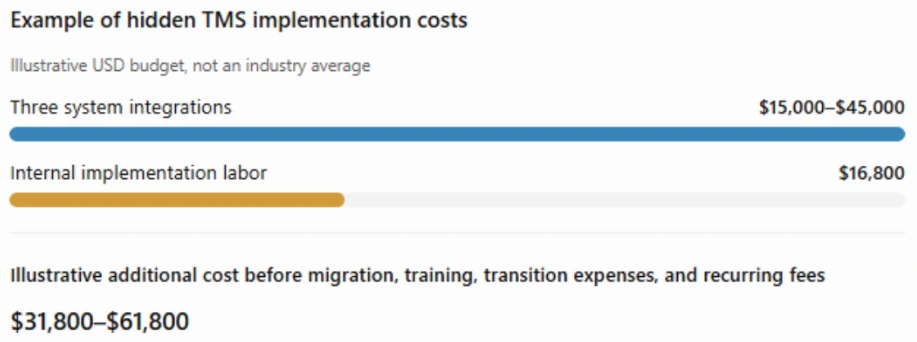
Internal labor can also create a substantial bill. For example, if 10 employees each spend four hours a week supporting implementation for 12 weeks, the project consumes 480 staff hours. At an illustrative loaded labor cost of $35 per hour, that equals $16,800 in internal resources, even if nobody receives overtime pay. Add recurring subscriptions, carrier connectivity, integration maintenance, and ongoing administration to calculate the full cost of ownership.
Before signing, request an itemized quote and a five-year cost forecast. Academic research published through Eindhoven University of Technology also identifies consulting fees and consultant experience as important implementation cost drivers. The practical lesson is to budget for both the vendor’s invoice and the employee time required to get the system running reliably.
Common TMS Implementation Challenges and How to Prevent Them
TMS implementation problems often show up before they delay deliveries or disrupt daily operations. The earlier you spot them, the easier they are to fix. Here are five common challenges and how to prevent them.
- Integration failures: If shipment updates arrive late or fail to reach the TMS, your team may work with outdated information. Test every carrier connection before launch and check failed messages daily so problems do not go unnoticed.
- Poor data quality: Missing, duplicate, or incorrect shipment records can cause problems after migration. Clean up the data before moving it into the new system, test a sample first, and assign someone to check its accuracy.
- Scope creep and too many custom features: New feature requests can keep pushing the launch date back and drive up costs. Focus on the workflows your team needs most, then add less urgent features in later phases.
- Low user adoption: If employees keep using their old spreadsheets instead of the TMS, information can end up scattered across different systems. Train staff using real shipping scenarios, involve experienced dispatchers in testing, and set a clear date for switching to the new process.
- Poor support from the implementation partner: Slow responses or unclear responsibilities can hold up decisions and delay the project. Agree on response times, escalation procedures, and named contacts before signing the contract.
What Metrics Indicate TMS Implementation Success?
Your baseline from step 2 decides what metrics indicate TMS implementation success. Success means the numbers you set out to move actually moved. A dashboard full of activated features means little if planners still work until 9 p.m.
Review results at agreed checkpoints, such as 30, 60, and 90 days, once you have enough shipments to compare. Expect a dip first. CIO notes that business processes often suffer for a while after enterprise software goes live (CIO). Judge the trend across checkpoints.
Guard your metrics against gaming. At Target Canada, managers graded business analysts on in-stock percentages, and some analysts switched off automatic replenishment so empty shelves stopped reporting as out of stock (Canadian Business). The reports looked healthy while customers found gaps. Pair every efficiency metric with an outcome your customers can feel.
| Goal | Metric | How to read it fairly |
|---|---|---|
| Less manual work | Weekly hours on booking, tracking, and reconciling | Compare the same roles at similar volume |
| Lower freight cost | Freight cost per shipment | Compare matching lanes and seasons |
| Cleaner billing | Invoice exceptions per 100 shipments | Separate new carrier setups from true errors |
| Better service | On-time pickup and delivery | Account for carrier and weather disruptions |
| Better visibility | Share of shipments with timely status updates | Count only carriers connected to the new system |
| Better data | Duplicate or missing shipment records | Track the trend weekly after cleanup |
Shippers can often start with freight cost per shipment and invoice accuracy. Carriers and brokers often watch dispatcher hours and status coverage. Tie each metric to the goal that justified the project, and report it in plain dollars and hours.
Build a TMS Implementation Plan Around Your Operations
A TMS earns its keep when freight moves, invoices match, and your team stops working late to hold everything together.
A disciplined TMS implementation process keeps those wins within reach. Choose your approach with clear eyes, capture your baseline, map every integration, test like a skeptic, and launch outside peak season. These best practices for TMS implementation project teams protect the two things your customers notice most: freight that moves and invoices that match.
Unique Software Development builds the integrations, extensions, and custom logistics software that hold a rollout together, as our Mode Transportation case study shows. When you want TMS implementation services shaped around your operation, our team is ready to map it with you.