


QA automation is often mistaken for a shortcut; in reality, it is a systemic shift. While it eliminates the “manual tax” of repetitive regression, the transition requires a calculated investment in framework design and maintenance.
At scale, the importance of QA automation becomes undeniable as it decouples your growth from your testing headcount. It isn’t about replacing the human element, but about removing the manual overhead that quietly kills deployment velocity. This guide analyzes the critical trade-offs and factors that determine when scripted QA becomes essential for your infrastructure.
What is Scripted QA?
Most teams we talk to enter a project thinking they can manage quality through manual reviews, ad hoc spot checks, and a small dedicated QA team. That works fine at 10 features. It breaks at 50.
Scripted QA is a flexible, adaptive approach to software testing that allows teams to scale their QA efforts based on project demands. Instead of relying on a fixed-size testing team that struggles to keep up with rapid growth or seasonal spikes, Scripted QA enables teams to adjust resources, tools, and processes dynamically to meet changing needs.
Here is what that looks like in practice. You write test scripts, coded instructions that tell a testing framework exactly what actions to perform, what data to use, and what outcomes to expect.
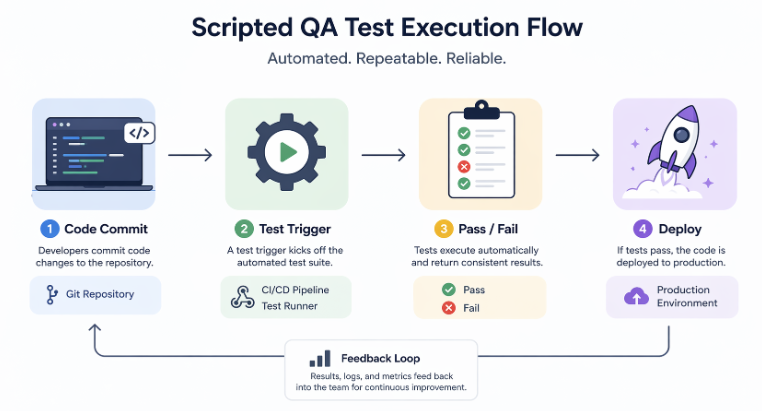
Those scripts run automatically, repeatedly, and identically every single time. When your product evolves, you update the script. When your user base doubles, you scale the runner infrastructure. Your QA effort grows with your product, not against it.
We use scripted QA across every major engagement we take on, whether it is a standalone mobile app, a SaaS platform, or a full-stack enterprise build. The results are consistent: faster deployments, fewer production incidents, and leaner QA overhead.
Advantages of Scripted QA in Software Development
“Cost reduction” and “time savings” are often tossed around as generic benefits of software development. However, these phrases rarely capture the operational reality of a scaling product. Rather than rehashing theoretical talking points, we’ve documented the specific advantages observed across our own client projects.
Deterministic Test Execution
Every scripted test produces the exact same outcome under the exact same conditions. There is no variance based on who runs the test, how tired they are, or whether they followed the checklist carefully. This determinism is what makes scripted QA the foundation of reliable software development quality assurance. When a build fails, you know the cause is real, not human inconsistency.
High-Speed Regression Cycles
One of the most expensive problems in growing software projects is regression. A new feature quietly breaks an old one. Manual regression means pulling testers off new work and running through hundreds of test cases by hand. Scripted regression runs the entire suite in minutes.
On one of our recent SaaS builds, we reduced regression cycle time from 3 days to under 40 minutes by shifting fully to scripted execution.
Shift-Left Defect Detection
Shift-left means finding bugs earlier in the development cycle. Before they reach staging or reach the client. Scripted QA integrates directly into the developer’s local environment and into the CI pipeline, catching defects at the commit level.
Production defects cost 10 to 100 times more to fix than those caught during development. So catching issues earlier is not just a quality improvement, it is a direct cost reduction.
Scalable Test Infrastructure
As your product grows, your test coverage has to grow with it. Scripted test suites scale horizontally. You add scripts for new features, parallelize execution across cloud runners, and maintain full coverage without adding headcount proportionally. This is what makes quality software development sustainable at enterprise scale.
Expanded Test Coverage Depth
Manual testers cover the most obvious paths. Scripted QA covers every path, boundary conditions, edge cases, data permutations, and negative scenarios that no human tester would realistically run on every build. We routinely see scripted suites covering 300% to 500% more test scenarios than the equivalent manual effort.
CI/CD Pipeline Integration
Scripted QA plugs directly into Jenkins, GitHub Actions, GitLab CI, and CircleCI. Every commit triggers a test run. Every pull request shows a green or red signal before merging. Deployment gates block broken code automatically.
This is the integration that makes continuous delivery actually continuous. Without it, “CI/CD” is just a term your team uses in stand-ups without living it in practice.
Reduced Human Error Rate
Human testers miss things, not because they are bad at their jobs, but because humans are not designed for repetitive precision over hundreds of test cases. Scripted automation testing services eliminate that variance. The script does not lose focus at step 47. It does not skip a field because it looked fine yesterday.
Scripted QA vs Manual QA: Key Differences
This comparison highlights how both approaches differ in execution, scalability, and reliability when applied in real-world development environments.
Why Manual QA Fails at Scale in Enterprise Projects
We have audited the QA processes of dozens of companies before onboarding them as clients. The pattern is almost always identical. Manual QA works fine up to a certain threshold, typically around 15 to 20 active features in a product. Beyond that, the cracks show fast.
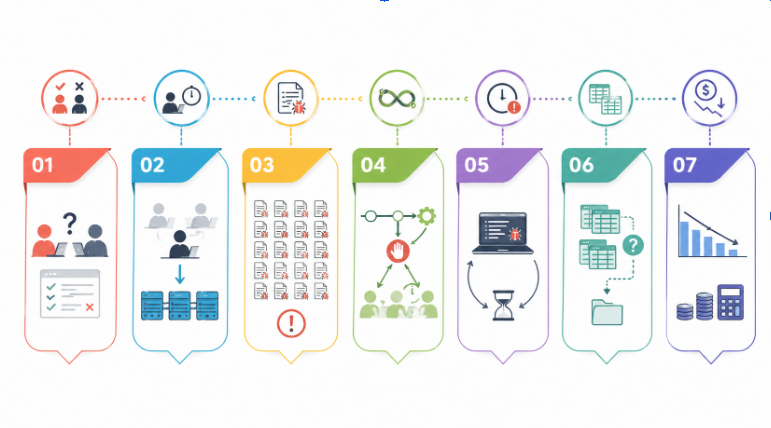
Here is what we observe, and why each one is a compounding problem at enterprise scale:
Non-Deterministic Execution Model
Two testers running the same manual test case on the same build will produce different results. One catches a validation error on an edge input. The other does not notice. This inconsistency means your test results are not actually reliable signals.
For quality assurance in software testing to mean anything at an enterprise scale, results need to be verifiable and repeatable.
Throughput Constraints
A single manual tester executes one test at a time. Ten testers execute ten tests at a time. Scripted QA executes ten thousand tests simultaneously on cloud infrastructure. When your deployment cadence moves to weekly or daily releases, manual throughput becomes the bottleneck that stops everything.
Regression Suite Explosion
Every feature you ship adds to the regression surface. After 18 months of active development, a mid-sized SaaS product can have 800 to 1,200 regression test cases. Running those manually before every release would take weeks. Teams respond by running partial regression, which means known-broken areas sail into production undetected.
CI/CD Incompatibility
Manual QA gates cannot plug into build pipelines. The pipeline cannot wait three days for a human test cycle. Teams end up choosing between slowing down delivery or skipping QA for “minor” releases. Neither option is acceptable for enterprise projects where stability is a contractual obligation.
Latency in Feedback Loop
The longer it takes to find a defect after the code is written, the more expensive it is to fix. In manual workflows, the feedback loop is measured in days. In scripted QA embedded into CI, the feedback loop is measured in minutes. That difference compresses directly into cost and delivery timelines.
Versioning and Traceability Gaps
Manual test execution produces inconsistent documentation. Test reports are often spreadsheets maintained by individual testers. When an audit or client review demands traceability between test execution and build versions, manual QA teams scramble to reconstruct a paper trail that was never built systematically.
High Cost Per Execution Cycle
Manual QA costs roughly the same per execution regardless of how many times you run it. Scripted QA has high initial investment and near-zero marginal cost per subsequent run. The break-even point typically arrives within 3 to 6 months on an active project. After that, every release represents pure efficiency savings.
This becomes even more critical in complex eCommerce systems, where every release touches multiple interconnected flows. There QA has to validate checkout logic, inventory synchronization, payment gateway validation, and cross-device user experience.
In such environments, even a small change can create unexpected side effects across the system, making consistent regression testing essential before every deployment.
How to Use AI to Create Scripted QA for Your Project
This is where we spend a significant amount of time with newer clients, because most teams know they need qa automation testing but have no clear starting point. AI has changed that starting point dramatically in the past two years. Here is the exact process we walk through:
Step 1: Audit Your Existing Test Coverage
Before writing a single script, map what you currently test manually. Export your existing test cases from whatever format they live in.
Group them by feature area and flag which ones are run on every release (regression candidates) versus which ones are run occasionally (exploratory candidates). This audit becomes your automation backlog.
Step 2: Feed User Stories Into an AI Test Generator
Tools like GitHub Copilot, Testim, Mabl, and even Claude (yes, the same AI you are reading about) can parse user stories and acceptance criteria and generate test case scaffolding automatically.
You paste in a feature description, and the AI produces a draft test suite with test IDs, steps, expected outcomes, and data inputs. We use this routinely to bootstrap automation on new feature sprints.
Step 3: Choose Your Scripting Framework Based on Stack
Your choice of framework matters for maintainability:
- Web apps: Playwright or Cypress for modern UI automation
- APIs: Postman with Newman runner, or RestAssured for Java stacks
- Mobile: Appium for cross-platform native apps
- End-to-end enterprise: Selenium Grid for complex, multi-environment coverage
We select frameworks based on the tech stack the client already runs. Introducing a new language ecosystem just for QA creates onboarding overhead that undermines the efficiency you are trying to build.
Step 4: Generate and Refine Scripts with AI Pair Programming
Once your framework is selected, use AI assistance inside your IDE to write the actual test code. Describe the test scenario in a comment, let the AI generate the initial code, then review and refine for stability.
Pay particular attention to locator strategies for UI tests, fragile XPath selectors are the number one cause of test maintenance overhead. AI tools now suggest more resilient CSS selectors and role-based locators automatically.
Step 5: Integrate into Your CI/CD Pipeline
Connect your test suite to your pipeline. Set thresholds, for example, block merges if more than 2% of tests fail, or if any critical-path test fails, regardless of percentage. Configure test result reporting to post directly into your team’s Slack channel or Jira board so visibility is automatic, not manual.
Step 6: Implement Continuous Maintenance With AI Monitoring
Autonomous AI systems now monitor test execution patterns and flag scripts that fail intermittently due to UI drift or environment instability. What the industry calls “flaky tests.” Tools like Testim and Functionize use ML models to detect selector changes and auto-heal affected scripts.
This maintenance layer is what makes large scripted suites sustainable over months and years without full rewrites.
Step 7: Review Coverage Reports Weekly
Use your framework’s coverage reporting to identify untested paths every week. Prioritize new script creation for high-risk areas, payment flows, authentication, and data export. Set a target coverage improvement metric (we target 5% net coverage gain per sprint on active projects) and hold the team to it in retrospectives.
Key QA Metrics to Measure Scalable Testing Success
Here are the metrics we track on every active engagement, and what each one actually tells you about the health of your QA process:
- Defect density measures the number of defects found per unit size of the software. Commonly per 1,000 lines of code and helps identify the areas of the software most prone to issues
- DRE identifies the test effectiveness of the system by measuring the proportion of defects caught during QA testing versus those found after release by end users.
- The best approach for measuring software quality progress over time on active projects. Track the ratio of automated test cases to total test cases. Target 70% automation on regression-critical paths in the first 6 months.
- The earlier bugs are found, the cheaper they are to fix. Scripted QA embedded in CI should produce MTTD measured in minutes from commit. If your MTTD is still measured in hours or days, your pipeline integration needs work.
- A flaky test passes sometimes and fails sometimes on identical code. It produces false alarms and erodes team trust in the test suite. Target a flaky test rate below 2%. Above 5% means your suite is actively undermining CI/CD discipline because developers start ignoring failures.
- Total automated suite runtime directly impacts deployment frequency. If your full suite takes 3 hours to run, you cannot deploy more than twice a day at most. Optimize with parallelization. Our target for mid-size products is under 15 minutes for the full regression suite on parallel runners. Under 5 minutes for the critical-path smoke test suite.
- Escaped defects are those not caught by the team during quality assurance processes but found after release. Track this metric monthly and tie each escaped defect back to a specific coverage gap in your test suite. Every production incident is a script you have not written yet.
QA Metrics and Performance Benchmarks for Scalable Testing
Conclusion: Scaling QA Requires Strategy, Not Just Tools
The software teams that scale cleanly are not the ones with the biggest QA budget. They are the ones that built the right system early and invested in maintaining it deliberately. Scripted QA is that system.
We have seen teams dispelling myths about automation, that it is too expensive to set up, too brittle to maintain, or only suitable for large enterprise organizations. None of that holds up in practice. With the right framework selection, AI-assisted script generation, and disciplined metric tracking, scripted QA delivers ROI within a single quarter on most active development projects.
The companies that treat QA as a bolt-on afterthought pay for it in production incidents, client attrition, and technical debt they spend years unwinding. The ones that build QA into their delivery system from day one ship faster, break less, and scale without hiring proportionally.
At Unique Software Dev, we build QA systems that grow with your product not against it.