

A hospital in Ohio pushed a scheduling update to its patient portal on a Friday afternoon. By Monday morning, appointment slots were doubling up, and front desk staff spent the entire week untangling bookings by hand. Nobody caught it because nobody tested the update against real clinical workflows before it shipped.
This happens more often than health systems admit. It is exactly why automated software testing in healthcare is now a non-negotiable requirement. You cannot build patient-facing tools without it.
If you have researched this before, you likely found vague advice instead of clear answers. This guide changes that. We break down what actually breaks in clinical software, which tests to automate first, and how to survive strict HIPAA audits and complex EHR updates.
What Makes Healthcare Software Testing Different?
Automated software testing in healthcare carries risks that a retail app or a marketing site never has to account for. A bug in an e-commerce checkout costs a sale. A bug in a medication dosage calculator costs a patient’s safety. That single distinction shapes everything about how healthcare software gets tested.
Three things drive the added complexity:
- Clinical workflows: Software doesn’t operate in isolation here. A single patient visit touches scheduling, intake, billing, and lab orders across multiple modern centralized patient record tracking systems. A test that only checks a single user interface screen misses the architectural chain reaction that occurs across the entire ecosystem when data updates.
- Regulatory requirements: HIPAA, HL7, and FHIR standards aren’t suggestions. Every test environment, every dataset, and every log file needs to respect patient privacy law, which rules out the shortcuts teams take in other industries.
- Interoperability: Healthcare software rarely stands alone. It talks to lab systems, insurance databases, pharmacy networks, and other EHR platforms. Each connection point is a place where automated tests need to verify that data actually arrives intact.
The teams that get ahead stop relying on manual QA sprints. Instead, they build autonomous AI-driven testing workflows. These pipelines run continuously against clinical and regulatory conditions. This approach catches complex cross-system failures before your software goes live.
What Is Automated Software Testing in Healthcare?
Automated software testing in healthcare is the practice of using scripts and tools. Instead of a person clicking through screens, to verify that clinical software behaves correctly across every workflow, integration, and regulatory rule it touches. The difference from manual testing isn’t just speed. Manual testing checks what a person remembers to check. Automated testing checks the same 500 scenarios every single time, at 2 a.m., without getting tired or skipping the edge case that only shows up once a month.
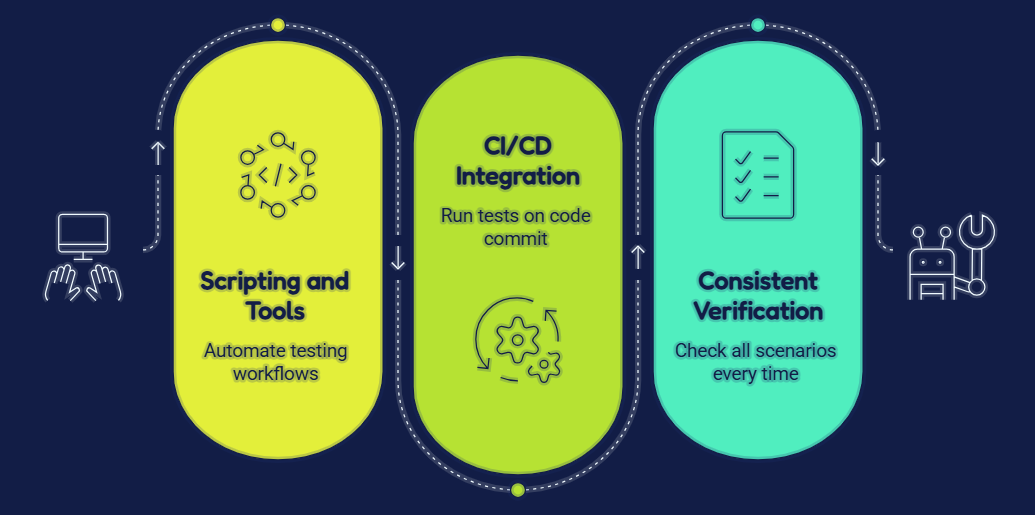
Inside the software development lifecycle, automation doesn’t replace developers or QA leads. It works inside CI/CD pipelines, running the moment new code gets committed. So a broken FHIR integration gets flagged in minutes instead of surfacing three weeks. That timing matters more in healthcare than almost anywhere else.
If it breaks on launch day, payment processing stalls, patient records stop syncing, and your team spends the weekend firefighting instead of shipping the next feature. Automated software testing in healthcare from Unique Software Development catches these failures before your users do, not after.
Which Healthcare Tests Should Be Automated First?
Most teams automate whatever is easiest to script, not what actually threatens patient safety. That backwards priority is the single biggest reason healthcare test automation programs stall out after six months.
Regression Testing
Regression testing confirms that new code hasn’t broken something that already worked. In a healthcare system, this covers medication dosage calculators, appointment scheduling logic, and insurance eligibility checks that get touched every release cycle.
When you automate regression here, you’re not just saving scripted QA hours. This setup closes the exact gap where scheduling bugs slip through. You verify the same 200 critical paths on every single deploy. Teams no longer need to rely on manual checks.
API Testing
API testing verifies that the data moving between systems, like a lab result posting from a diagnostic tool into the patient’s chart, arrives correctly formatted and on time. Healthcare systems lean on FHIR and HL7 APIs constantly, and a single malformed payload can mean a doctor never sees an updated allergy list.
Automating this layer ensures every API call gets validated continuously. Scans check expected response codes, data structures, and latency thresholds. This process catches broken endpoints before they reach a clinician’s dashboard.
Integration Testing
Integration testing checks that separate systems, like your EHR and your billing platform, actually work together instead of just working alone. Healthcare stacks are rarely built by one vendor, so a patient’s visit might pass through five different platforms before billing closes out.
Automated integration tests simulate that entire chain. They catch the moment a lab order fails to sync with the pharmacy. This hidden failure is nearly invisible. It only surfaces when a patient arrives for a missing prescription.
What is Software Performance Testing in Healthcare
Performance testing measures how software holds up under real load instead of ideal conditions. A patient portal that works fine for 50 users can collapse during a sudden seasonal surge.
Automated runs simulate heavy load scenarios on a set schedule. This setup flags drop-offs in response time long before an actual surge hits your servers.
When teams ask what software performance testing in healthcare is, the answer is simple. It is the safety net that keeps critical systems online when patients need them most.
Security Testing
Security testing probes for vulnerabilities that let unauthorized access slip through. In healthcare, a single breach means massive HIPAA violations and financial penalties.
Automated scans check for exposed endpoints, weak authentication, and poor data encryption on every build. This continuous approach is safer than waiting for an annual audit.
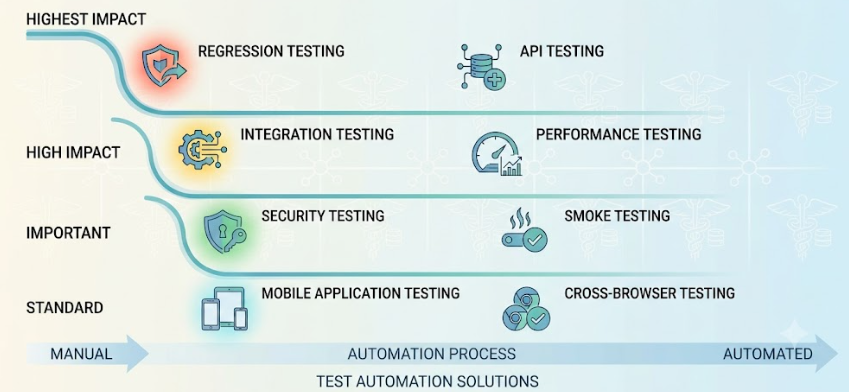
Smoke Testing
Smoke testing is the quick pass that confirms the core functions of an application still work after a deploy, before anyone runs the deeper test suites. In a healthcare app, that means checking that login, patient search, and appointment booking all load correctly within minutes of a release.
Automating smoke tests gives your team an immediate green or red signal, so a broken build gets caught in the first five minutes instead of after a full QA cycle has already run.
Mobile Application Testing
Moving away from isolated native test cycles toward unified cross-platform frameworks streamlines your engineering workflows. This shift allows teams to significantly reduce mobile app development costs while accelerating continuous deployment cycles.
Automated mobile testing runs the same critical flows, like appointment check-in or prescription refill requests, across a matrix of real devices continuously.
Cross-Browser Testing
Cross-browser testing confirms that a web-based healthcare application renders and functions the same way across Chrome, Safari, Firefox, and Edge. A layout bug that only appears in Safari might block a patient from submitting an intake form, and healthcare teams can’t assume every patient uses the same browser their developers tested on.
Automated cross-browser suites run the same test scripts across every major browser combination on each release, catching rendering failures that manual spot-checks routinely miss.
Best Practices for Healthcare Test Automation: Core Software Testing Strategies
Teams search for these practices after they’ve already been burned once, usually by a test suite that broke the week after launch or a coverage gap that let a real bug reach patients.
Automate Stable Workflows First
Think of a healthcare app like a house. You don’t paint the walls before the foundation is set. Automate the parts of your software that don’t change much, like login or patient search, before you touch the newer features that are still being rebuilt every sprint.
Build API Automation Before UI Automation
An API is like the plumbing behind the walls, and the UI is the paint on top. If the plumbing leaks, a fresh coat of paint won’t fix it. Automate the API layer first, because that’s where the real data moves, and the UI tests will be far more stable once the plumbing underneath is solid.
Separate Clinical and Non-clinical Test Suites
A medication dosage check and a marketing newsletter signup don’t belong in the same test folder. Clinical workflows need stricter, slower, more careful checks, while non-clinical features like a contact form can run faster and looser. Keeping them apart means a slow clinical test never blocks a quick fix somewhere else.
Use Risk-Based Testing
Not every button in your app carries the same weight. A broken font size is annoying. A broken dosage calculator is dangerous. Risk-based testing means giving your automation the most attention to the features that could actually hurt someone if they failed, and less attention to the ones that just look bad.
Shift Testing Left in Development
Shifting left means checking for problems while the house is still being built, not after the family has already moved in. Run your automated tests the moment a developer writes new code, instead of waiting until the whole feature is finished, so small mistakes get caught before they turn into big ones.
Run Automation Continuously in CI/CD
A smoke detector that only checks for fire once a month isn’t much use. Automated tests need to run every time new code gets added, all day, every day, inside your CI/CD pipeline, so nothing dangerous slips through in between checks.
Review Automation Coverage Regularly
Even a good test suite gets old fast if nobody looks at it again. Healthcare software changes constantly, with new regulations and new EHR updates landing every few months. Someone needs to sit down regularly and check whether the automated tests still cover what actually matters today.
Challenges of Automated Software Testing in Healthcare
Every team that builds a strong automation strategy still runs into a set of problems unique to healthcare. Pretending these don’t exist is how projects quietly fall behind schedule.
- HIPAA compliant test data: Real patient records can’t sit in a test environment, which means every testing team needs a compliant way to generate data that behaves like the real thing without exposing anyone’s actual information.
- Testing with synthetic patient records: Synthetic data solves the compliance problem, but it introduces a new one: fake records need to be realistic enough to catch real bugs, or your tests pass while a genuine edge case slips through untouched.
- Maintaining automated tests after EHR updates: EHR vendors push updates on their own schedule, risking breaking automated tests built against older interfaces. Partnering with a healthcare AI development company to build intelligent, self-healing test scripts removes this bottleneck entirely, allowing your pipeline to automatically adapt to layout changes instead of stalling releases.
- Third-party healthcare integrations: Lab systems, pharmacy networks, and insurance databases are outside your control, and a change on their end can silently break your automated tests without any warning.
- Legacy healthcare systems: Plenty of hospitals still run software built a decade ago, and automating tests against systems that were never designed to be tested takes far more custom engineering than a modern stack requires.
- Flaky UI automation: A test that passes sometimes and fails other times for no clear reason erodes trust in the whole suite, and healthcare UIs, with their dense forms and conditional fields, are especially prone to this.
- Complex clinical workflows: A single patient journey branches into dozens of paths depending on insurance, compliance, and history. Scripting automation for these complex loops requires deep technical expertise. Working with an experienced mobile app development company ensures your automated suites are architected around real clinical logic rather than shallow UI checks.
What Are the Right Automation Tools for Healthcare Applications
The right tool depends entirely on which layer of your application you are testing. Most healthcare engineering teams run a hybrid matrix rather than relying on a single vendor platform.
| Software Testing Tool | Best Healthcare Use Case | Enterprise Strength |
|---|---|---|
| Playwright | Multi-portal workflows (e.g., Patient portal to Provider dashboard sync). | Fast, parallel execution with native support for complex EHR embedded frames. |
| Selenium | Legacy enterprise systems and older hospital networks. | Unmatched backward compatibility with older web-based medical intranets. |
| Cypress | Front-end heavy patient apps and intake forms. | Runs directly inside the browser for rapid local developer debugging. |
| Appium | Telehealth, prescription tracking, and native iOS/Android apps. | Unified, cross-platform mobile automation using a single test codebase. |
| Postman | Fast FHIR/HL7 API validation and rapid security checks. | Excellent for visual script building and verifying third-party lab schemas. |
| REST Assured | Programmatic, high-volume backend API testing. | Integrates seamlessly into enterprise CI/CD pipelines. |
| JMeter | Stress testing multi-tenant SaaS portals under heavy concurrent load. | Simulates thousands of concurrent connections to prevent database lockups during shift changes. |
The Architecture Over the Tool: Picking the right tool matters far less than architecting the framework correctly. Unique Software Development builds customized, zero-maintenance automation frameworks around your existing technology stack.
Whether that means wiring headless Playwright scripts into your CI/CD pipeline or deploying Appium suites to validate patient-facing mobile apps, we have you covered. Our software testing services ensure your test coverage scales efficiently without generating technical debt.
How to Measure the Success of Healthcare Test Automation
A test suite that runs without anyone tracking its impact is just noise. Six numbers tell you whether your automation strategy is actually working.
- Automation coverage shows what percentage of your critical workflows run through automated checks versus manual ones.
- Defect leakage tracks how many bugs still reach production despite your test suite, which is the clearest signal of where coverage gaps remain.
- Regression execution time measures how long a full test cycle takes, since automation should be shrinking this steadily.
- Test stability flags how often tests fail for reasons unrelated to real bugs, catching the flaky tests that waste engineering time.
- Release frequency shows whether your team can actually ship faster now that automation is catching issues earlier.
- Mean time to detect defects tracks how quickly a bug gets flagged after it’s introduced, and in healthcare, shorter is always safer.
6 Steps to Build an Enterprise Healthcare Test Automation Strategy
A strong automation strategy doesn’t start with tools. It starts with knowing exactly which parts of your software carry the most risk if they fail. This risk assessment forms the core of your software testing strategy. It tells your team exactly which workflows to protect first.
Step 1: Identify high-risk clinical workflows. Map out the patient journeys where a failure would cause real harm, like medication dosing or lab result delivery, and prioritize those first.
Step 2: Prioritize automation candidates. Rank your features by how often they’re used and how much damage a bug in them would cause, then automate in that order.
Step 3: Prepare HIPAA-compliant test data. Build or license synthetic patient datasets that behave like real records without exposing actual patient information.
Step 4: Select automation frameworks. Match your tools to your tech stack, choosing something like Playwright for a modern web app or Appium for a patient-facing mobile experience.
Step 5: Integrate testing into CI/CD. Wire your automated suite directly into your deployment pipeline, so every code change gets tested before it ever reaches production.
Step 6: Continuously maintain and optimize the automation suite. Revisit your tests every time an EHR update or integration change lands, and retire tests that no longer reflect how your software actually works.
How DevSecOps Changes Modern Software Testing
Modern engineering teams no longer separate security checks from regular QA. Adopting DevSecOps blends security testing directly into your daily development cycle.
This transformation shifts critical vulnerability checks into the core DevSecOps pipeline. Automated scans now run every time a developer commits new code.
Teams rely on modern DevSecOps tools to flag flaws instantly. This proactive approach ensures fast deployments remain highly secure.
Validate Your Software Via Experts
Healthcare software carries a different weight than most industries will ever understand, and cutting corners on testing shows up in the worst possible place: a patient’s care. Automated software testing in healthcare isn’t about running more scripts for the sake of it. It’s about catching the scheduling conflict, the broken FHIR call, and the failed integration before they ever reach the people relying on your system to work.
If you are building a centralized patient record-tracking system, or you’re ready to replace your patient record system, you need to get testing right from day one. Our software testing services make it easy to replace your legacy patient record system with a secure platform that holds up under real clinical use. Unique Software Development builds automation frameworks that grow with your product, so your team ships faster without shipping risk.