

As a fleet grows, so do its profit opportunities and its blind spots. More trucks mean more revenue potential, but they also mean more drivers to monitor, more vehicles to maintain, more data to reconcile, and more decisions to make every day. One map sits in the telematics portal. Another lives inside the ELD app. Maintenance has its own system, while dispatch works from another browser tab beside a spreadsheet named “FINAL_v7.”
That fragmentation gets expensive. A dispatcher can assign a truck without seeing a maintenance issue. A manager can miss a fuel anomaly buried in another system. A driver can report a defect that takes hours to reach the person responsible for fixing it. The data exists, but it does not always reach the right person at the right time.
Fleet management software brings those moving parts into the same operational flow. It connects vehicles, drivers, telematics, maintenance, fuel, compliance, dispatch, and business systems so a piece of information can trigger the next action instead of becoming another tab someone has to check.
That is the real purpose of fleet management software development: not another dashboard, but a system that helps the fleet make faster decisions with fewer gaps between data, decision, and action. In this guide, we’ll break down the features, architecture, development process, costs, and testing involved in building one.
What Is Fleet Management Software Development?
Fleet management software development means building software around how your fleet actually runs, instead of renting a platform and bending your operation to fit it. In this custom logistics software development, you decide how a load gets assigned, how a defect becomes a work order, and who gets the alert when a truck goes quiet.
The important part is that the system follows the business, not the other way around. If a driver reports a defect, the system can route it to maintenance, create a work order, notify the right person, and keep the repair history tied to that vehicle. If dispatch needs live vehicle status, that data can feed directly into the workflow instead of sitting in another dashboard.
When Does a Business Need Custom Fleet Management Software?
Not every fleet needs custom software. If one of the best fleet management platforms already fits the way your team works, buying it will usually be faster and cheaper.
The problem starts when you pay for features you don’t need while still working around the ones you do. Your team exports data, re-enters it into another system, patches gaps with spreadsheets, or changes its workflow just to keep the software happy.
If the team is still doing the work around the software, the software is not doing enough.
These are the signals:
- Your software doesn’t fit the workflow. Your team exports, re-keys, and patches gaps with spreadsheets every day.
- Too many systems, zero connection. Telematics, ELD, maintenance, fuel cards, and accounting all hold a piece of the truth, and nobody sees the whole picture.
- You own hardware you can’t throw away. Hundreds of GPS units and ELDs already sit in your trucks, and a new vendor wants you to replace them.
- You need fleet-specific automation. A defect should block dispatch. A fuel anomaly should open a case. Generic platforms rarely let you write those rules.
- Manual work keeps growing. Every new truck adds more phone calls and more copy-paste. Our breakdown of manual dispatch vs. dispatch software shows how fast that time adds up.
- You want control over data and integrations. Raw data, API access, and your own roadmap matter more to you than a vendor’s release calendar.
- You want your own SaaS product. Some operators turn their internal platform into software they sell to other fleets.
What to Define Before Developing Fleet Management Software
Understand the problem and the market first, and leave the tech stack for later. Before fleet management software development starts, pin down these eight things.
Fleet size and vehicle types
Twenty box trucks and 600 Class 8 tractors need different software. Count vehicles, trailers, and equipment, and note growth plans for the next three years. Vehicle mix and installed hardware influence which data the system can collect and how it collects it.
Users and roles
List every person who touches the system: fleet managers, dispatchers, drivers, technicians, safety officers, finance, and admins. Each role needs its own screens and its own permissions.
Current fleet workflows
Map how work moves today, ugly parts included. Where does a defect report go? Who approves a repair? Which spreadsheet holds the real fuel numbers? Those answers become your business rules.
Hardware and telematics devices
Audit what already sits in your trucks: GPS units, ELDs, dash cams, OBD-II dongles, and sensors. Keeping working hardware can save a fortune, so record makes, models, and how each device shares data.
Required integrations
Name every system the platform must talk to: ERP, accounting, TMS, fuel cards, telematics providers, and maps. For each one, write down what data moves and in which direction.
Compliance requirements
US fleets answer to FMCSA. Note your hours-of-service, ELD, DVIR, and IFTA obligations early, because compliance rules shape the data model.
Data and reporting requirements
Decide which decisions the reports must support. Cost per mile, downtime per vehicle, and on-time delivery each need different data captured from day one.
MVP scope
Finally, draw the line. Write down what the first release must do to replace today’s process, and park everything else for phase two.
Key Features to Include in Fleet Management Software
Features matter, but they are the output of good planning, not the plan itself. Here is the feature set a serious fleet platform needs, and what each one actually does for the business.
Vehicle and asset management
One record per vehicle, trailer, and piece of equipment: VIN, unit number, specs, documents, assignments, and full service history. Every other module hangs off this record.
GPS tracking
Live location, trip history, geofences, and idle time. GPS is now table stakes: Verizon Connect’s 2026 Fleet Technology Trends Report found 80% of fleet professionals rely on GPS tracking, up 11 points in a year. The value comes from what the data triggers, which is why dispatch software with GPS and telematics beats a map on its own.
Those savings come from fleets acting on the data. A custom platform turns each signal into a rule, an alert, or an assignment, so the savings stop depending on someone remembering to check a tab.
Driver management
Profiles, licenses, medical cards, qualifications, scorecards, and coaching history. Driver behavior data from telematics feeds safety scores automatically.
Dispatch and route management
Assign loads by location, hours available, and vehicle condition. Optimize routes and push changes to drivers in real time. Our list of dispatch software features covers what modern dispatchers expect.
Maintenance management
Preventive maintenance triggered by date, mileage, or engine hours. Work orders, parts, vendor repairs, and fault codes pulled straight from the vehicle.
Fuel management
Fuel card transactions matched against vehicle location and tank data. That match exposes theft, idling waste, and out-of-route fueling.
ELD and compliance
Hours of service, duty status, and record retention, pulled from an FMCSA-registered ELD into one compliance view.
Inspections and DVIR
Digital pre-trip and post-trip inspections with photos. A failed item opens a work order and flags the vehicle before dispatch can assign it.
Alerts and notifications
Rules that fire on real events: a speeding spike, a geofence exit, an overdue service, an unsigned DVIR. Alerts go to the person who can act, not to everyone.
Reporting and analytics
Cost per mile, utilization, downtime, fuel economy, and safety trends by vehicle, driver, and location.
Mobile app
The driver app is where adoption lives or dies. Strong logistics mobile app development delivers offline mode, one-tap status updates, DVIRs, and photo proof of delivery.
API and third-party integrations
An open API and webhooks let the platform share data with ERP, accounting, TMS, and fuel systems. Without them, you are building another island.
How to Develop Fleet Management Software
Here is the full lifecycle, from first workshop to a platform that scales with the fleet. Skip a step, and you usually pay for it twice.
- Define the fleet and its workflows: Map the users, fleet size, vehicle types, daily workflows, compliance requirements, existing systems, hardware, and integrations. This gives the development team a clear scope instead of a feature wishlist.
- Choose the MVP and design the experience: Prioritize the workflows the fleet needs first, such as vehicle records, tracking, dispatch, DVIRs, and maintenance. Then design simple interfaces around each role, from dispatchers working at a desk to drivers using a phone on the road.
- Design the architecture and data flow: Decide how devices send data, where it is stored, how business rules process it, and how the platform will scale. A typical flow is GPS/ELD → data ingestion → normalization → database → business logic → dashboards and alerts.
- Build the core platform and telematics layer: Develop the fleet modules for vehicles, drivers, dispatch, maintenance, fuel, compliance, and reporting. Connect GPS, ELDs, and other vehicle hardware through an ingestion layer that can handle different device formats.
- Connect the systems around the fleet: Integrate TMS, ERP, accounting, fuel cards, maps, CRM, and other systems the business already uses. Add role-based permissions, audit logs, encryption, and other security controls as part of the build.
- Test and run a pilot: Test the platform with realistic telemetry, device failures, peak loads, and real workflows. Then launch with a small group of vehicles and drivers before rolling it out across the fleet.
- Deploy, monitor, and improve: Roll out in stages and monitor device health, data gaps, integrations, and application performance. Continue updating the software as the fleet grows, APIs change, and compliance requirements evolve.
Fleet Management Software Architecture
Good architecture keeps a fleet platform fast at 50 trucks and calm at 5,000. Most production systems follow the same layered shape.
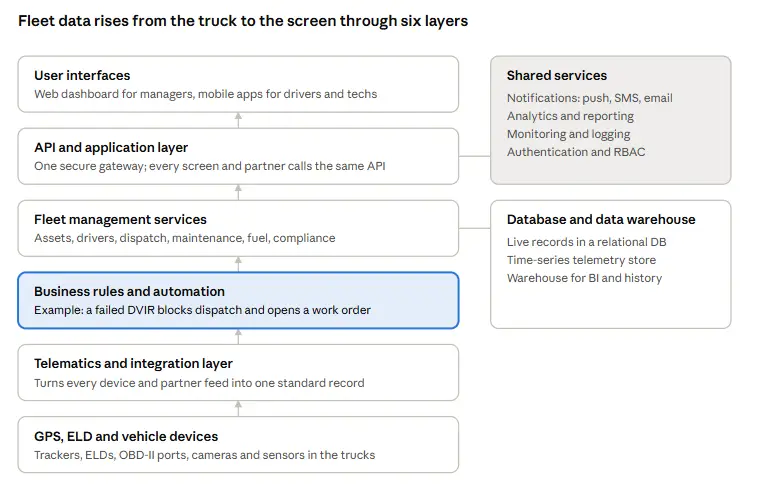
Data flows from the truck to the screen. Devices send raw signals, and the integration layer translates them into usable data. The data store keeps live records, telemetry history, and reporting data organized, while shared services handle notifications, analytics, monitoring, and access control. The rules layer decides what matters, and application services turn those decisions into tasks people can act on.
The business rules layer deserves the most attention because it holds your competitive edge. Anyone can show a dot on a map, but only your platform knows that a reefer unit above 40°F on a pharmaceutical load needs a call to the customer within ten minutes.
Technology Stack for Fleet Management Software
No stack wins every fleet. The right one depends on data volume, real-time needs, your team’s skills, and where the system must run. Here is how the choices map to fleet requirements in fleet management software development.
- Frontend: React, Angular, or Vue. React is a common choice for live dashboards and dispatch interfaces, especially when paired with efficient state management and map rendering.
- Backend: Node.js can handle many concurrent device connections and lightweight messages. .NET and Java suit systems with complex business logic and teams experienced in those ecosystems. Python fits analytics and machine learning services. The best choice depends on workload, integration needs, and team expertise.
- Mobile: React Native or Flutter covers iOS and Android from one codebase for most driver apps. Go native when the app needs deep Bluetooth, camera, or background-location control.
- Databases: PostgreSQL with PostGIS stores vehicles, drivers, work orders, and geofences. A time-series store such as TimescaleDB keeps telemetry fast as history piles up, and Redis caches live positions.
- Maps: Google Maps Platform, Mapbox, or HERE. HERE offers truck-specific routing with height and weight limits, and Mapbox supports offline maps for weak-signal areas.
- Real-time communication: WebSockets push live updates to dashboards. MQTT carries lightweight device messages over patchy cellular networks.
- Cloud infrastructure: AWS, Microsoft Azure, or Google Cloud. Pick the cloud your team already runs well, and use its IoT services for device ingestion.
- Data processing: Apache Kafka or a managed streaming service can become useful as telemetry volume, processing complexity, and real-time workloads grow. Smaller fleets can often start with simpler processing and introduce streaming infrastructure when operational needs justify it.
Fleet Management Software Integrations
Integrations turn a fleet app into a fleet operation. They also create some of the biggest surprises during development.
Take accounting software. “QuickBooks integration” could mean a true two-way sync, a one-way data transfer, a CSV export, or a third-party automation sitting between the two systems. Those are very different levels of integration.
So during fleet management software development, don’t ask only, “Does it integrate?” Ask “What data moves, in which direction, how often, and what happens when the sync fails?”
| Integration Depth | What It Means | What It Costs You |
|---|---|---|
| Export | Someone downloads a file and uploads it elsewhere | Manual time and stale data |
| One-way sync | Data flows automatically in one direction | Fixes reporting, not workflows |
| Two-way sync | Both systems update each other on every change | Highest build effort, lowest daily friction |
How Much Does It Cost to Develop Fleet Management Software?
Start with the money the software protects. The American Transportation Research Institute puts the 2025 average cost of operating a truck at a record $2.336 per mile, 3.4% higher than the year before.
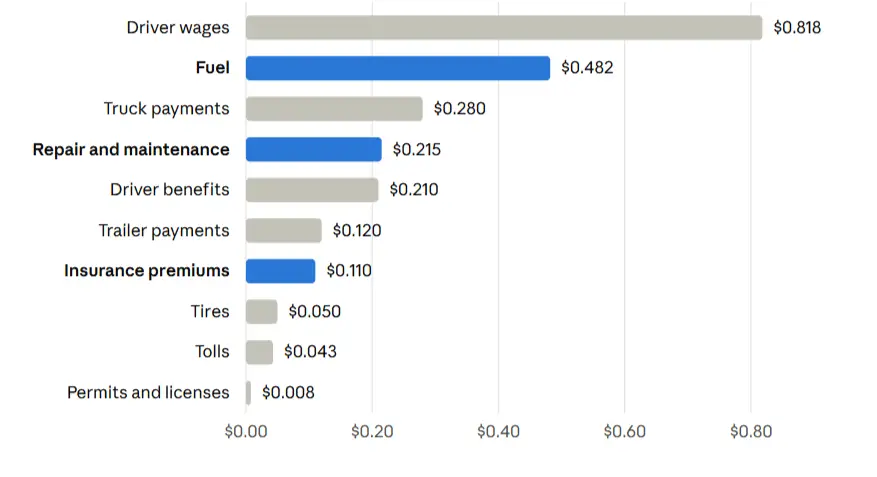
Now run the numbers on a 100-truck fleet. ATRI reports an average of 85,991 miles per truck in 2025, so fuel alone costs that fleet about $0.482. The 12% fuel reduction GPS-tracked fleets reported in the Verizon Connect survey would be worth roughly $497,000 a year on fuel alone. That figure frames every budget conversation about developing fleet management software.
The planning ranges below assume a professional team and production-grade engineering. They are estimates for budgeting, not fixed quotes.
| Scope | Planning Range | Typical Timeline | What You Get |
|---|---|---|---|
| MVP fleet management software | $40K– $90K | 3–5 months | Vehicle records, GPS tracking from one provider, dispatch board, driver app with DVIRs, basic maintenance and reports |
| Mid-level platform | $100K–$250K | 6–10 months | Multiple telematics sources, ELD and HOS data, fuel cards, preventive maintenance, accounting and TMS integrations, role-based access |
| Enterprise platform | $250K–$600K+ | 10–18 months | Multi-location operations, mixed hardware, ERP integration, advanced analytics, predictive maintenance, high availability, data migration |
Note: These ranges are preliminary planning estimates, not fixed quotations. Actual costs vary with project scope, integration complexity, hardware requirements, team location, and production requirements.
What Affects Development Cost?
Ten fleet platforms with the same feature list can carry very different price tags. These factors decide yours:
- Number of platforms: web only, or web plus iOS and Android apps for drivers and technicians.
- Fleet size: 50 trucks and 5,000 trucks need different data pipelines and infrastructure.
- Telematics integrations: every extra hardware brand adds parsing, testing, and edge cases.
- ELD compliance: HOS views, violation alerts, and audit-ready records add serious logic and testing.
- Mobile apps: offline sync, background location, and camera features take real effort.
- Real-time tracking: live maps for thousands of vehicles need streaming and caching.
- Dispatch: assignment rules, load matching, and route changes grow complex quickly.
- Reporting: standard dashboards cost less than a self-service analytics layer.
- AI: predictive maintenance and ETA models need clean historical data first.
- Security: SSO, encryption, audit logs, and penetration testing.
- Integrations: two-way syncs cost far more than exports.
- Cloud infrastructure: telemetry storage grows every single day.
- Testing: device, integration, load, and pilot testing.
- Ongoing maintenance: plan roughly 15–25% of the build cost every year for support, updates, and improvements.
Team location matters too. The U.S. Bureau of Labor Statistics puts the median US software developer wage at $135,980 a year, while Accelerance’s 2026 rate survey shows senior outsourced rates from about $31 to $76 an hour depending on region. Compare total hours and seniority, not just the hourly rate.
How Long Does It Take to Develop Fleet Management Software?
Speed depends less on features and more on what the platform must connect to. These are planning ranges for fleet management software development with a dedicated team:
| Development Scope | Estimated Timeline | Main Deliverables | Factors That Can Extend the Timeline |
|---|---|---|---|
| MVP | 3–5 months | Vehicle records, GPS tracking, one telematics integration, basic dispatch, driver app, and essential reports | Hardware compatibility issues, unclear requirements, and delayed feedback |
| Production platform | 6–10 months | Multiple telematics integrations, ELD data, maintenance workflows, mobile apps, fuel tracking, and accounting or TMS connections | Third-party API limitations, complex workflows, and data migration |
| Enterprise platform | 10–18 months or longer | Multi-location operations, mixed hardware, ERP integrations, advanced analytics, high availability, and phased rollout | Legacy system dependencies, inconsistent historical data, extensive testing, and complex security requirements |
Four variables most often stretch timelines: undocumented legacy systems, hardware vendors with slow API access, messy historical data, and decisions that wait weeks for sign-off. Phased releases keep momentum, and value lands every few months instead of all at the end.
Challenges in Fleet Management Software Development
Vendors rarely put these in a brochure. Fleet operators talk about them constantly, especially on forums where nobody sells anything. Large IT projects carry real risk: a McKinsey and University of Oxford study of more than 5,400 projects found they ran 45% over budget on average. Most of that pain traces back to the challenges below.
- Getting different hardware to speak the same language. A 2019 truck, a newer tractor, and a trailer can all send different data. The software needs an integration layer that turns those different signals into one usable format.
- Keeping the map honest. A GPS dot is easy to display. Keeping it accurate when a device goes offline, a truck enters a dead zone, or an ELD stops sending data is harder. Offline storage, health checks, and clean data syncing matter here.
- Turning messy fleet data into something useful. Old service records can have different vehicle names, missing odometer readings, or VINs that do not match unit numbers. Move that mess into the new system, and you have simply automated the mess.
- Building for tomorrow’s fleet, not today’s. One hundred vehicles may be easy. A thousand vehicles sending telemetry every few seconds is a different engineering problem. Storage, processing, and archiving need room to grow.
- Getting humans to actually use it. The best driver app in the world loses if it takes ten taps to report a defect. Drivers, dispatchers, and technicians need workflows that fit the job, not software that creates another job.
- Keeping control after launch. APIs change. Devices get replaced. Compliance rules evolve. If the vendor controls the source code, raw data, and integrations, a future switch can become painfully expensive. Treat ownership and maintenance as part of the build from day one.
How to Test Fleet Management Software Before Full Deployment
Make it a pilot-first decision, not a demo-first decision. Demos run on perfect data. Your fleet doesn’t. This stage protects the entire fleet management software development investment.
Start with a representative pilot
Pick 5–10% of vehicles across different locations, ages, hardware types, and routes. Include a few difficult vehicles and dead zones rather than testing only the easy ones.
Test data and real-world conditions
Compare GPS positions, mileage, HOS records, and telemetry against a trusted source. Test dead zones, offline devices, and difficult routes to catch data gaps before they spread across the fleet.
Run real workflows and integrations
Submit actual DVIR defects, trigger service intervals, create work orders, and move records through the TMS, ERP, accounting system, and driver app. Check what actually arrives, not what the integration documentation promises.
Compare reports with existing records
Run fuel economy, cost-per-mile, downtime, and other key reports during the pilot. Compare them with your existing records to catch data-mapping and calculation problems early.
Watch driver adoption and support
Track login rates, DVIR completion, support requests, and response times. If drivers keep calling dispatch instead of using the app, the workflow needs fixing before the rollout gets bigger.
Build the Fleet Around the Work
Fleet management software should do more than put trucks on a map. It should connect vehicles, drivers, maintenance, dispatch, telematics, and business systems so information turns into action without another spreadsheet in the middle.
The right fleet management software development starts with the workflows costing the business the most time, money, or control. From there, the platform can grow around real fleet needs instead of becoming another collection of features nobody uses.
Unique Software Development builds custom fleet management software around existing hardware, integrations, workflows, and growth plans. The goal is simple: less chasing data, fewer manual steps, and more work handled by the system itself.